Available on Asana Advanced, Enterprise, and Enterprise+ tiers, as well as legacy tiers Business and Legacy Enterprise.
Visit our pricing page for more information.
This article will answer the most frequently asked questions about portfolios, including permissions, adding custom fields and limits.
If your portfolio is set to public, anyone you share the url with in the organization will be able to access your portfolio. Once they visit the url, it will automatically show up in their recents section in portfolios view. If any of your projects in the portfolio are private, they will see a notification at the bottom of the screen letting them know some projects are private.
Private portfolios can only be accessed by portfolio members.
Yes, you automatically become a project status follower for all of the projects. You will get notified when any of the projects in your portfolio have a status update.
Navigate to the customize menu within the portfolio, and click +Add field. From here a pop up window will appear allowing you to add a custom field.
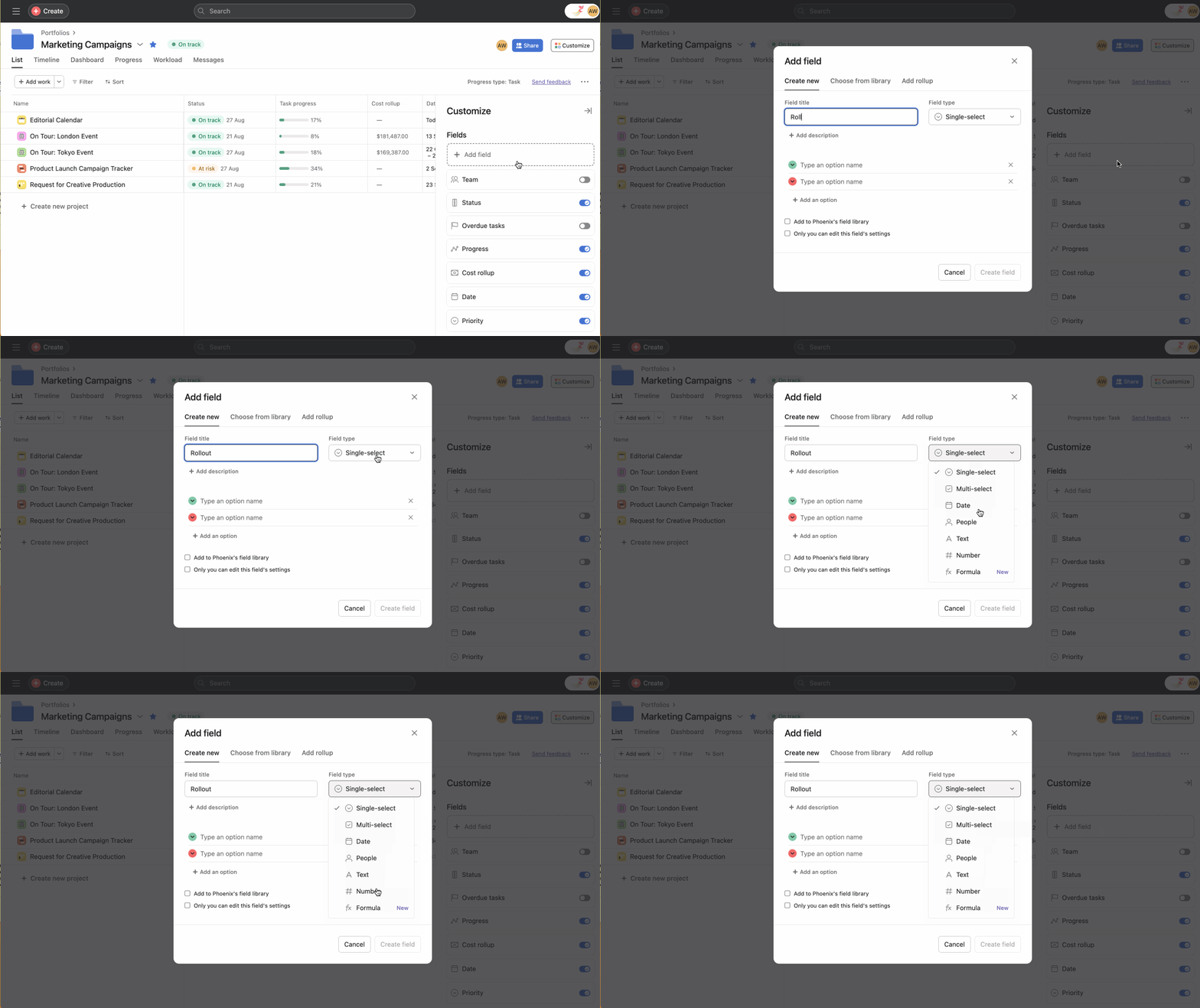
Note
You can add up to 100 fields per portfolio. 5 fields can also be shown in the portfolio view at any time.
How many portfolios can appear in my Recents at the same time? A maximum of 20 portfolios and there is no time limit
How many projects can I add to a portfolio? A maximum of 1500 (including archived projects)
How many custom fields can I add to a portfolio? A maximum of 100
How many portfolio Weekly Report email notifications can I receive per week? A maximum of 20
How many projects are included in each weekly report email? A maximum of 50, however a link provided will allow you to view more.

These cookies are strictly necessary to provide you with certain features. For example, these cookies allow you to access secure areas that require registration and set your privacy preferences. Because these cookies are essential to providing services to you, they cannot be disabled. You can set your browser to block or alert you about these cookies, but it may cause some parts of the site to not work.
Third party trackers collect information used for analytics and to personalize your experience with targeted ads. Under the Virginia Consumer Data Protection Act, you have the right to opt-out of the sale of your personal data to third parties. You also have the right to opt out of targeted advertising related processing. You may exercise your right to opt out of the sale of personal data and targeted advertising by using this toggle. If you opt out, we will not be able to offer you personalized ads and we will stop sharing your personal information with third parties. For more information please see our Privacy Statement.
These cookies allow us or our third-party analytics providers to collect information and statistics on use of our services by you and other visitors. This information helps us to improve our services and products for the benefit of you and others.
These cookies, provided by our third-party advertising partners, collect information about your browsing habits, as well as your preferences for various features and services. They also provide us with auditing, research, and reporting to know when advertising content has been displayed and how successful the content has been. This information allows us and our third-party advertising providers to display relevant advertising content.
These cookies provide enhanced functionality, providing chat support, allowing you to more easily complete forms, personalizing content to your preferences, and selecting your communications preferences. If you do not enable these cookies, or choose to disable them in the future, that could impact your ability to use certain features.