Loading

Topics

No articles found for this topic.

No articles found for this topic.

No articles found for this topic.

No articles found for this topic.

No articles found for this topic.

No articles found for this topic.

No articles found for this topic.

No articles found for this topic.

No articles found for this topic.

No articles found for this topic.

No articles found for this topic.

Inbox on Android

Who can use this feature?
PersonalStarterAdvancedEnterpriseEnterprise+PremiumBusinessLegacy Enterprise

Visit our pricing page for more information.

Inbox is your notification center for Asana. Your Inbox displays updates on all projects you're a member of and tasks that you collaborate on or are assigned within a given workspace or organization.

Related articles

To get to your inbox, tap on the Inbox icon from your Home screen.
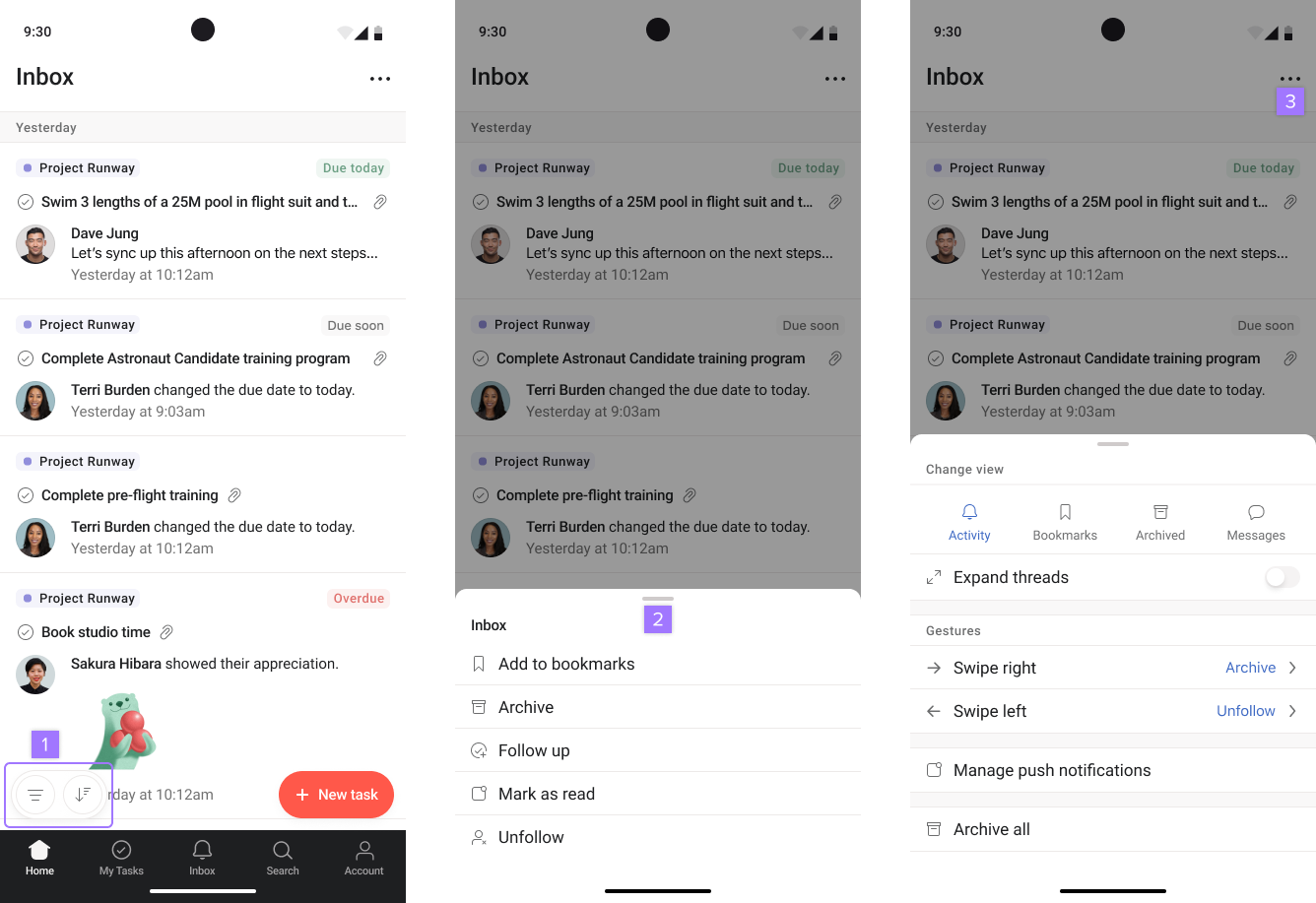
Inbox on Android

From your inbox, you can:

  1. Sort and filter
  2. Press and hold on a task to take action
  3. Tap the three dot icon to view more options

Create follow-up tasks

Inbox follow-up tasks allow users to get updates from their team and respond in real-time, straight from your inbox.

To create a follow-up task press and hold on the task. Click on Follow up.

Loading
Asana Inbox on Android: stay updated on mobile | Help Center