Products


AI Platform


Asana Foundations
Company Type
No articles found for this topic.
No articles found for this topic.
In This Article

Visit our pricing page for more information.
This article delves into how you can add rules to My tasks to save time, reduce manual effort, and increase efficiency when managing your tasks.
Rules are available for customers on Asana Starter, Advanced, Enterprise, and Enterprise+ tiers, as well as legacy tiers Premium, Business, and Legacy Enterprise. Due date is approaching is the only preset rule in My tasks available to Asana Personal.
The custom rule builder is available on Asana Starter, Advanced, Enterprise, and Enterprise+ tiers, as well as legacy tiers Business and Legacy Enterprise. When adding a rule to My tasks, select Create custom rule to get started.
Adding automation to My tasks will help you save time on manual processes like triaging and automate the movement of tasks through your sections. From the gallery of preset rules, you can pick an option that already has the trigger and action set. You can then specify the parameters needed.
Choose from a selection of preset rules with common triggers such as Due date is approaching, Task is overdue, and Task marked complete.
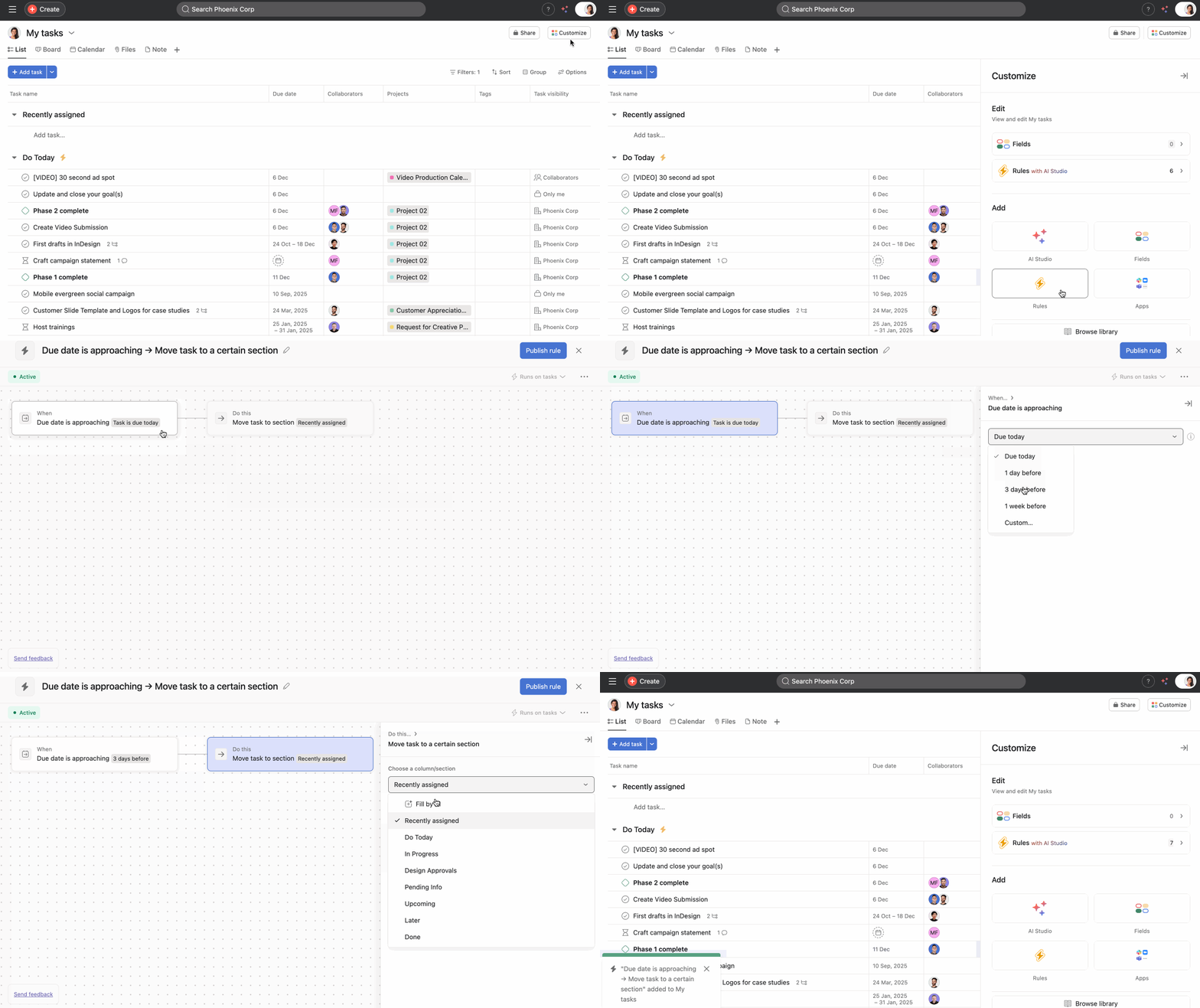
To recreate the behavior where tasks moved from Later to Upcoming and from Upcoming to Today, you'll need to add 2 rules to your My tasks. You'll need to add a rule to move tasks to the Upcoming section when the due date is approaching and a rule to move tasks to the Today section when the task is due today.
You can see that a rule has been deployed when the rules icon (a lightning bolt) appears beside the section that has a rule.
Note
You can add an additional rule for each section to which you would like your tasks to move. For example, you would need to create two rules if you would like your tasks to move first to an Upcoming section when the due date is 3 days away, and a second separate rule to move them to a Today section as the task's due date nears.
When you've created these automations, tasks will move from anywhere in your My tasks into these sections as the due date approaches. They'll move right from your Recently assigned section, or any other section, between midnight and 1am when these automations update your My tasks.
Join our Personal Productivity virtual training to learn more about effectively managing your tasks in Asana. Register now.

