Streamline your interview process by centralizing communication, standardizing evaluations, and maintaining consistency across hiring teams. This article outlines how to leverage Asana's features to create an efficient and organized interviewing workflow.
Setting up your interview project
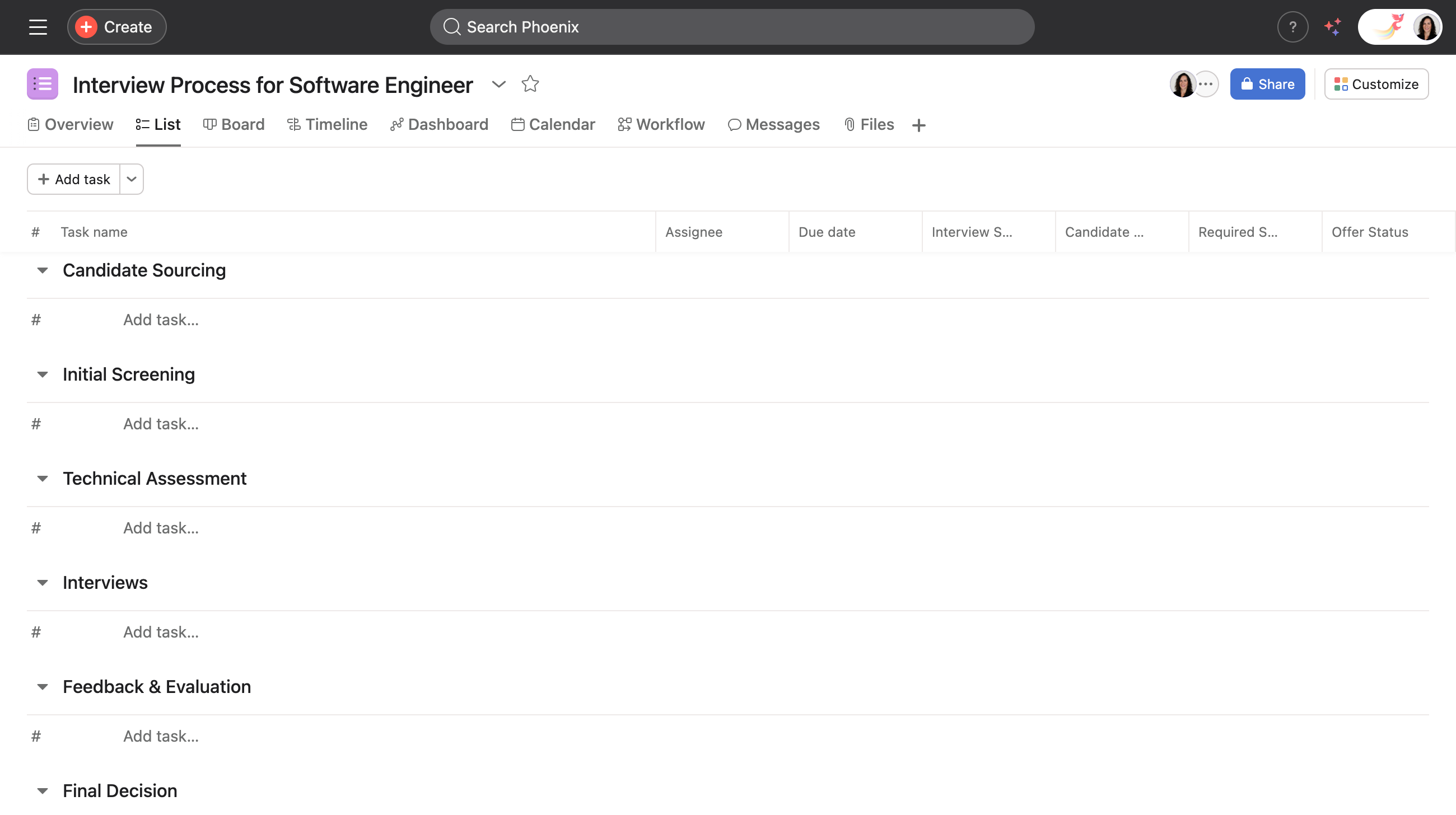
- Begin by creating a project for the specific role. For instance, name it "Interview Process for Software Engineer."
- Utilize Asana AI to save time on setting up your project framework. Smart projects enable users to quickly create a customized project by generating suggested descriptions, sections, and custom fields based on the project's name and purpose.
- Add a link to the job description and any important documents needed for the interview process in the project description.
- Add sections to organize different stages of the interview process such as Initial Screening, Technical Interview, and Final Round.
Assign roles and responsibilities
- Use the Share button at the top right of your project to add recruiting team members, interviewers, and the hiring manager to the project.
- Assign tasks to individuals based on their role in the hiring process, such as conducting interviews or reviewing candidate applications.
Standardize interview questions
- Add tasks for each interview question, organizing them by interview type or competency.
- Create sections for different question categories depending on the competencies being assessed.
- Utilize rules to automate the process of assigning questions to interviewers. For example, if a question (task) falls under this category (section), assign it to X (interviewer).
Track candidate evaluations
- Create custom fields to standardize evaluation criteria.
- Add numeric fields for scoring responses (e.g., 1-5 scale).
- Include status fields to track candidate progress (e.g., Scheduled, Completed, Decision Pending).
- Leverage Asana AI capabilities to summarize feedback notes and highlight key points for quicker decision-making with Smart summaries.
Coordinate interviews efficiently
- Integrate with Google Calendar or Outlook to coordinate interview schedules.
- Set up rules to automatically notify team members when interviews are scheduled.
- Use dependencies to ensure all necessary steps are completed before moving candidates forward.
Collect and analyze feedback
- Use task comments to gather interviewer feedback in one place.
- Create subtasks for each interviewer to provide structured feedback.
- Leverage Smart chat to quickly analyze feedback patterns and identify key insights.
Monitor interview process
- Use dashboards to monitor interview completion rates and candidate pipeline.
- Create custom reports to analyze hiring metrics.
- Use Smart status to share quick status updates on interview progress.
Maintain consistency
- Once the process is complete, convert the successful project into a template for future interviews. You can create project templates for different roles or departments.
- Continuously refine this template by incorporating new insights and interview techniques suggested by Asana AI.
- Use bundles to maintain consistent interview processes across multiple positions.
- Set up automated workflows to ensure all steps are followed consistently.
- Connect with Slack for real-time notifications and updates.
- Use the Zoom integration to schedule and manage virtual interviews.
- Link to your applicant tracking system to maintain synchronized candidate data.
Make data-driven decisions
- Use custom fields to track quantitative feedback data.
- Generate reports to identify bottlenecks in the interview process.
- Leverage Smart summarie to get quick insights into candidate evaluations.
By implementing these steps, your team can create a more efficient and organized interview process, ensuring consistent evaluation of candidates while maintaining clear communication throughout the hiring journey.
Additional resources
- Use our interview questions template to get your interview organized beforehand.
- Explore our hiring and onboarding templates here.
- Learn about how you can use Asana for the candidate tracking process here.




