Products


AI Platform


Asana Foundations
Company Type

Visit our pricing page for more information.
Asana is the leading work management platform that helps teams coordinate work from strategy to execution. With powerful AI capabilities, advanced automation, and comprehensive collaboration tools, Asana enables organizations to achieve their goals faster and more efficiently.
Build sophisticated AI-powered workflows using natural language without coding. AI Studio functions as an orchestration platform that combines human and AI capabilities to create business processes.
Get started quickly with prebuilt AI workflows tailored to common use cases:
With multi-homing, one task can belong to multiple projects, and every change made to that task, such as comments, attachments, and changes to due dates, just to mention a few, will be reflected across all projects. This allows you to collaborate seamlessly with stakeholders across departments, avoiding silos.
Let’s say the Marketing department is working on a new campaign and needs to create three new assets. Marketing would create a task titled Create three new assets within their campaign project, then multi-home this task in the Design team's Creative requests project. Depending on their workflow, the Design team can multi-home this same task in another project.
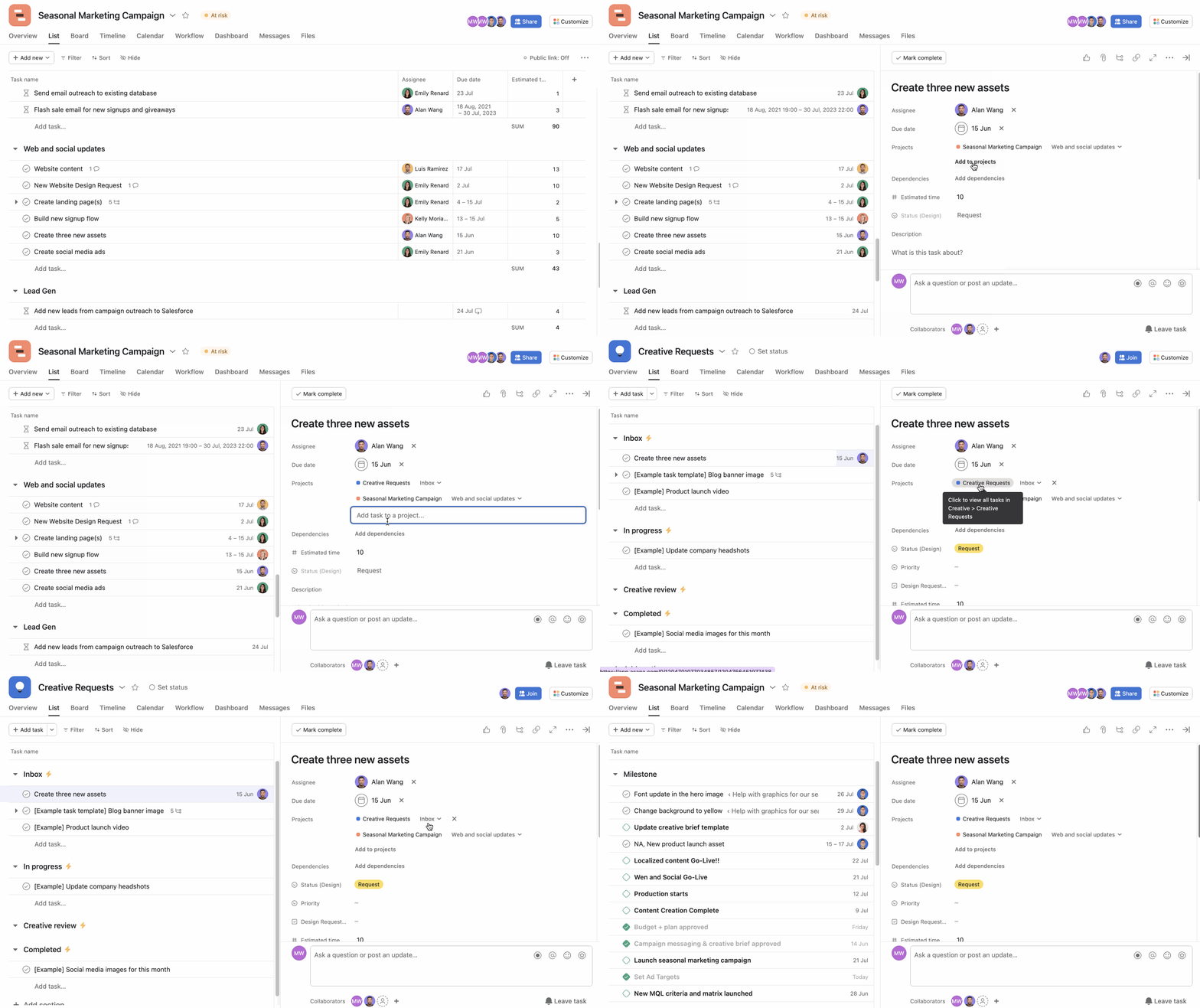
Multi-homing ensures teams keep track of the work and avoids duplication by centralizing work. In the example above, the marketing team can make the Create three new assets task dependent on Create social media ads. Once the Create three new assets is completed, the person responsible for creating the ads will receive a notification saying they can start working on their task.
Custom fields allow you to customize your project and add additional data to your tasks, allowing you to capture specific information relevant to your workflow. You can then use these fields to sort, track, and categorize tasks within projects.
Design teams can use custom fields in their Requests for creative production project to track which departments across the company are submitting a request, the type of asset, and the channel where this asset will live.
Custom fields help you prioritize and visualize data. For example, you can sort your tasks by department request to quantify how many requests come from each department. You can also use a filter to view how many videos you need to create.
You can combine custom fields with rules to automate processes and increase your team’s productivity. For example, you can add a rule that adds a collaborator and a comment to the task when the custom field value changes so that stakeholders are kept informed only when it matters. This will reduce manual work for your team and keep tasks from falling through the cracks.
Another way of using custom fields and rules to streamline your workflow is by combining them with forms.
Create a form that other departments can use to submit requests and incorporate custom fields within that form. Then create rules with those custom fields to move things forward in your workflow automatically.
For example, creative teams can assign a request to a specific person every time the custom field Asset type is Video.
Note
You can use bundles to apply a combination of rules, fields, sections, and task templates to multiple projects simultaneously.
When it comes to project planning, using timeline view to visualize your project’s schedules, dependencies, and deadlines allows you to gain a clear overview of your project’s progress and manage resources efficiently.
By looking at dependencies on your timeline, you can see which tasks are blocking others and pinpoint bottlenecks. You can then reschedule due dates manually or choose one of the date-shifting options.
To optimize your project planning process, consider leveraging critical path on timeline. Critical path will show you which tasks are crucial to complete your project. It notes roadblocks to help you manage the project timeline.
Asana seamlessly integrates with numerous popular tools, such as Zoom, Slack, Microsoft Teams, Gmail, and more. These integrations enable teams to connect Asana with their existing workflow and collaborate effortlessly across multiple platforms.
Integrations will help you maximize your productivity and keep you connected with external and internal stakeholders. For example, you can use our Gmail integration to create tasks directly from an email. These tasks will contain all the information from your email, including attachments; this is great, especially when working with external stakeholders.
Another great tool is Slack. With our Slack integration, you can take ideas from conversations happening in Slack and transform them into actionable tasks in Asana, preventing work from falling through the cracks.
Connecting your everyday tools will make coordinating work and keeping everyone on the same page much more effortless, enhancing collaboration and clarity between teams.
You can even take it a step further and combine integrations with rules.
Like what you see? Get started with a free Asana trial today. Try for free.

