Available on Asana Enterprise and Enterprise+ tiers, as well as legacy tier Legacy Enterprise.
Custom field visibility in Asana is tied to the visibility of the project or portfolio where the field is used. By default, if someone has access to a project, they can view all custom fields and their values.
Private custom fields add an extra layer of control, allowing users to keep specific fields and their values private. When a custom field is marked as private, only explicitly named members can view or edit it—across all projects, portfolios, or tasks where it appears.
This feature makes Asana a powerful tool for managing sensitive workflows by offering detailed control over who can access custom field data.
Key benefits
- Protect sensitive data by restricting access to specific individuals.
- Ensure privacy settings are consistently applied across all workflows.
Editing field access for local custom fields
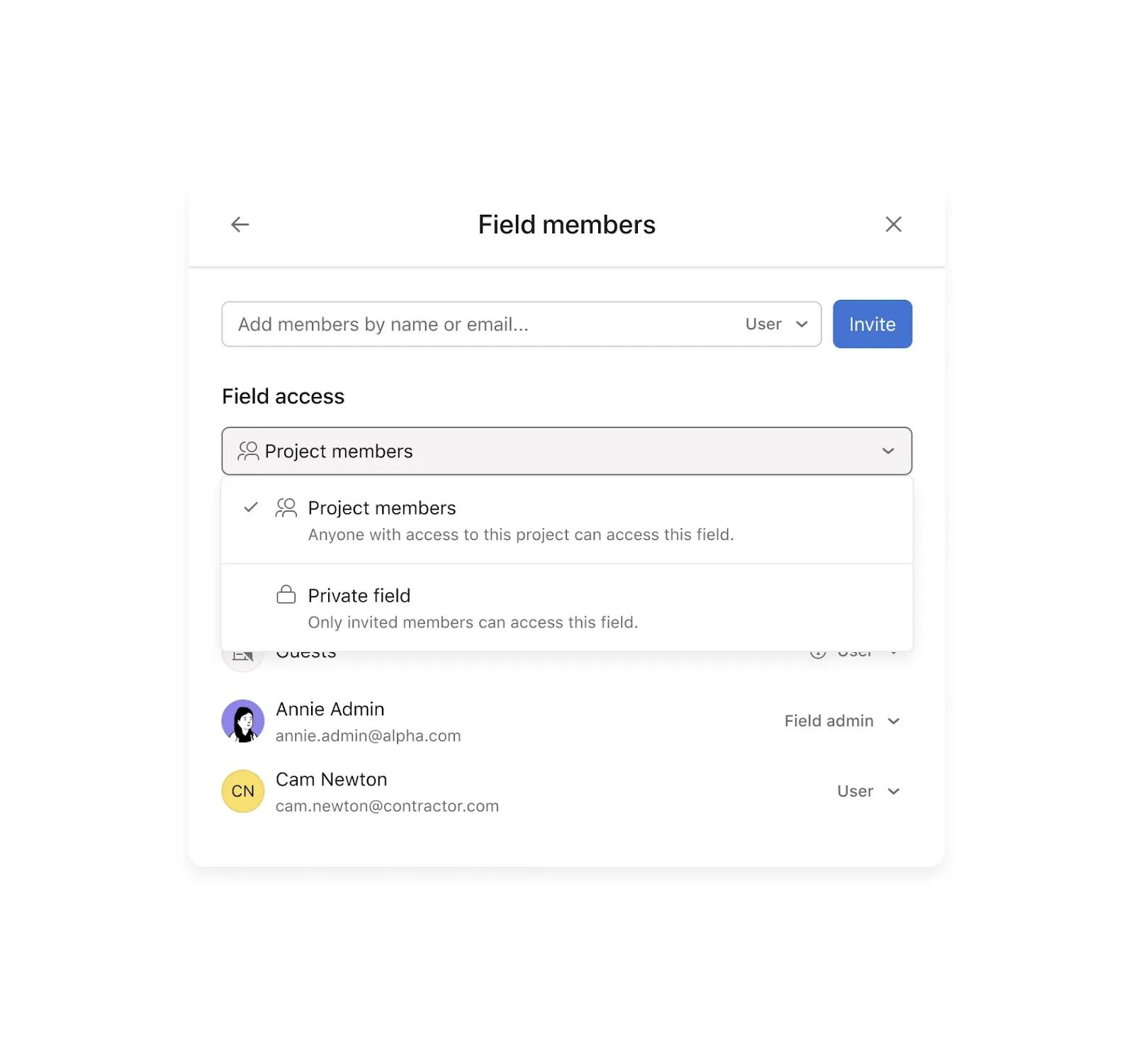
Follow these steps to adjust the visibility of a custom field within a specific project:
- Click on the drop-down arrow next to the custom field in your Asana project.
- Select Edit field and click the Field access settings button in the top right corner of the pop-up.
- Under Field access, click the drop-down arrow to choose:
- Project members: This makes the field visible to everyone in the project.
- Private field: This restricts access to named members only.
- Confirm your choice by clicking Make private.
- To revert, select Project members to restore visibility for all project members.
Editing field access for global custom fields
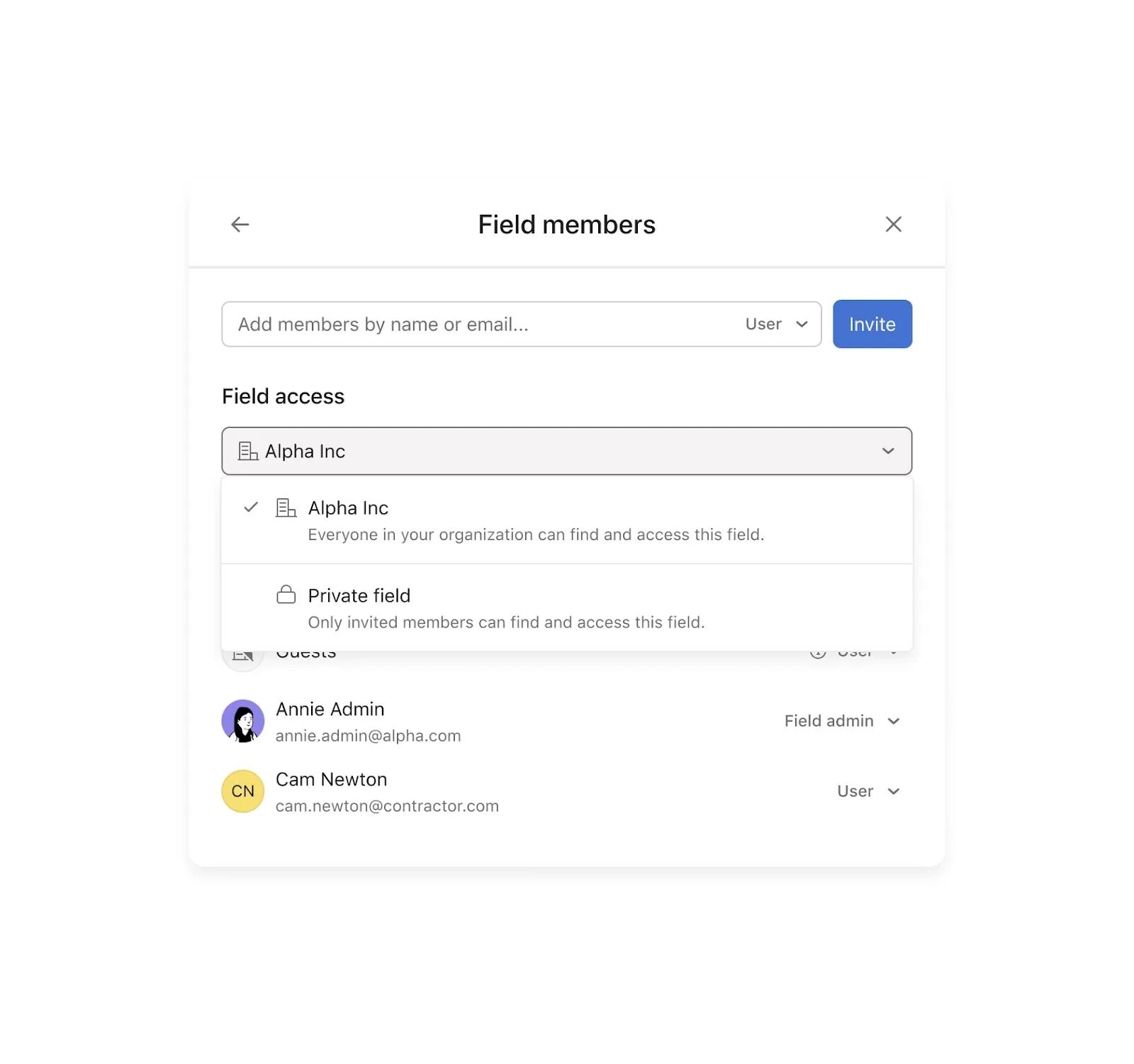
To change the visibility of a global custom field across your organization:
- Click the drop-down arrow next to the global custom field.
- Select Edit field and click on the Field access settings button in the top right corner.
- Under Field access, click the drop-down arrow to choose:
- Everyone in your organization: This makes the field visible to all.
- Private field: This restricts access to named members only.
- Confirm your choice by clicking Make private.
- To restore organization-wide access, select your organization’s name from the drop-down.
Additional notes on private custom fields
- Default visibility remains unchanged: Custom fields retain their current visibility unless modified.
- Visibility restriction options:
- No guest visibility: Guests cannot view private fields.
- Private fields: Only named members can access these fields.
- Consistent settings: Field privacy settings are applied universally; fields cannot have different visibility for specific projects or portfolios.
- Field admins: Any admin can set or modify field privacy. If the organization is the admin, any member can make changes.
Using private custom fields in rules
Available on Asana Enterprise and Enterprise+ tiers.
You can use Private Custom Fields in rules and bundles, making it easier to automate workflows that involve sensitive data, without expanding field visibility beyond the right people.
How it works
- If you have permission, you'll see the private field and its values, often with a "Private" indicator when adding or managing it in a rule or bundle.
- If you don't have permission, the field will appear as a "Private Field" chip or be completely hidden, ensuring data privacy.
- Rules functionality: Rules referencing private fields will still execute. For dynamic values (e.g., a rule that adds a private field's value to a comment), you'll see warnings to prevent accidental exposure. If your access to a private field changes, the rule might display a token instead of the actual value.
- Bundle behavior:
- Creation: When converting a project to a bundle, only private fields you have access to will be included.
- Installation: Bundles containing private fields will install completely, but those private fields will remain invisible to users without permission. Any rules within the bundle that use these private fields will still function correctly.
- Duplication/Templates: When duplicating projects or using templates with bundles, the structure of private fields is copied, but their values are only copied if the user has appropriate permissions.
Important caveats
- Handling private fields: When someone has access to a private field, we provide subtle visual cues to help indicate that they’re working with sensitive information. This helps guide responsible use without getting in the way.
- Private field presence: In some cases, users who don’t have access to a private field may see a placeholder (like “Private Field”) in rules or bundles. This maintains the structure of the workflow without revealing any sensitive details.
- Bundle editing Bbehavior: Bundle administrators need access to a private field in order to remove it from a bundle. If they don’t have access, the field will remain part of the bundle’s setup until someone with access updates it. The field’s presence will still be visible, but its values will remain hidden.
- Rule editing access: If your access to a private field changes—for example, if it’s made private to a more limited group—you may no longer be able to edit the part of a rule that uses that field. The rest of the rule remains editable, and you can regain full access by either removing the field or getting added back to its access list.
- Note on dynamic values: While warnings are shown when using private fields in dynamic values, it’s possible for someone with access to the field to intentionally set up an automation that surfaces the value in a more visible place—like a task title or comment. This is something to keep in mind when designing workflows that involve sensitive information.
Frequently asked questions
What types of custom fields are not supported?
Currently, private custom fields are not supported for:
-
Time tracking fields, ID fields, App-managed fields, Asana-generated fields (e.g., priority, template fields) and Built-in fields (e.g., assignee, due date)
Are all Asana features compatible with private fields?
No, private fields cannot yet be used in:
Who can create and manage rules with private fields?
- Only users who have access to the private field and can edit the project can:
- Add private fields to a rule
- Edit or remove private fields within a rule
- View the field configuration in the rule
- Users without access to the private field:
- Can still see the rule (if they have access to the project)
- Will not see the private field name or value in the rule setup
- Can still trigger the rule through normal task activity
What happens if someone loses access to a private field?
If a user loses access to a private field:
- They will still see the rule if they have access to the project
- They will not be able to view or modify the part of the rule that references the private field
- The rule will continue to run as expected
- Users with access to the private field can continue managing it





