Products


AI Platform


Asana Foundations
Company Type

Visit our pricing page for more information.
Marketers rely on product innovation to tell a compelling story to customers, which is why marketing teams need to be constantly up to date with what’s on the product roadmap. Knowing the roadmap means staying ahead of how you’ll bring these new products or features to market effectively.
Use one project in Asana as the source of truth for the product roadmap across your product and marketing teams. Sales and other teams across the company can also follow the project to stay informed about launch plans. Using Asana to track your product launches will ensure everyone knows what is happening, when it’s happening, and who’s responsible for all the different pieces of work.
This article will guide you through building your own product roadmap project, and using Asana to streamline and optimize your product launch process.
Click the + Create button in the top bar and select Project or use our product roadmap template to save time.
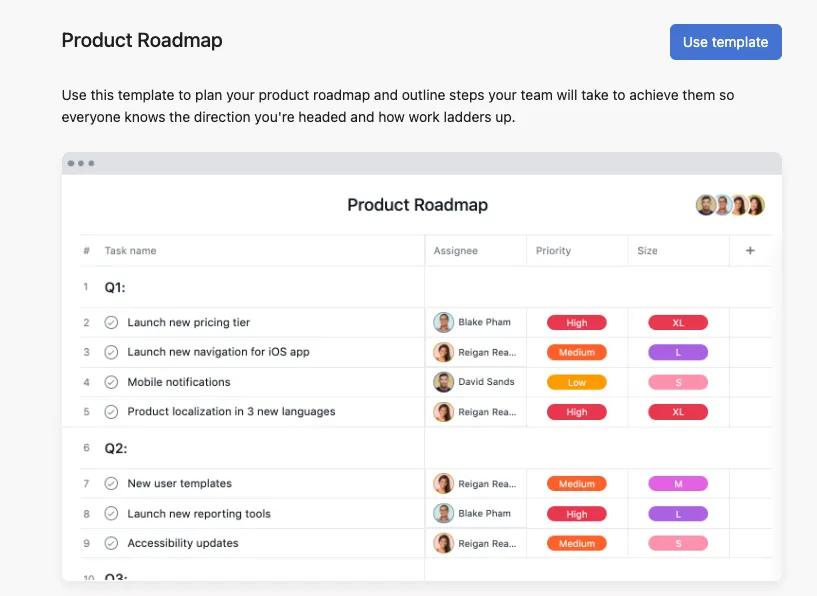
Name the project “Product Roadmap” or “Product Launches” an add it to a public team, so it is visible to the entire company.
Add custom fields to track important information like campaign type, target audience, channel, priority, and status.
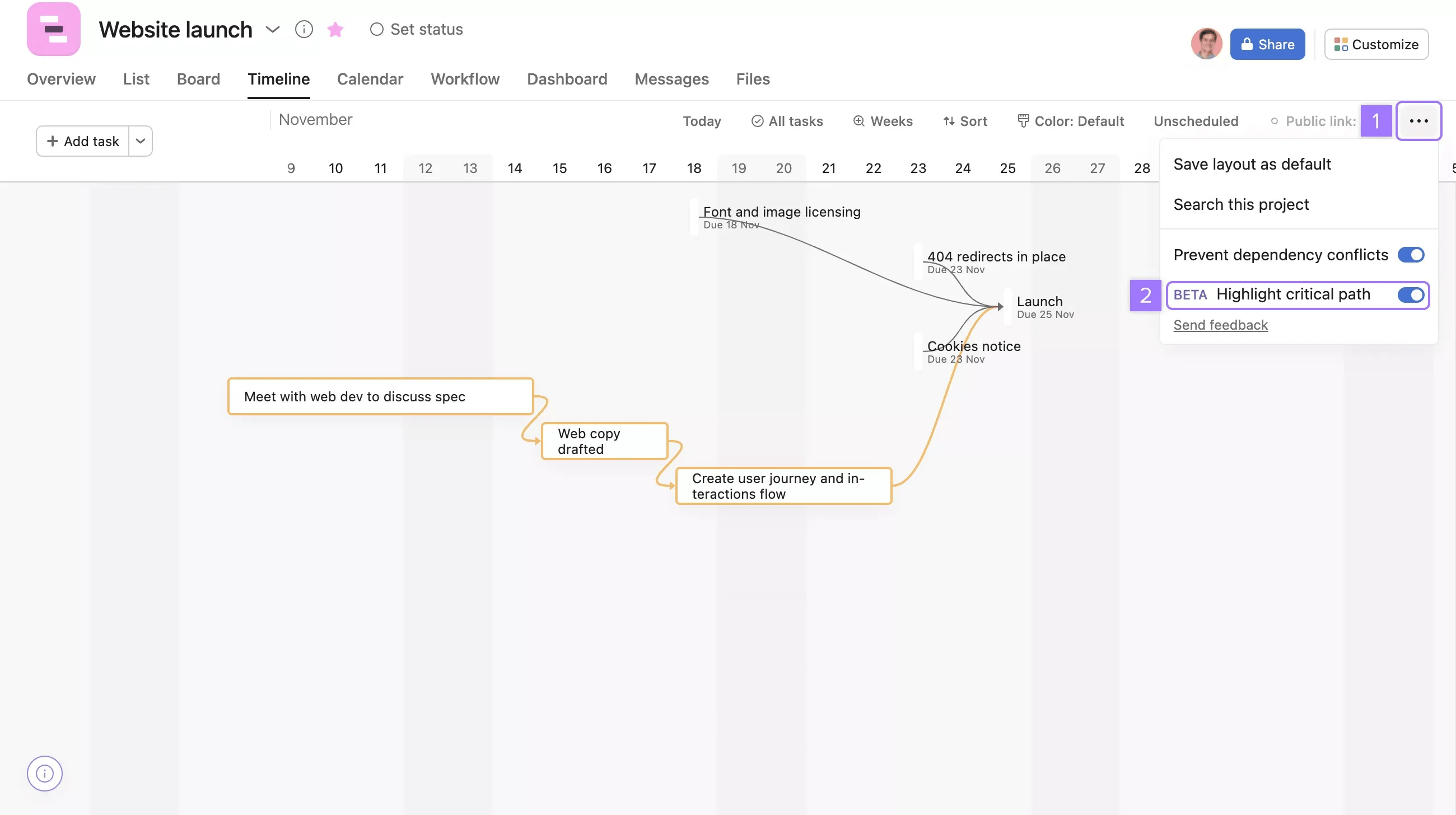
Use timeline and Gantt view to visualize your roadmap and manage dependencies between tasks. You can also use timeline to outline your project's critical path.
Create a form to standardize the information collected for each new launch.
Include compulsory fields for objectives, target dates, and key contacts, this ensures essential details are collected upfront.
Assign tasks to team members to ensure everyone knows who is responsible for what.
Use task dependencies to establish the order of work. You can mark several tasks as dependent on another task. For example, you could make all subtasks dependent upon “Launch messaging.” Once the messaging task is complete, task assignees of dependent subtasks will receive a notification. Your copywriters, social media managers, and email marketers can all begin on their respective subtasks and keep the launch on schedule
Add milestones for key events like kickoff, content approval, launch date, and post-campaign analysis.
Use workload view to monitor team capacity and balance assignments.
If a launch becomes too big for a task, convert the task into a project. Keep a reference task in the launches roadmap project that links to the new project so the launch is accounted for in your roadmap.
Set up rules to automatically move tasks between sections, notify team members, and send reminders.
Use Asana AI features like smart rules to automate your workflows with custom rules powered by AI, ensuring that routine processes are handled efficiently.
Connect Asana to tools like Slack, Google Drive, and Adobe Creative Cloud to avoid context switching.
Use portfolios to track the status of all ongoing campaigns in one place.
Create dashboards to monitor key performance indicators like task completion rates, adherence to deadlines, and resource utilization. Use reporting features to generate insights for weekly or monthly status meetings.
Use custom fields and reporting tools to gather insights and measure success against initial goals and identify areas for improvement.
Create a "Feedback" section within your project and add a new form to collect feedback from team members and stakeholders about the campaign process. Automate this workflow by adding a rule which will move any feedback form submissions to the "Feedback" section.
Convert your project into a template to save time when planning your next product roadmap. Update your project template based on learnings to continually improve your launch process.
By following these steps, you can effectively manage your product launch roadmap, ensure timely deliveries, and maintain high visibility across your teams. This holistic approach empowers your teams to work efficiently, reduce bottlenecks, and achieve better campaign outcomes.

