Products


AI Platform


Asana Foundations
Company Type

Visit our pricing page for more information.
Whether you’re brand new to Asana or have been using the free version for a while now, a trial is the best way to explore all that Asana Starter and Advanced have to offer. This article will help you understand the power of Starter and Advanced features available to you during your trial and how to get started with them.
If you haven’t tried Asana's paid features yet, you can sign up for a free Asana trial.
Asana is one of the leading collaborative work management tools, built for better productivity, collaboration, and coordination across teams and organizations. Instead of trying to wrangle everything via email, files, meetings, and chat, you can plan, manage, and monitor all your work in one place with Asana. It even integrates with your other collaboration tools so work stays connected.

For a successful start to your trial, familiarize yourself with the Asana basics. These include:
Invite teammates so they can start using and evaluating Asana during the trial.
Using Asana for a project or process your team is already familiar with is the easiest way to get started. The specific process you try depends on your team, but we have dozens of templates to get you started. Some of our top templates are work requests, content calendars, and product launches.
Note
Are you currently planning your work and projects in spreadsheets? You can use our CSV importer to move that work into Asana in just a few clicks.
Use your trial to test Advanced features across your existing tasks and projects. It’s a good idea to test specific features within certain projects. For example, you could start using priority custom fields on a design request project, or dependencies in an event plan. Then, make sure to add these projects to a portfolio to keep track of them all.
See more project ideas from Asana, use case best practices and tips, or check out our customer case studies to see examples in action.
Features outlined in this section are available on Asana Advanced, Enterprise, and Enterprise+ tiers, as well as legacy tiers Business and Legacy Enterprise.
The features below don’t represent everything that Starter and Advanced have to offer, but they work well together and are easy to start using right away.
Portfolios are the best way to keep all projects for a specific initiative or team in one place. They’re an easy way to file and organize the projects you access most often, and you can sort by project owner, deadline, status, priority, and more.
Share a portfolio by copying its URL and sharing it with any Asana user in your domain.Workload
Project managers can struggle to manage workloads if relying on a complex system or manually piecing together information from emails, docs, and meetings. Portfolio workload provides a single, accurate view of your team’s bandwidth based on work already assigned to them in Asana.
Portfolio workload facilitates informed staffing decisions, ensuring balanced workloads and helps keep initiatives on track.
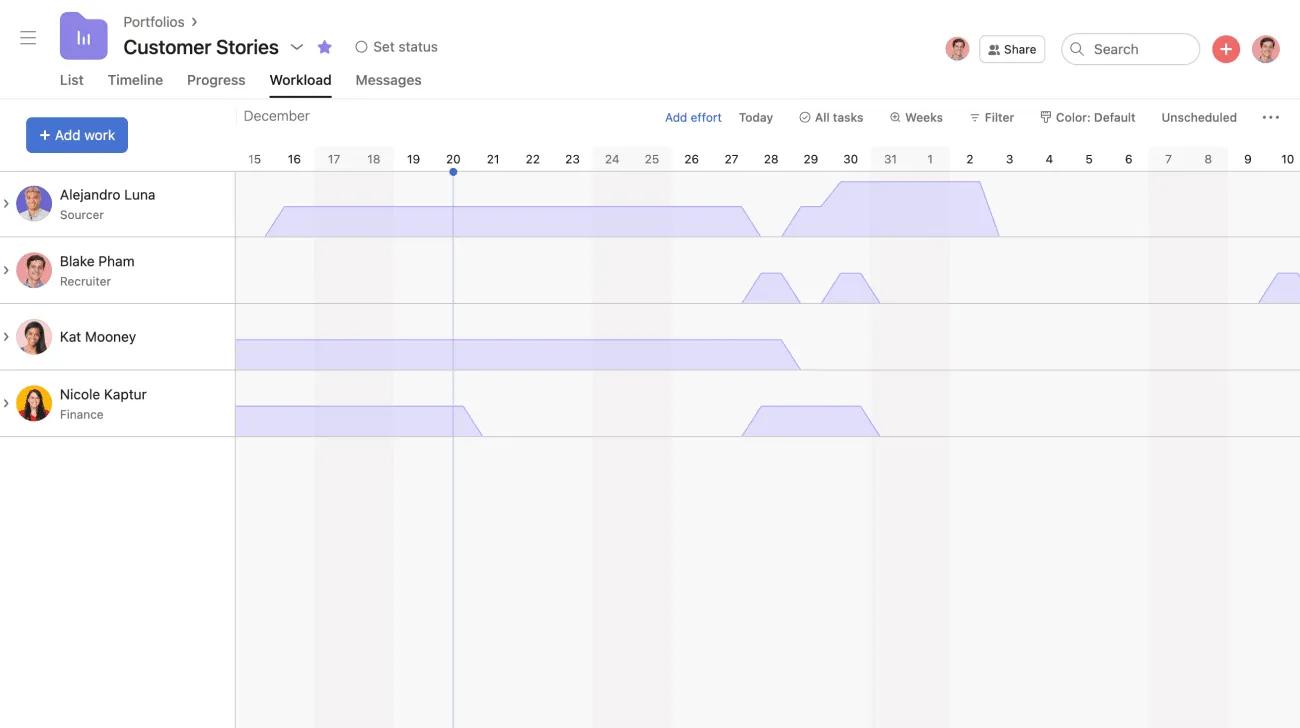
Get started with workload with our step-by-step tutorial.
Proofing lets stakeholders leave specific, actionable feedback on images. Proofing in Asana makes it easy for reviewers to comment directly on assets so feedback is provided in context. Each comment turns into an actionable subtask that the creator can then decide how to incorporate.
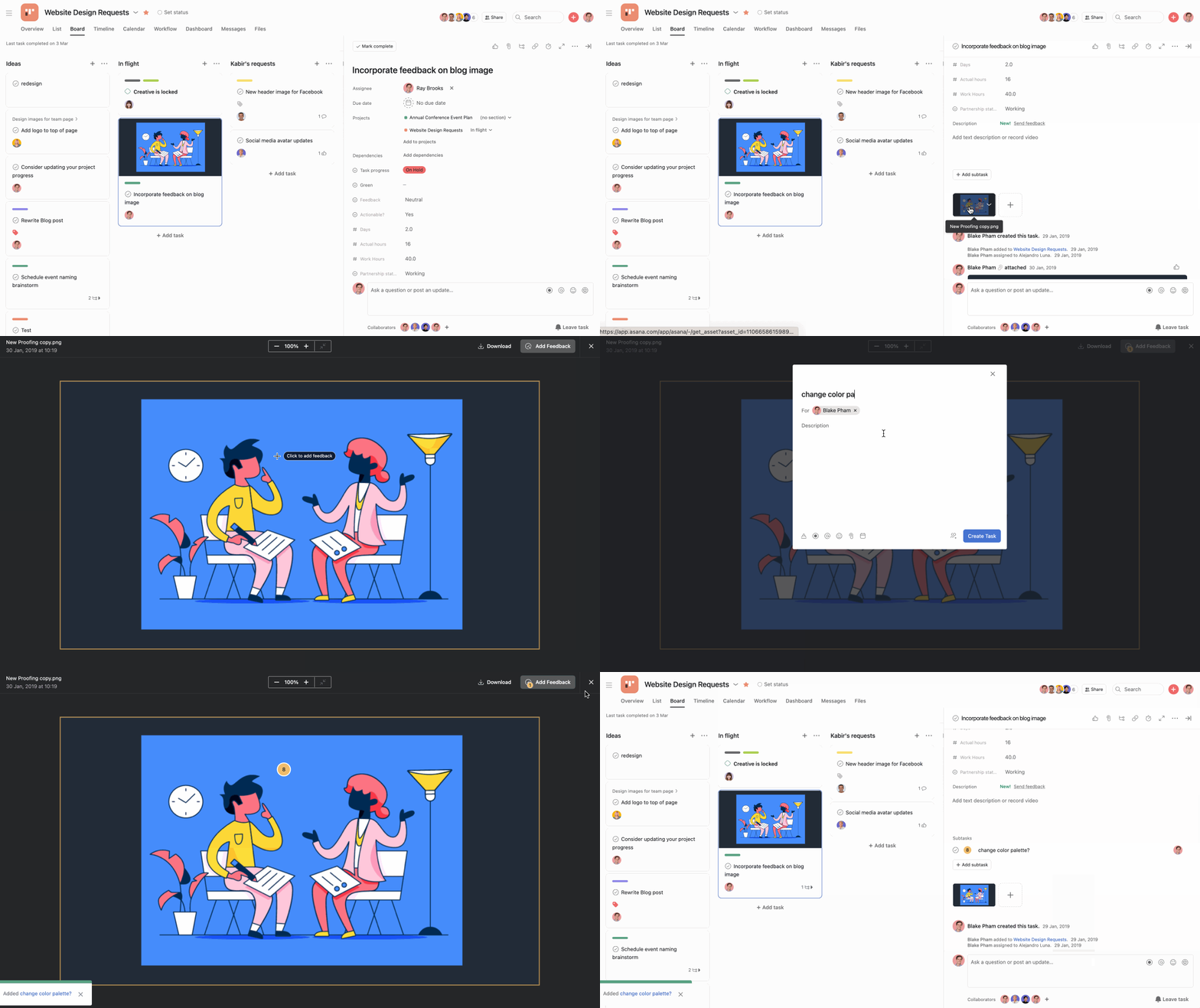
Proofing streamlines the feedback process by allowing reviewers to express their ideas clearly and creators to decide whether to incorporate them, while also maintaining a centralized record.
Features outlined in this section are available on Asana Starter, Advanced, Enterprise, and Enterprise+ tiers, as well as legacy tiers Premium, Business, and Legacy Enterprise.
Custom fields help track specific details uniformly on each task or on a project in a portfolio. You can use them to filter and sort a project or portfolio and report on at-risk work, approvals, and more.
Field names and values are customizable, so you can create a field for stage, priority, cost, or whatever else is important to your workflow, team, and company. You can also get notifications when custom fields are changed to keep work moving forward and make approvals clear.
Use Asana-created templates or create and save your own custom templates to standardize your team’s common processes and save time on project setup. See our full template gallery here.
Start dates show when you should begin your work to hit your deadlines without the last-minute scramble. They also help you plan projects with a specific deadline to make sure your schedule won't hit any snags.
Use start dates on tasks that get worked on across multiple days, like drafting a blog post or making a video.
Mark a task as waiting on another to help keep complex projects on track and ensure the right work is getting done at the right time. Dependencies also save you time by eliminating the need for constant check-ins with individuals regarding their progress or a task's completion status.
Use dependencies on tasks that need to happen in a sequence, like reviewing a first draft once it’s written, or pushing a web page live after the final QA.
Your team may be accustomed to submitting requests and outlining project requirements through documents and emails. You can create forms to standardize your request process. Submitted forms are directly connected to specific projects, capturing essential information upfront and allowing for easy tracking in one location.
Forms can be submitted by anyone—even if they don’t use Asana. You can simply send them the form link. Once submitted, the form details turn into a task in your project so it can get prioritized. Set up a form by following the steps outlined here.
Create a beautiful, living view of how your work fits together to start projects on the right foot, and hit your deadlines. With timeline you can see, share, and adapt your project plans in minutes.
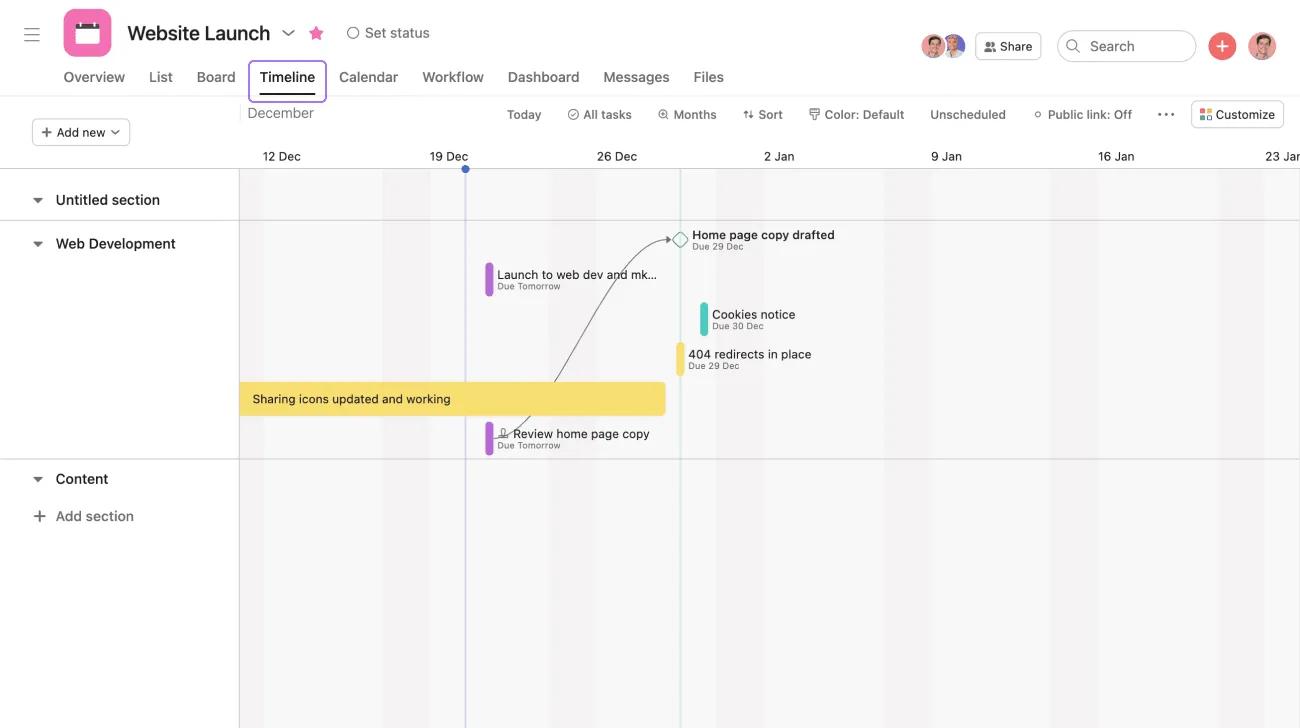
Timeline is most powerful when tasks have dependencies and start dates so you can see how work connects. As work progresses, you can easily drag and drop tasks to see schedules and conflicts.
Have more questions as you get up and running? Check out these resources:

