Products


AI Platform


Asana Foundations
Company Type

Visit our pricing page for more information.
In Asana, permissions control the level of access users have to view and edit information. This enables users to balance collaboration and control while ensuring that company data remains secure. For instance, when working on a confidential project, the project team should be able to collaborate, but the information should only be shared with those who need it.
Permissions mainly occur at the object level and are options that limit access to things like teams, projects, or tasks.
Object-based permissions determine the type of access you have as a member depending on which team, portfolio, project, or task you've been invited to. You typically gain access to a project when you are directly invited, or because of a team membership or membership in an organization.
For example, if you add someone to a team, they can access all the projects in the team with that team as a member.
You can also add collaborators to a task without adding them to the project that the task lives in. These task collaborators won't have access to other tasks in the project. Authorized members, such as a project admin or project editor, can give teams or individuals access to view or edit projects as needed.
In Asana, a single user can have multiple access levels, based on the content created and the permissions given.
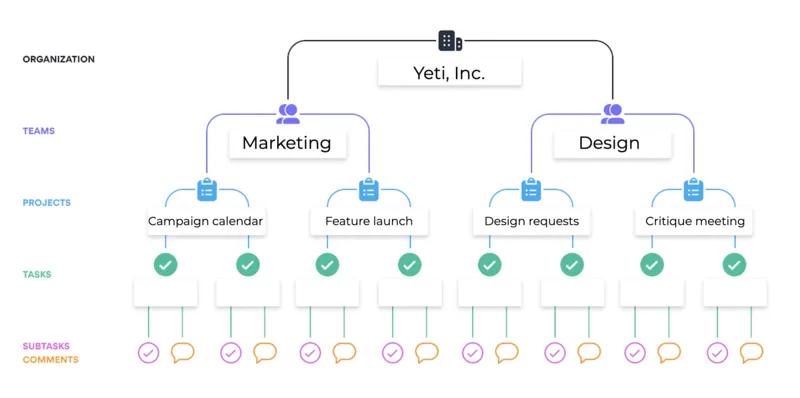
Projects have both access settings and permissions for scaled control over project data. Our project permissions article is the most comprehensive guide to managing privacy and permissions for projects.
Visit our team permissions article for the best insight into team privacy and sharing, including the team admin roles.
Organizations are only accessible by Asana users who have signed up for an account with their company email address, or were specifically invited into an organization. Admins can control invite settings via the admin console.
Workspaces are only accessible by Asana users who have been explicitly invited into the workspace by a current workspace member.
The admin console is where admins can manage Asana for your organization. The members tab provides an accurate count of the members, guests, and pending invites. Also included are security options and provisioning controls. This allows you to easily add or remove users as needed, giving you complete control over your organization's members from a single, central location.
Guests are users that don't share the organization's email domain. Guests can only access what is explicitly shared with them. Use guests to collaborate with clients, contractors, customers, or anyone without an approved organization email domain.
Learn more about guests and their permissions in our Guests FAQ Help Center article.
Asana provides in-product admin controls, user and object-level permissions, plus the ability to define which third-party applications are accessible to your organization.
Read more about how we protect and secure your data.
Asana has established a comprehensive GDPR compliance program. Read about the significant steps Asana has taken to align its practices with GDPR.

