With AI Studio Plus, individuals and small teams can purchase access to AI Studio directly in-product. Available for customers on monthly and annual plans, you can independently purchase additional AI Studio credits to power your Smart workflows without the need to contact our sales team.
This guide gives an overview of AI Studio Plus, and walks you through the complete upgrade process from accessing your billing settings to purchasing and managing your AI Studio Plus subscription independently.
Related articles
What is AI Studio Plus?
AI Studio Plus is designed for individuals and small teams who want to expand their AI Studio capabilities beyond the AI Studio Basic tier. Here's what makes AI Studio Plus different:
Key features
- Convenience: Purchase and manage your subscription independently in-product, no need to contact sales
- Simplified billing: Available for customers on both monthly and annual plans, AI Studio billing cadence matches your base Asana subscription’s frequency
- Credit stacking: Your Plus credits stack with existing Basic tier credits
- Workflow scaling: Perfect for customers looking to slowly scale their workflows beyond what Basic credits can provide
Credit system
- Customers can purchase credits in 100,000 credit increments (100k, 200k, 300k, etc.) in-product
- Maximum of 1 million credits per purchase (contact sales for more)
- Credits reset monthly and do not roll over
- Pro-rated billing matches your base Asana subscription frequency
Prerequisites for purchasing AI Studio Plus
Before upgrading to AI Studio Plus, ensure you meet these requirements:
- You are an admin or billing owner of your Asana organization or division
- You can pay via credit card; manual invoice customers should contact sales
- Your organization or division is on a paid Asana plan, either Starter or Advanced. Enterprise and Enterprise+ customers are unable to pay via credit card, but may contact sales to discuss AI Studio Plus or Pro.
- You have Asana AI enabled for your domain. This is automatically enabled for most paid domains, see these instructions on how to enable Asana AI if needed.
How to upgrade to AI Studio Plus
Follow these steps to upgrade from AI Studio Basic to AI Studio Plus
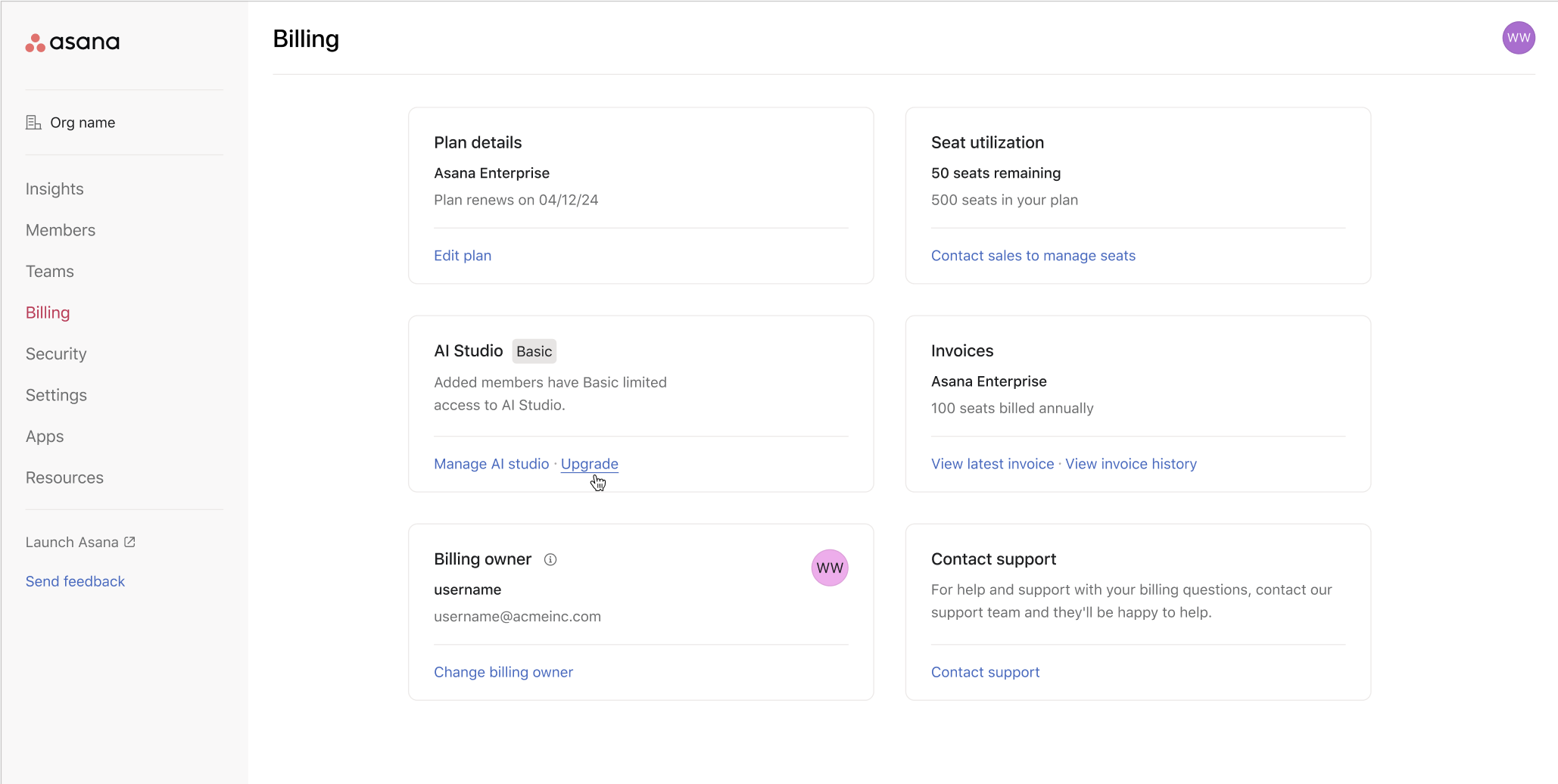
Step 1: Access the Billing tab of the admin console
- Click your profile picture in the top right corner of Asana
- Select Admin console from the dropdown menu
- Navigate to the Billing tab in the left sidebar of the admin console
- Within the Billing tab, look for the AI Studio section
- Under AI Studio, click Upgrade to begin the upgrade flow
Step 2: Select your credit package
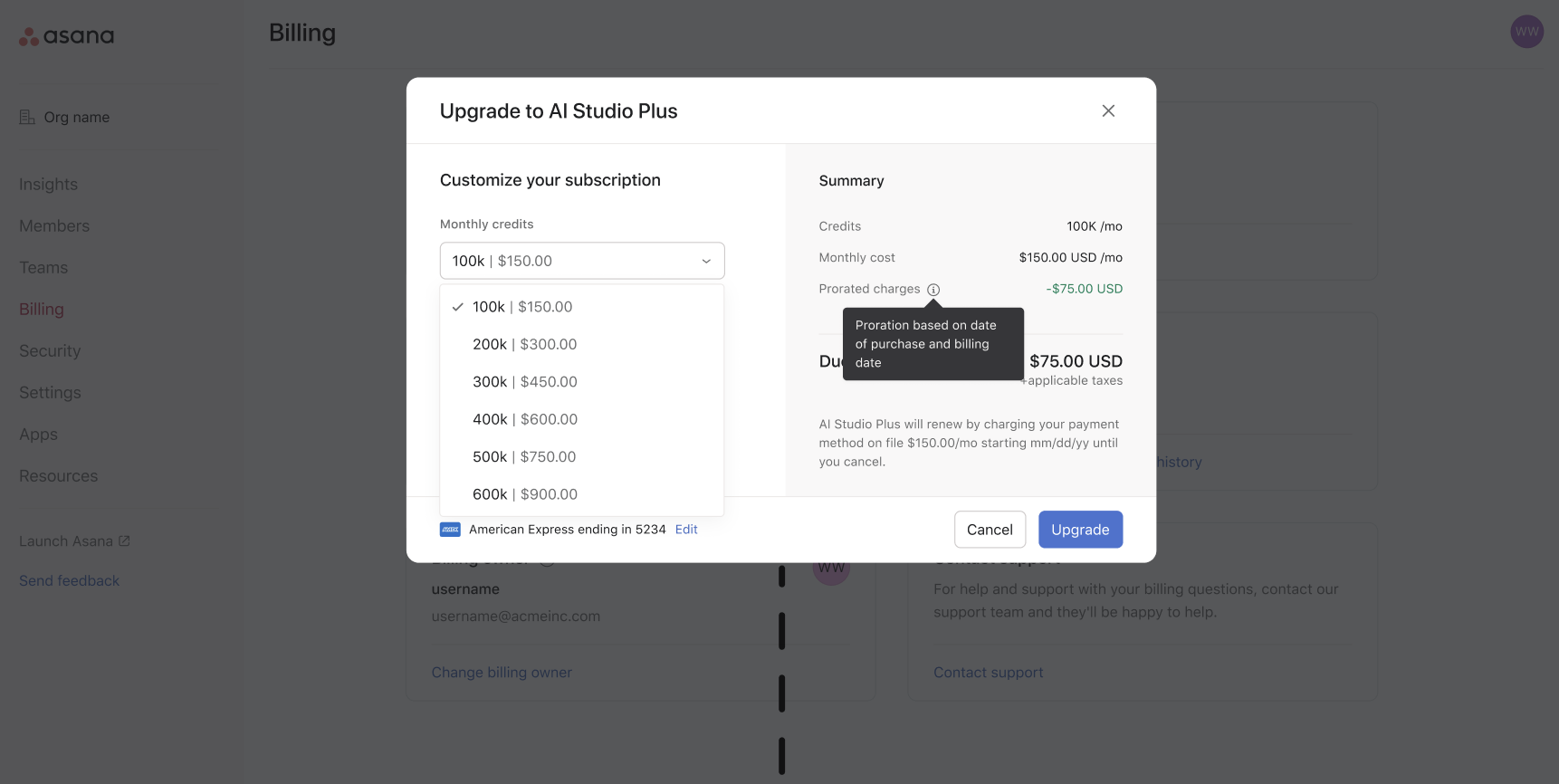
- The checkout modal will open, showing available credit packages and a purchase summary
- Choose the desired amount of credits (100k, 200k, etc. up to 1 million credits)
- Note the billing frequency, which matches that of the base Asana subscription
- Note the payment method and edit the credit card details if needed
Step 3: Review and complete your purchase
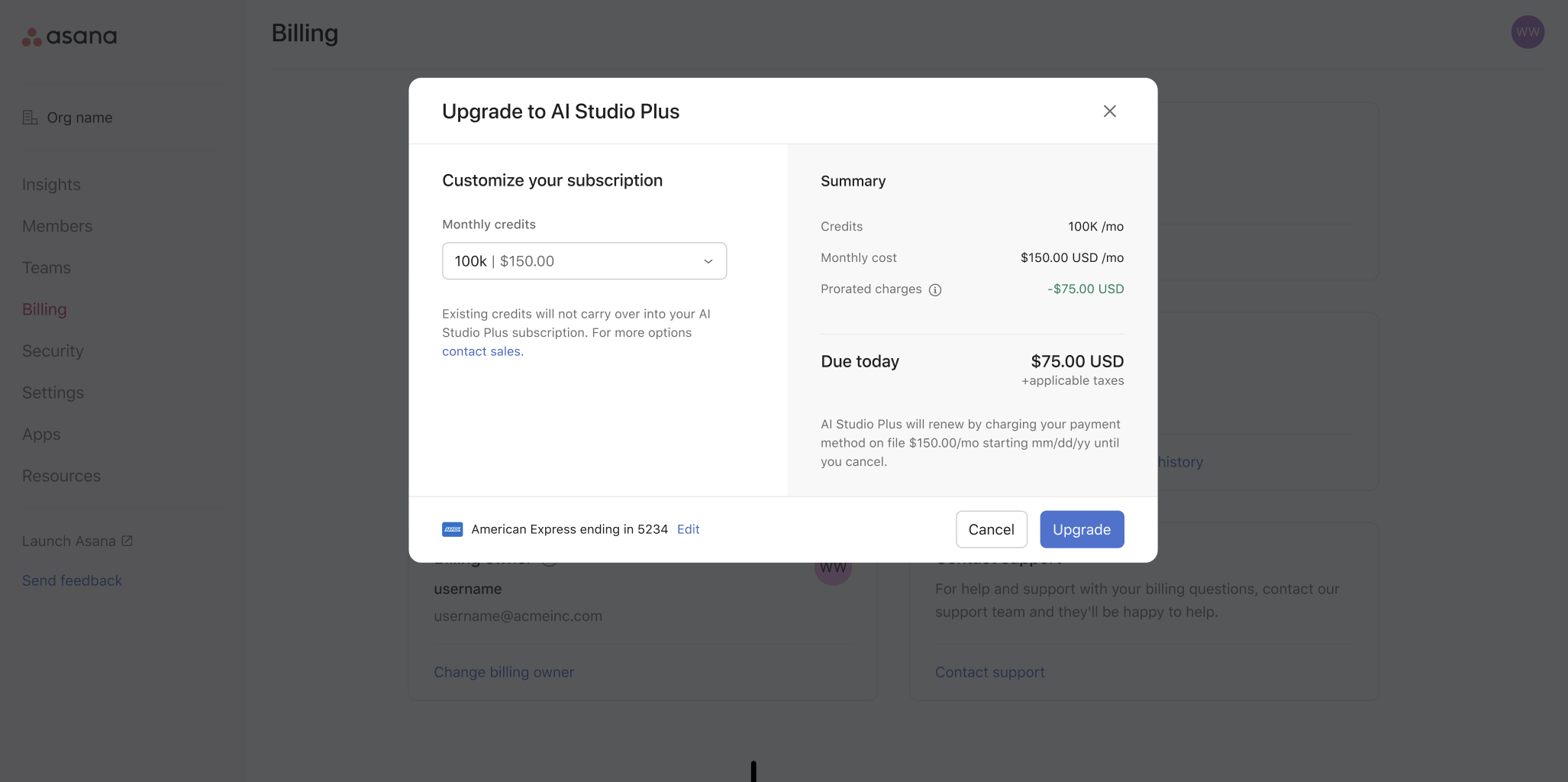
- Review your order summary, including any pro-rated amount
- Once satisfied, click Upgrade to complete the purchase
- You will receive confirmation of your upgrade via email
Notes on pricing and credits
Pro-rated billing
AI Studio Plus subscriptions match your base Asana subscription’s billing frequency. If your Asana plan is billed annually, AI Studio plus will be billed annually on the same date. If your Asana plan is billed monthly, AI Studio plus will be billed monthly on the same date. To align billing cycles, you’ll pay a pro-rated amount at checkout when upgrading to AI Studio Plus.
Stacked credits
AI Studio Basic credits will stack with AI Studio Plus credits. For example, a customer on an Asana Starter plan automatically receives 50k free AI Studio credits per month. If they upgrade to AI Studio Plus, and purchase a package of 100k credits on a monthly subscription, they will receive 150k credits per month.
Purchasing additional credits
If you need more than 1 million credits, or need to add credits before the billing cycle is up, contact Asana’s sales team.
How to cancel your AI Studio Plus subscription
Customers can independently manage their AI Studio Plus subscription from within the admin console, including cancellation.
To cancel your AI Studio Plus subscription:
- Navigate to the admin console by clicking your profile picture and choosing Admin console from the list
- Click the Billing tab on the left side of the admin console
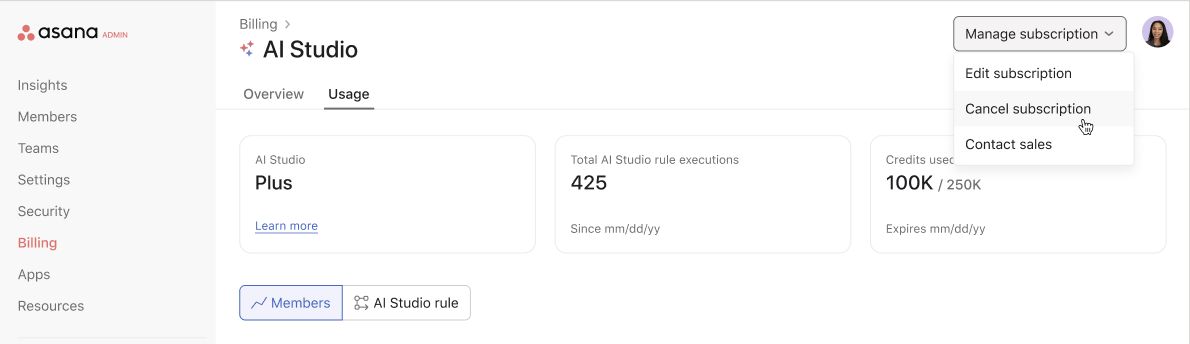
- Under the AI Studio card, click Manage subscription. A new page will open (see image below)
- In the new page which opens, click the Manage subscription dropdown
- Choose Cancel subscription
- If you’d prefer to reduce or increase your credits instead, choose Edit subscription
Frequently asked questions
How is AI Studio Plus different from AI Studio Pro?
AI Studio Plus is designed for individuals and small teams who can purchase online without contacting sales, no builder list management, and a lower entry price than our Pro tier. AI Studio Pro is for Enterprise and Enterprise+ customers who need sales assistance and builder list controls.
What happens to my existing Basic credits?
Your Basic credits continue as normal and stack with your Plus credits. For example, if you have 50k Basic credits and purchase 100k Plus credits, you'll have 150k total credits per month.
Can I purchase AI Studio Plus in-product if I'm on a manual invoice?
No, purchasing AI Studio Plus in-product is only available for customers who pay via credit card. Manual invoice customers should contact sales for AI Studio Pro and Plus.
What if I need more than 1 million credits?
Contact sales to discuss AI Studio Pro or for higher usage needs.
When do my credits reset?
Credits reset monthly regardless of billing cadence.
Can I cancel my AI Studio Plus subscription?
Yes, you can cancel anytime through the admin console billing settings. See How to cancel your AI Studio Plus subscription above.
Does AI Studio Plus include builder list controls?
No, unlike AI Studio Pro, there's no builder list - all members in your billing account get access. Customers who require advanced billing controls should consider AI Studio Pro and contact sales.




