Keep your team and stakeholders informed with Asana's project status updates. Share progress, highlight achievements, and communicate roadblocks efficiently using Asana's built-in status update features.
Related articles
What are project status updates?
Project status updates are regular communications that keep everyone informed about your project's progress. In Asana, these updates combine project health indicators with detailed progress reports, making it easy to share comprehensive information with your team and stakeholders.
Project members automatically receive inbox notifications when you post a new status update, ensuring everyone stays in the loop without additional effort.
How to create a project status update
Step 1: Access the status update feature
- Navigate to your project in Asana
- Click Set status next to your project's name
Step 2: Set your project status
Choose from five status options that best reflect your project's current health:
- On track - Project is progressing as planned
- At risk - Project faces potential delays or issues
- Off track - Project is behind schedule or facing significant challenges
- On hold - Project is temporarily paused
- Complete - Project has been finished
- Dropped - The project is canceled
 Note
Note
Use consistent status criteria across your organization to ensure everyone interprets project health the same way.
Step 3: Build your update content
Asana's status builder helps you create comprehensive updates quickly:
Use the highlights tab
- Access the Build your update panel on the right side
- Switch between Previous update and Highlights tabs
- The Previous update tab shows your most recent status for reference
- The Highlights tab contains draggable modules for customization
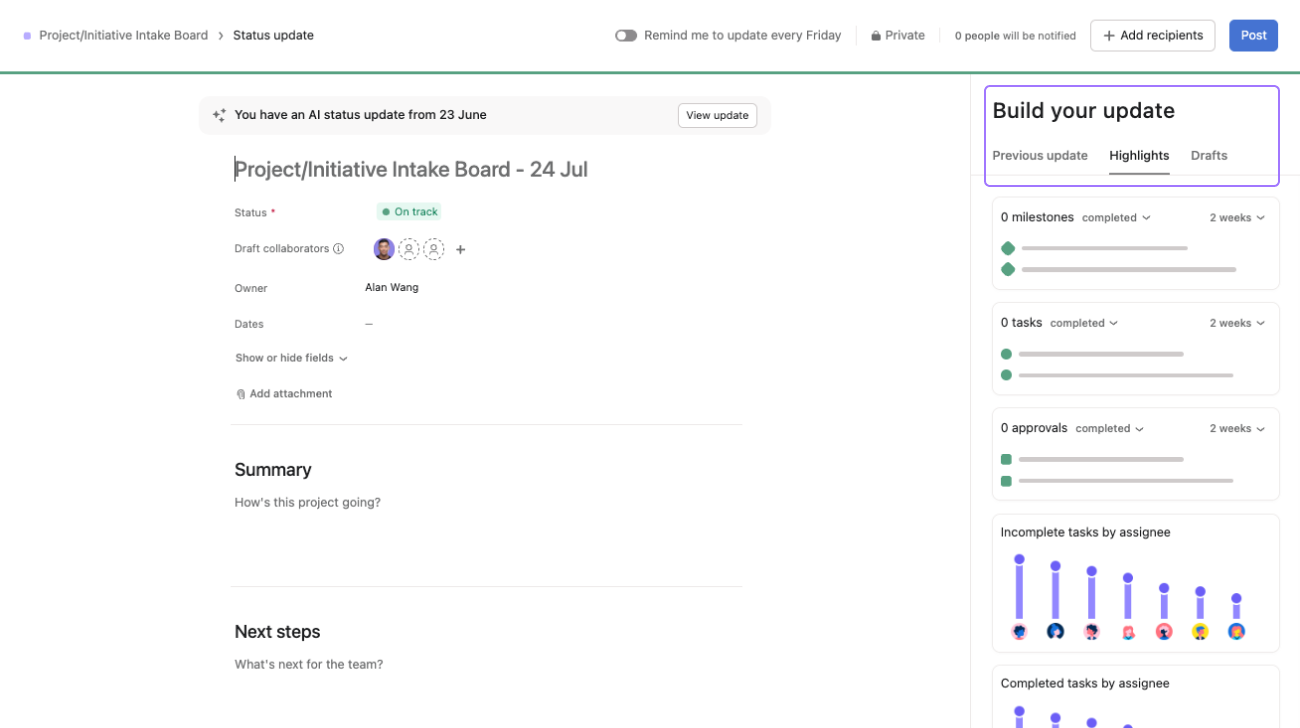
Add visual elements
- Drag and drop charts to automatically visualize progress
- Include completed milestones and overdue tasks
- Show completed or in-progress work with a single click
- Charts update in real-time based on your project data
Write your update
- Provide a clear summary of current progress
- Highlight specific accomplishments since the last update
- Identify any blockers or upcoming challenges
- Outline next steps and priorities
- Use @mentions to give kudos to team members and reference specific tasks
Best practice: Structure your updates consistently. Include what was accomplished, what's coming next, and any support needed from stakeholders.
Step 4: Enhance with AI assistance
Asana offers AI-powered drafting to help you create compelling updates. Use smart status to generate initial content with AI.
- Choose the Draft update with AI option
- Customize the AI-generated text to match your project's specifics
- Maintain your authentic voice while leveraging AI efficiency
Step 5: Save and publish
- Review your complete update
- Click the blue Post button in the top right corner to publish
Status update best practices
Keep stakeholders engaged
- Be specific: Instead of "making progress," say "completed 3 of 5 design mockups"
- Use visuals: Include charts and progress indicators to make updates scannable
- Highlight people: Use @mentions to recognize team contributions and create accountability
- Link to work: Reference specific tasks and deliverables for easy access
Maintain consistency
- Regular cadence: Establish a predictable update schedule (weekly, bi-weekly, monthly)
- Standard format: Use the same structure across all your project updates
- Clear status criteria: Define what each status level means for your organization
Make updates actionable
- Identify blockers clearly: Specify what's preventing progress and who can help
- Request specific support: Don't just mention challenges—ask for what you need
- Set clear next steps: Help readers understand what's happening next and when
Want to learn more? Check out all the features of Asana Status Updates.
Note
It's no secret—Asana offers free trials. Start yours today. Try for free




