Products


AI Platform


Asana Foundations
Company Type

Visit our pricing page for more information.
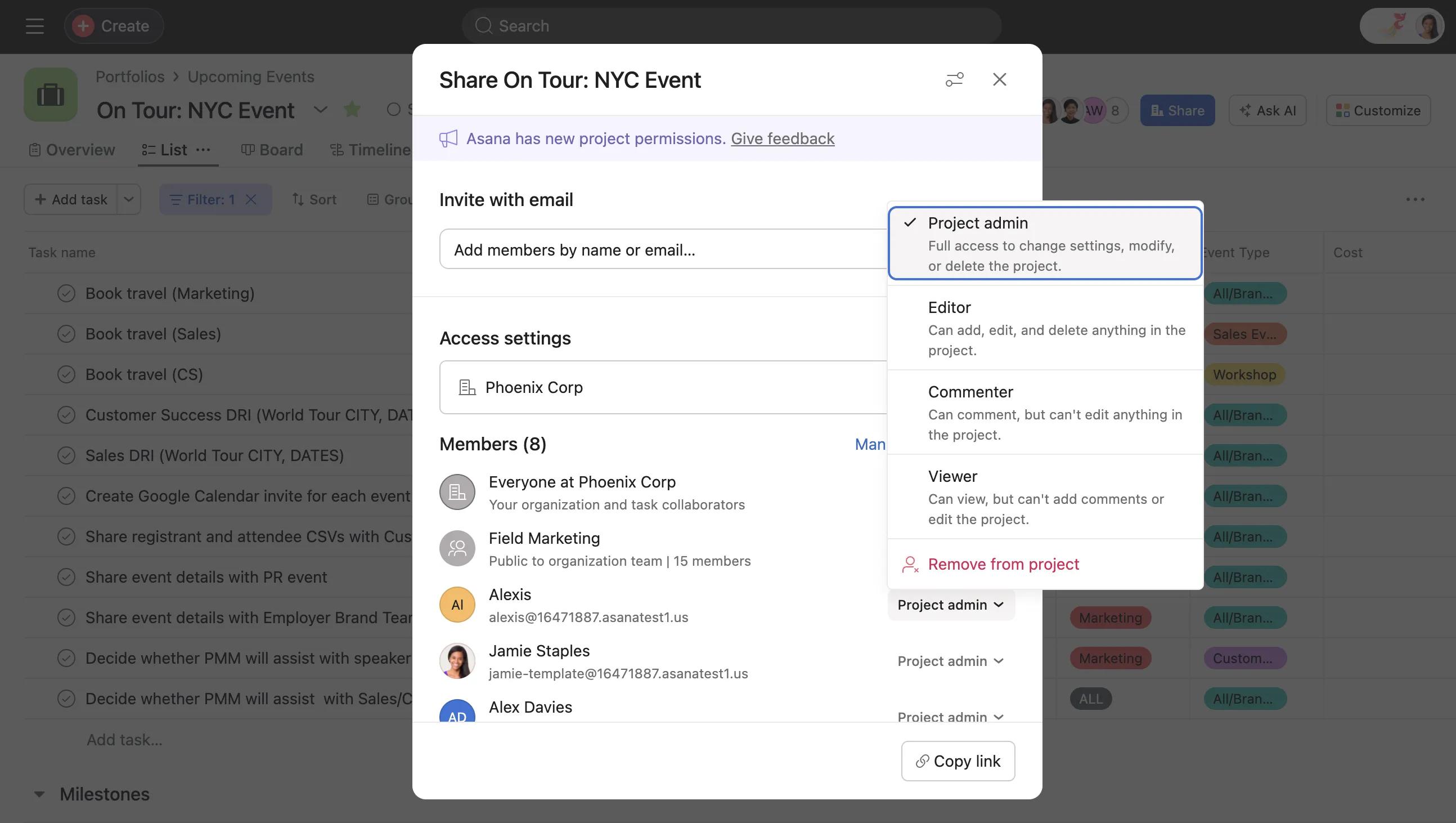
Individual project permissions dictate the kind of actions that project members can take within a project. This may also extend to other members of the organization depending on the project's privacy setting.
Commenter permission level is available with a paid Asana subscription.
Commenter permission for projects allow users to view or comment on projects without giving them access to edit them. This makes it easier to share the information in a project with anyone that needs it, while preventing any accidental or unnecessary changes. Capture feedback on projects and update stakeholders, while keeping the structure of your projects intact. Commenter permissions are perfect for company wikis, templates, points of reference and processes that have been solidified and shouldn’t be changed.
Viewer permission level is available with a paid Asana subscription.
Viewer access level is designed for team members or stakeholders who need to stay informed on project progress without having the ability to make edits ensuring project integrity and alignment. This means that you can create projects where members can view information and stay up to date but cannot make edits, facilitating collaboration and informed participation while safeguarding the integrity of the project.
The project owner and project members with project admin or editing permissions can give other project members editing access by changing their individual permission settings to Project admin, Editor, Commenter or Viewer.
Note: Project members will see what permissions they have in the top right corner within task view.
If a user has been assigned two different access levels in a project through different roles, Asana will automatically assign the highest level of access they are entitled to across these roles.
For instance, if Céline is granted Commenter access when she joins a project, but as a member of the Scale design team, she is entitled to Editor access, then her Editor access will have priority over the Commenter access.
Project members can be given individual permissions regardless of the project's default setting. On the project level, members with commenter permissions or members who are assigned a task with commenter permissions, can only post project messages and project status updates.
The table below outlines the capabilities of project members with Project admin, Editor, Viewer and Commenter permissions. Commenters can also be assigned tasks, which gives them some additional permissions on those specific tasks.
For more information on the different access permission levels, take a look at the articles Viewer access level and Editor access level.
| Action | Project Admin | Editor | Commenter | Commenter with task assigned | Viewer | Viewer with task assigned |
| Delete or archive project | ✅ | ❌ | ❌ | ❌ | ❌ | ❌ |
| Rename project | ✅ | ❌ | ❌ | ❌ | ❌ | ❌ |
| Change project privacy or team | ✅ | ❌ | ❌ | ❌ | ❌ | ❌ |
| Move project to a different team | ✅ | ❌ | ❌ | ❌ | ❌ | ❌ |
| Create / delete share links and read-only links | ✅ | ❌ | ❌ | ❌ | ❌ | ❌ |
| Customize permissions | ✅ | ❌ | ❌ | ❌ | ❌ | ❌ |
| Add or modify project overview | ✅ | ❌ | ❌ | ❌ | ❌ | ❌ |
| Edit notifications for all members | ✅ | ❌ | ❌ | ❌ | ❌ | ❌ |
| Add or modify project brief | ✅ | ✅ | ❌ | ❌ | ❌ | ❌ |
| Share project and manage memberships | ✅ | ✅ | ❌ | ❌ | ❌ | ❌ |
| Add and modify tasks, including subtasks, dependencies, and multihoming | ✅ | ✅ | ❌ | ❌ | ❌ | ❌ |
| Change project appearance such as default view, icon and color for everyone | ✅ | ✅ | ❌ | ❌ | ❌ | ❌ |
| Add and modify workflow features such as custom fields, rules, forms, task templates, bundles, autoshifting due dates, and integrations | ✅ | ✅ | ❌ | ❌ | ❌ | ❌ |
| Complete tasks, change assignee or due date | ✅ | ✅ | ❌ | ✅ | ❌ | ✅ |
| Delete tasks | ✅ | ✅ | ❌ | ❌ | ❌ | ❌ |
| Set project status | ✅ | ✅ | ❌ | ❌ | ❌ | ❌ |
| Send message to project | ✅ | ✅ | ❌ | ❌ | ❌ | ❌ |
| Submit forms | ✅ | ✅ | ❌ | ❌ | ❌ | ❌ |
| Modify custom field values | ✅ | ✅ | ❌ | ✅ | ❌ | ✅ |
| Add / remove attachments | ✅ | ✅ |
❌ Can only remove their own attachments |
❌ Can only remove their own attachments |
❌ Can only remove their own attachments |
❌ Can only remove their own attachments |
| Comment on tasks or messages | ✅ | ✅ | ✅ | ✅ | ❌ | ✅ |
| Like tasks or comments | ✅ | ✅ | ✅ | ✅ | ✅ | ✅ |
If you have Commenter access and are assigned a task, subtasks of that task must also be assigned to you in order to be able to action them. In this case, you would have commenter access to the subtasks.
If a task is multi-homed, project members who have access to every project the task lives in will inherit the greatest permissions.
For example, anyone who has full editing access to a task in one project, will not lose that access if the task is multi-homed to another project in which they have commenter access. This means you won't lose editing privileges on tasks if they are multi-homed into projects you have commenter access to.
This also means that anyone with commenter permissions in one project will gain the ability to edit a task that is multi-homed into another project in which they have Editor or project admin permissions.

