Managing the recruitment process effectively requires clear organization, seamless collaboration, and consistent communication. Asana provides a comprehensive solution for tracking candidates through your hiring pipeline while maintaining visibility and efficiency. This article guides you through setting up and optimizing your candidate tracking workflow in Asana.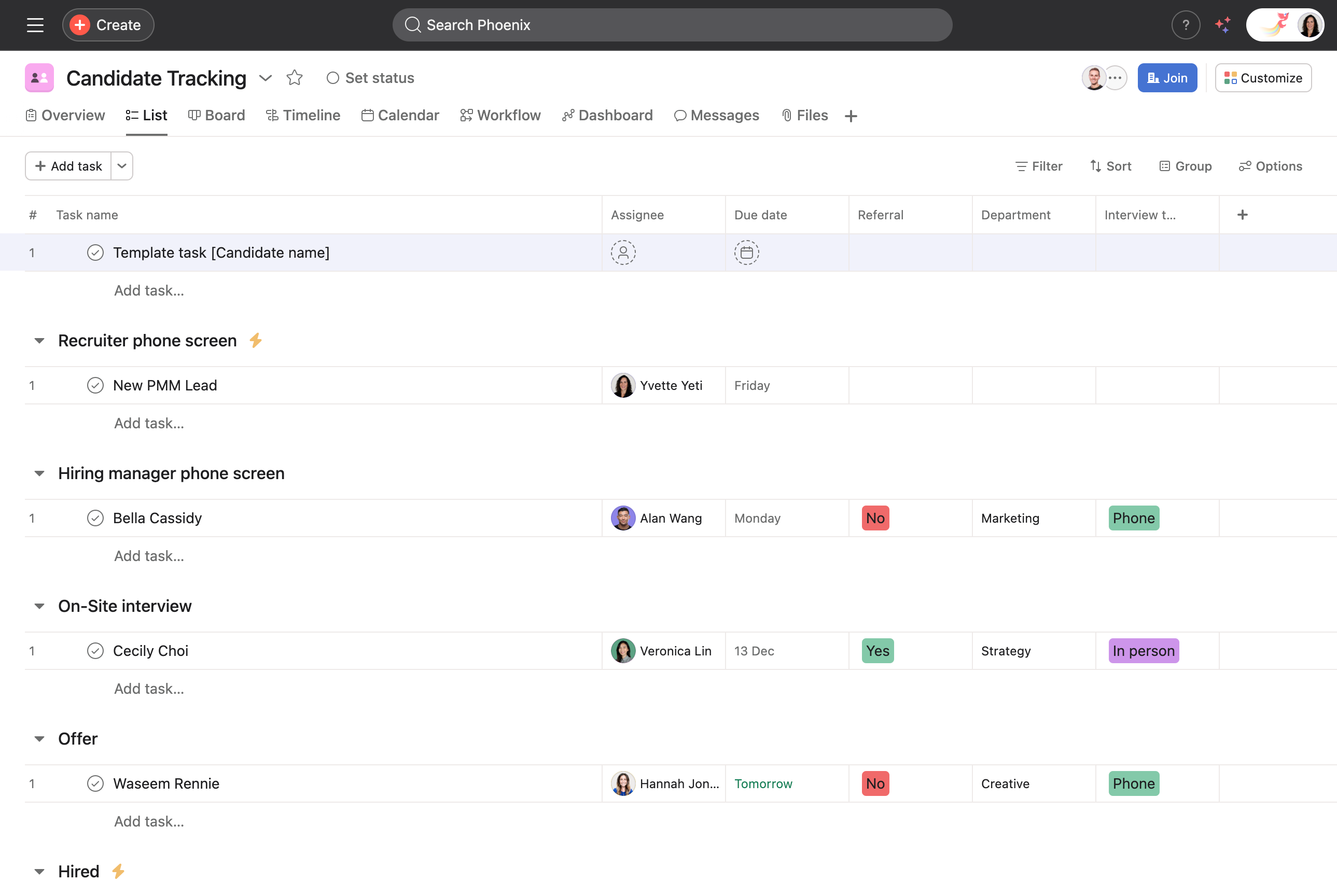
Project setup
Create your candidate tracking project:
Custom field setup:
- Utilize custom fields to track candidate information such as position, interview stages, and hiring status.
- Update these fields as candidates progress through the hiring pipeline—leveraging Asana AI to predict potential bottlenecks and suggest timeline adjustments.
- Create a "Status" field with options like Active, On Hold, Declined, or Hired.
- Add fields like; Position applied for, Department, Source, Interview stage and Expected start date.
Task management:
- Create tasks and task templates.
- Use a task template for each new candidate titled “[COPY ME] To add a candidate.”
- Include a clear description detailing the information required for onboarding each candidate: resumes, contact details, and source.
- Use subtasks to break down the recruitment process into steps, for example, you can add a subtask to collect interview feedback.
Segment and organize the project
Break the project into sections by department or team or by hiring stage:
- Include distinct sections for candidates who declined offers or were not selected, maintaining a comprehensive historical record.
- Designate a project owner for oversight.
- Assign specific tasks to relevant hiring managers while using comments for collaboration.
Automate your workflow
Set up rules to streamline processes:
- Use rules to notify hiring managers when new candidates are added.
- Have a rule move tasks between sections based on interview stage.
- Send reminders for scheduled interviews.
- Use rule creator to easily build rules, automating repetitive tasks and maintaining consistency.
Collect candidate information using Asana forms:
- Add a form to your project which will automatically create a task for new applications.
- Use forms to gather basic candidate information, resumes and team referrals.
Communication and collaboration
Maintain consistent candidate communication:
- Use comments to centralize feedback from interviewers.
- @mention team members to bring them into discussions.
- Attach interview notes and evaluation forms directly to tasks.
Enhance candidate interaction:
- Collect referrals or direct applications using Asana form, ensuring seamless data capture and task creation.
- Automate candidate feedback reminders, using rules and Asana AI to ensure timely and consistent communication.
Resource management
Monitor hiring team workload:
- Use workload to balance interview schedules.
- Track interviewer availability and capacity.
- Reassign tasks when team members are overloaded.
Review and optimize the workflow:
- Regularly review the project dashboard for insights generated by Asana AI on workflow efficiency.
- Adapt strategies based on AI feedback, focusing on bottlenecks and candidate satisfaction trends.
AI-powered insights
Leverage Asana AI features:
- Get AI-generated insights about pipeline bottlenecks.
- Use Smart status for quick updates on hiring progress.
Reporting and analytics
Track recruitment metrics:
- Create dashboards to monitor; time-to-hire, pipeline status, source effectiveness.
- Generate reports for stakeholder updates.
Connect with your existing tools:
By following these steps, your recruitment team can create an efficient, transparent, and collaborative candidate tracking process in Asana. This system helps ensure a positive experience for both candidates and hiring teams while maintaining organization throughout the recruitment lifecycle.
Additional resources
- Use this template to organize and track candidates for all of your open roles so your team is aligned throughout the hiring process.
- View all hiring and onboarding templates here.
- Visit the Asana Academy to take online courses or participate in live trainings.




