Products


AI Platform


Asana Foundations
Company Type

Visit our pricing page for more information.
Onboarding is more than just a one-day orientation; it’s a comprehensive process that spans from offer acceptance to a new hire becoming fully productive. With onboarding encompassing everything from completing paperwork to immersion in the company culture, it’s important to have a centralized platform where all onboarding tasks, from paperwork to training modules, are organized, easily accessible, and where you can easily track progress. Learn how to create a consistent, scalable onboarding experience that helps every new hire feel supported from day one.
When creating a dedicated onboarding project template in Asana, name the project “[Employee Name] HR Onboarding Template” or something similar to ensure clarity and organization right from the start. For every new employee, you can make a duplicate of this project and update the title and any additional information needed.
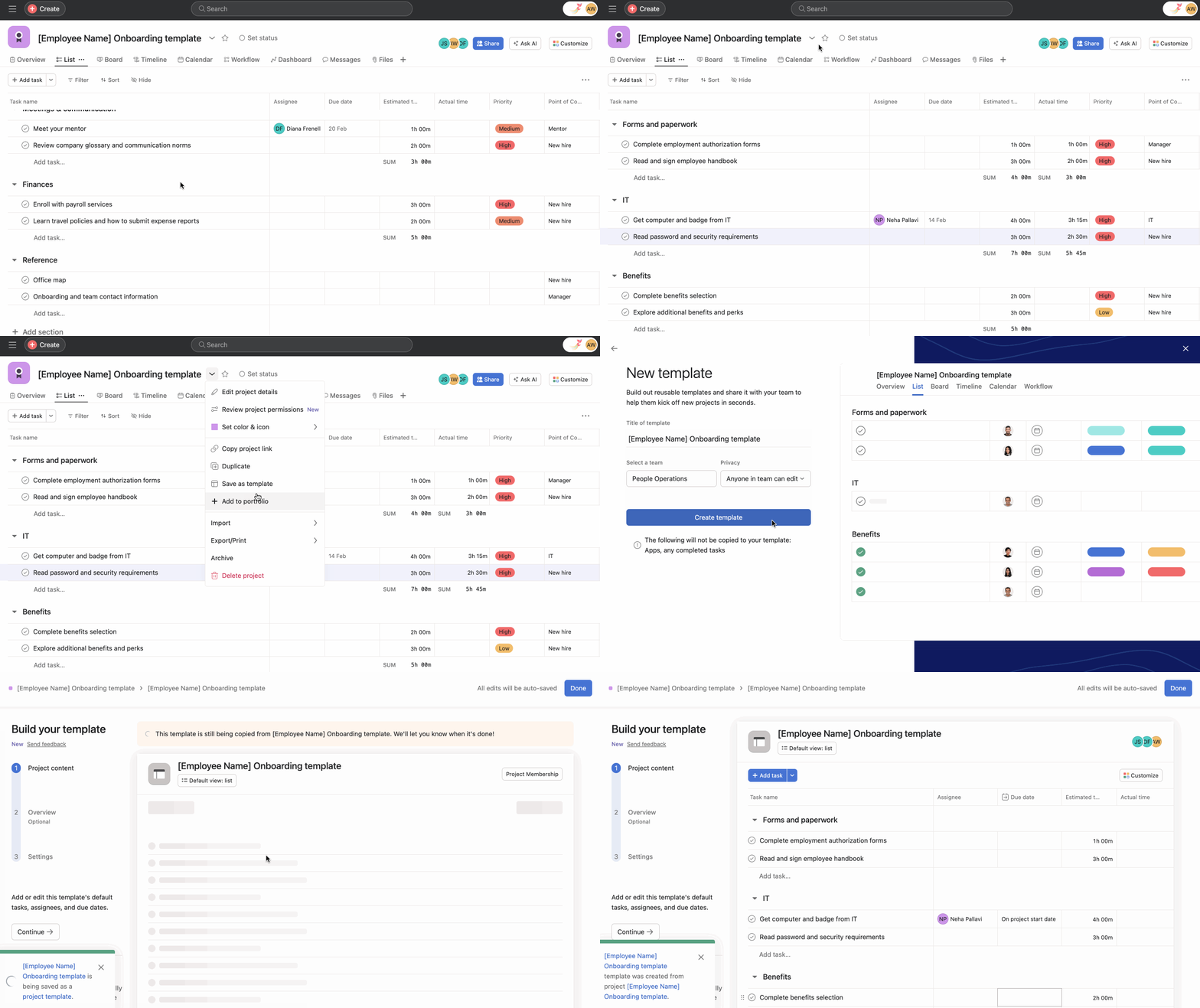
Organization is key in every project, so use sections to keep your onboarding project organized. These sections can include Reference, Day One, as well as Benefits, and Prep and Access. You can then add tasks to each section; these can be anything from “Meet your managers” to “Assign a task.” Include everything from introductory meetings and training sessions to initial tasks. These tasks should all contain clear instructions as well as @mentioning anyone relevant to the task. Invite any teammates involved in the onboarding process to the project for easy access and transparency.
Add custom fields for clarity, some examples are:
Add new fields to your field library so they can be reused across projects.
Once set up, save your project as a template. Click the project header dropdown and select Convert to Template. That way, you can copy the template anytime a new hire starts.
Note
Instead of creating your project template from scratch, why not use the Asana Employee onboarding template, and customize it to suit your organization’s onboarding process?
Create tasks under each section (e.g., Order laptop and equipment, First 1:1 with manager) and add at least a couple of milestones to mark key moments (e.g., Equipment delivered, End of Week 1). Milestones make progress visible for the new hire and stakeholders.
One-to-one meetings are an important way for managers to connect with their team members and provide a dedicated and comfortable space for coaching, communication, and connection. Start a 1:1 project to create a central location for the new hire and their manager to discuss topics, action items and development areas. Multi-homing tasks from another project into a 1:1 project ensures a single, reliable source of truth for each task while including all information, communication and all attachments belonging to this task. Pre-populating the 1:1 agenda each week facilitates the reflection on topics beforehand, meaning they can be approached thoughtfully instead of on the spot. Adding ideas to the project throughout the week means that there is something to talk about during each meeting and that important ideas and questions aren’t forgotten between meetings. A 1:1 project is also a great place for the new hire and their manager to regularly check in on goals, career planning, and growth opportunities to ensure greater commitment to achieving them.
Tracking onboarding progress is essential for the new hire and HR alike. Use calendar and board views to visualize the onboarding timeline, making it easy to track progress and deadlines. Timeline can also be used to create a project plan showing how all of your project's pieces fit together.
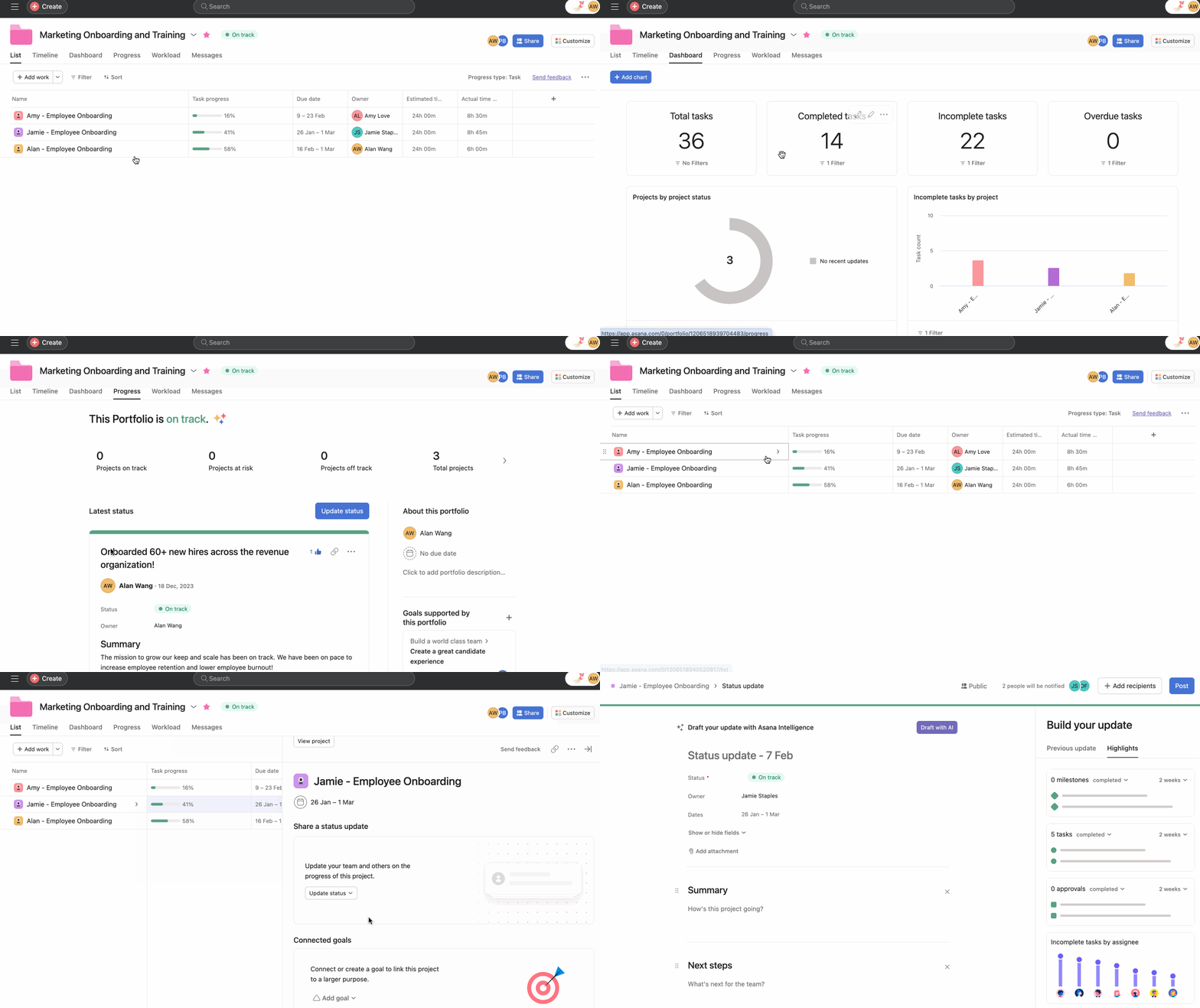
It can be hard to see how every new hire is progressing—especially if you have a lot of people starting at once. Instead of following up with them in one-off chats or hoping they’ll come to you with any questions, you can maintain an overview of their progress by adding their onboarding project to a portfolio. This makes it easier to see updates in one place, and jump in when you spot issues. You can also use dashboards to display key metrics related to onboarding, facilitating data-driven decisions, and ensuring a smooth onboarding experience.
There’s more that you can do to make onboarding individuals even easier. Check out some of the apps Asana is integrated with to make every day more efficient and collaborative.
The Zoom and Asana integration makes it easy to prepare for meetings, hold actionable conversations, and access information once the call ends.
With the Asana for Gmail integration, you can create Asana tasks directly from your Gmail inbox. Any tasks you create from Gmail will automatically include the context from your email, so you never miss a beat.
Turn ideas, work requests, and action items from Slack into trackable tasks and comments in Asana. Go from quick questions and action items to tasks with assignees and due dates. Easily capture work so requests and to-dos don’t get lost in Slack.
Leveraging Asana for new hire onboarding and training simplifies administrative tasks and enhances the overall experience for HR professionals and new employees. By creating a structured, engaging, and informative onboarding process, organizations can accelerate the path to productivity for their new hires, ensuring they feel valued and equipped to succeed.

