Products


AI Platform


Asana Foundations
Company Type

Visit our pricing page for more information.
Available on Asana Starter, Advanced, Enterprise, and Enterprise+ tiers, as well as legacy tiers Premium, Business, and Legacy Enterprise.
Visit our pricing page for more information.
Task names with descriptions can be helpful but can also be long and hard to remember, especially if you are working on intake or ticketing tasks with similar names.
With ID custom fields, you can create unique and readable IDs for tasks. ID custom fields can be added to any project. When you add ID custom fields to a project, it will automatically generate incremental IDs for both existing and new tasks.
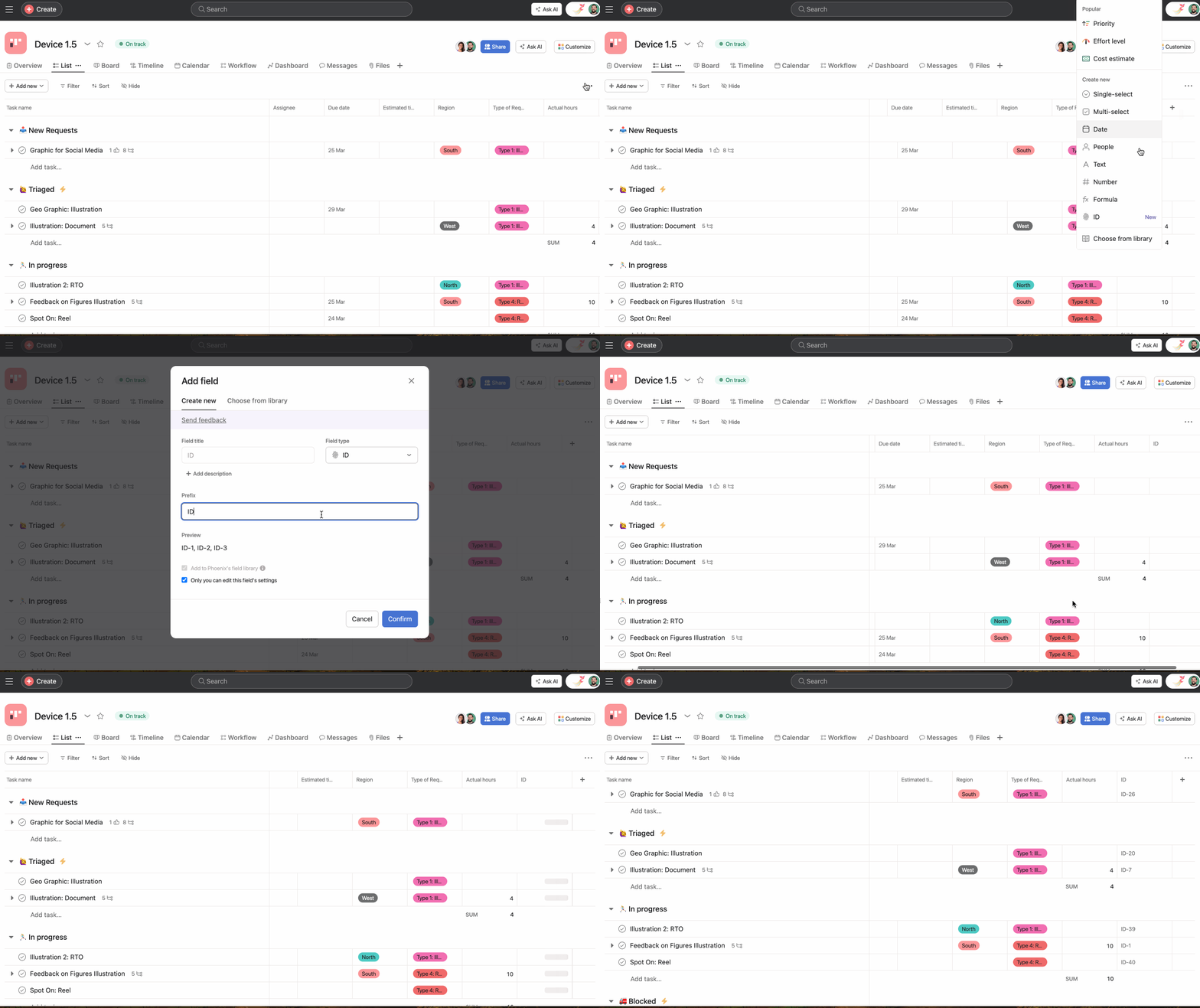
To add an ID custom field:
1. You can add an ID custom field from the Customize menu or by clicking the + button in the column header
2. Select ID as the field type
3. Create a custom prefix for your ID
4. Click Confirm
5. ID values will be generated for all existing and incoming tasks in the project
You can also reuse an existing prefix/field from the library.
ID custom fields can have prefixes that contain letters and numbers, up to 20 characters, and must be unique. All ID custom fields will be shared with your domain by default.
Want to learn more? Check out the Custom fields article.

