Products


AI Platform


Asana Foundations
Company Type
In This Article

Visit our pricing page for more information.
Available on Asana Advanced, Enterprise, and Enterprise+ tiers, as well as legacy tiers Business and Legacy Enterprise.
Visit our pricing page for more information.
The native ServiceNow Spoke integration has been deprecated and is no longer actively supported by Asana. The legacy setup steps in this article are retained for historical reference only. Review the supported options below before deciding how to connect ServiceNow and Asana.
The ServiceNow and Asana integration helps IT, operations, and service management teams coordinate work across both platforms. While the original ServiceNow Spoke is no longer supported, there are two ways to connect these tools.
Note
The ServiceNow and Asana integration is compatible with DC and Vancouver versions. Learn more here.
Asana recommends the Unito-powered ServiceNow integration for teams that want a maintained, supported connection between ServiceNow and Asana. This integration is built and supported by Unito and requires a paid Unito plan.
To learn more and begin setup, visit the ServiceNow integration page on Asana's app directory.
Organizations that prefer to build their own connection can use the Asana API to create a custom integration between ServiceNow and Asana. This approach requires technical resources, your own hosting infrastructure, and ongoing maintenance by your team.
A custom API integration is best suited for organizations with established internal integration practices and clear ownership for long-term support.
The ServiceNow integration requires an Asana Advanced account or legacy tier Business which provides access to all projects that are to be used in the Asana actions. All requests to Asana will be made in the context of this account.
Integration components required: Web services
Assign the x_asana_asana.asana_integration_admin role to the user. Ensure that the user also has he following three system roles:
The Asana integration administrator needs to set Run as: System User in the properties of the flow/subflow if it should run for regular users without access to OAuth Credential Table.
If the flow/subflow should run in the context of the current regular user:
Subflow execution details should contain the Get task data step. Output Data of the Get task data step must return the correct Name and Description of the task. Status should equal 200, and Error Message should be empty.
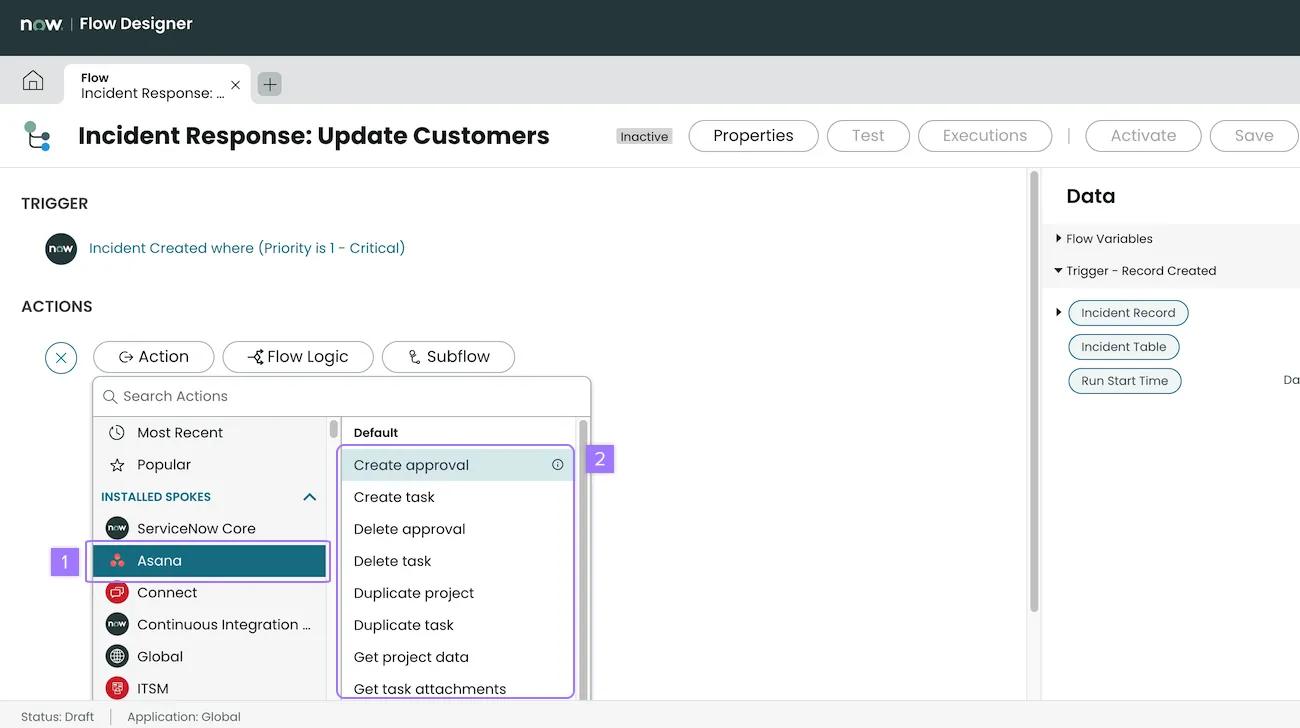
Once installed, you can find supported actions by searching for Asana in the Flow Builder. You can then choose from a list of default actions.
The following Asana actions will be available for use in the FlowBuilder:
Tasks:
Projects:
You cannot use a project_template_id to duplicate projects.
Approvals:
Attachments:
Because of the flexibility of the ServiceNow platform, this is not a comprehensive list, but reflects some common use cases:
IT service management teams using ServiceNow for automating incident management can create a flow that triggers a task in Asana for customer-facing teams whenever incidents of a certain severity level occur. So, if IT logs a serious performance issue in ServiceNow, it’ll automatically trigger an Asana task for marketing to monitor customer sentiment and prepare reactive comms.
Internal-facing service teams who use ServiceNow to track and manage employee tickets often receive requests that require actions outside ServiceNow, like fulfilling hardware requests, or managing a workplace request.
Please see Asana Privacy Statement for more information.
Asana processes information we receive directly from you, automatically collected when you use Asana or visit one of our websites, and collected by Asana from third parties. This includes information that is needed for Asana to create an account for you and manage your ability to log in and out of Asana, which may include but is not limited to:
Information you provide to us through your use of Asana, which may include but is not limited to:
Information automatically processed when you visit our websites or use our mobile or desktop app, which may include but is not limited to:
Sometimes Asana receives your information from third parties (other individuals, marketing services, third-party integrations), which may include but is not limited to:
Please see the Asana Privacy Statement for more information.
Please see the Asana Privacy Statement for more information.
Asana uses your information to operate our products and services, communicate with you, process transactions when you change Asana plans, for security and fraud prevention, and to comply with the law. Specifically, we may process your information to:
Provide services to you and operate our business, which may include but is not limited to:
In addition, we use information about your use of Asana, account information (which may include your email address and name), and information related to third-party integrations to:
Unless otherwise prohibited by law, we may combine the information that we collect through your use of our products and services with information that we receive from other sources, both online and offline, and use that combined information as set out above.
We may aggregate and/or de-identify information related to your use of Asana (for example, how many tasks or projects you created) so that such information can no longer be linked to you or your device. We may use such aggregated and de-identified data for any purpose, including but not limited to, research and marketing purposes and may also disclose such data to any third parties, including advertisers, promotional partners, sponsors, event promoters, and/or others.
Some features in Asana are powered by artificial intelligence (AI) and machine learning. Admins and super admins can adjust AI preferences for your domain at any time by visiting the admin console.
When features powered by Asana AI are enabled in your domain, we use metadata related to your domain’s use of Asana to train machine learning models. Depending on the model and the feature, these machine learning models power features, both in your domain and other Asana domains.
When features powered by AI Partners are enabled in your domain, we leverage third-party LLM service providers. Our third-party LLM service providers do not use customer data to train their models.
For more information about AI in Asana, please review Asana AI features and admin controls.
Asana may use AI technologies, including bots on our websites and in our product, to communicate with you, respond to your comments and questions, and provide information about our products and services. Learn more by visiting Asana’s Trust Center.
For more information about the legal bases Asana relies on to process your information, please visit Other Important Information.
Please see the Asana Privacy Statement for more information.
We need to disclose the information we collect about you to make our products and services run smoothly and to operate our business, which may include but is not limited to:
Please see the Asana Privacy Statement for more information
Please see the Asana Privacy Statement for more information
Asana takes technical and organizational measures to protect your information against accidental or unlawful destruction or accidental loss, alteration, unauthorized disclosure or access. However, no method of transmission over the Internet and no means of electronic or physical storage is absolutely secure, so we cannot ensure or warrant the security of that information. We are constantly updating and improving our safeguards and you can read up to date information about our security practices by visiting our Trust page.
When you use Asana, some information about you will be stored in the United States. For more information about our EU data storage options, please visit our Trust page.
When you use our products and services, information about you will be transferred to the United States where the majority of Asana’s data processing occurs. We may also transfer information that we collect about you to third party processors across borders from your country or jurisdiction to other countries or jurisdictions around the world.
Asana complies with the EU-US Data Privacy Framework program (EU-US DPF), the UK Extension to the EU-US DPF, and the Swiss-US Data Privacy Framework program (Swiss-US DPF) as set forth by the US Department of Commerce. Asana has certified to the US Department of Commerce that it adheres to the EU-US Data Privacy Framework Principles (EU-US DPF Principles) with regard to the processing of personal data received from the European Union in reliance on the EU-US DPF and from the United Kingdom (and Gibraltar) in reliance on the UK Extension to the EU-US DPF. Asana has certified to the US Department of Commerce that it adheres to the Swiss-US Data Privacy Framework program Principles (Swiss-US DPF Principles) with regard to the processing of personal data received from Switzerland in reliance on the Swiss-US DPF.
We will retain your information for the period necessary to fulfill the purposes outlined in this Privacy Statement, to make our products and services available to you, or as instructed by you, unless a longer retention period is required or permitted by law.
Please see the Asana Privacy Statement for more information
Looking for a better way to manage your work? Get started with a free Asana trial. Try for free

