제품
주제
- 규칙에 날짜 설정하기
- 양식 제출자와의 이메일 커뮤니케이션
- ID 사용자 지정 필드를 사용하세요.
- 양식의 필드 매핑
- 프로젝트에 번들 적용하세요
- 프로젝트 템플릿용 관리 대시보드
- 규칙 연동 및 위젯
- 규칙 실행 기록을 확인하세요
- 규칙 트리거를 사용하세요.
- 양식 사용자 지정
- 사용자 지정 필드
- 작업 종속성
- 종속 작업의 날짜 자동 전환
- 승인
- 수식 사용자 지정 필드
- 규칙의 조건 및 브랜칭
- Asana에서 시간 추적하기
- 종속성 유형
- 사용자 지정 필드 필터링 및 정렬
- 수동 규칙 트리거를 사용하세요.
- 사용자 지정 필드 유형 및 제한 사항
- 규칙
- 규칙 권한을 설정하세요
- 클라우드 스토리지 및 파일 공유를 위한 규칙 연동
- 규칙 동작을 수행하세요.
- 양식 공유하세요
- 규칙의 변수를 사용하세요.
- 생산성 및 커뮤니케이션을 위한 규칙 연동
- PagerDuty 규칙 연동
- Bundles FAQ
- 번들 관리 및 권한
- 전역 필드에 대한 관리 대시보드
- HubSpot 규칙 연동
- 참조 사용자 지정 필드
- Bundles
- API를 통해 Asana에서 모든 시간 입력 데이터를 CSV로 내보내는 방법
- 작업 템플릿
- 양식
- 상태 업데이트 템플릿
- 프로젝트 템플릿
- Instagantt와 Asana를 연동하세요.
- Zapier와 Asana를 사용하세요.
- 규정 준수 관리: API 및 연동 지원
- Asana for Gmail 부가 기능
- Asana for Tableau 연동
- Google과 Asana
- Google 양식 및 Asana
- Adobe Creative Cloud용 Asana
- Google 스마트칩을 사용하세요.
- Chrome 확장 프로그램과 Asana를 사용하세요.
- Asana for Jira Cloud 자주 묻는 질문
- Jira Data Center
- Asana에서 개발한 Microsoft 365 연동을 위한 권한 활성화
- Asana for Jira Cloud
- Asana에서 Salesforce 연동
- API
- Microsoft Teams + Asana 연동
- Asana for Outlook 추가 기능
- Asana에서 Zoom 미팅
- Power BI 연동 또는 통합을 수행하세요.
- Google 스프레드시트 & Asana
- GitHub와 Asana 연동
- Asana와 캘린더 동기화하기
- Google 캘린더 + Asana
- Vimeo 및 Asana
- 자동화 및 AI 스튜디오를 위한 Zoom 대화록을 사용하세요.
- AI 스튜디오로 Zoom 통화 메모 워크플로를 생성하세요.
- Slack과 Asana
- Outlook 캘린더 및 Asana
- Tray.io와 Asana를 사용하세요.
- ServiceNow & Asana
- Wufoo와 Asana
- 웹 양식 및 Asana
- Zendesk 연동
- Jira Data Center FAQ
- Asana + Meta의 Workplace
- Splunk + Asana
- ChatGPT의 Asana 앱
- Claude의 Asana 앱
- Everhour에서 Asana로 시간 추적 데이터 마이그레이션
- Microsoft Single Sign-On
- AI 스튜디오에서 워크플로에 단어를 추가하세요.
- AI 스튜디오 자주 묻는 질문
- AI 스튜디오 Plus
- AI 스튜디오 부가 기능 및 요금
- AI 스튜디오에 대한 관리자 가이드
- AI 사용 변수의 작동 방식
- AI Studio에서 문제 해결하기
- AI 스튜디오 - 루프 내의 인간
- Asana AI 스튜디오 소개
- Asana AI로 더 스마트하게 업무를 처리하세요
- 스마트 워크플로를 올바른 데이터 소스와 연결하세요.
- AI 스튜디오 모델
- AI 스튜디오에서 지침 작성하기
- AI 스튜디오에서 프롬프트를 구성하는 방법
- AI 스튜디오로 스마트 워크플로 만들기
- AI Studio 사전 구축 AI 규칙
- AI 스튜디오 크레딧 최적화
- SAML 그룹 매핑 및 SCIM 상호작용을 수행하세요.
- SCIM을 사용하여 Microsoft Entra ID에서 Asana 역할 설정하기
- 관리 콘솔에서 비밀번호 설정을 관리하세요.
- Asana에서 IP 허용 목록
- 사용자 지정 역할을 사용하는 RBAC(역할 기반 접근 제어)
- 작업 항목에 대한 관리자 권한 요청
- SCIM을 사용한 사용자 권한 설정 및 권한 해제
- 유료 플랜에 대한 인증 및 액세스 관리 옵션
- Asana IP 주소 범위 및 호스트 이름
- 전자 검색 리소스 센터
- 여러 조직 배포
- 필수 2단계 인증
- 엔터프라이즈 키 관리 (EKM)
- Asana 일본 데이터 센터
- Asana EU 데이터 센터
- HIPAA 규정 준수
- Asana와 글로벌 무역 규제 준수
- 관리 콘솔에 액세스하는 방법
- 개인 정보 보호 및 보안
- 2단계 인증
- 계정
- SCIM을 사용하여 Okta에서 Asana 역할 설정하기
- 서비스 계정
- 라이선스에 대한 SAML 그룹 매핑을 설정하세요.
- 여러 계정 통합
- 데이터 보존 정책
- Asana 계정 이메일 정책
- Asana 계정 삭제
- 액세스 및 권한
- 규정 준수 관리 추가 기능
- FedRAMP 규정 준수하십시오
- 권한 관리 추가 기능
- Asana에서 관리자 역할 및 최고 관리자 역할
- 전역 인증 설정
- 게스트 자동 제거
- 모바일 앱 보안 권한
- 앱 관리 및 연동
- Asana 계정을 분리하는 방법
- Enterprise 조직을 위한 SecureAuth
- 프로필 필드 편집 가능 여부 제어
- Asana 데이터 보존
- 관리 보안 제어
- 앱 간 액세스
- Setting up Licensing Division ID with SCIM
- 결제 수단 및 청구서
- 관리 콘솔에서 청구 설정하기
- 디비전의 보안 및 청구
- CAD 및 KRW 통화 결제
- MXN 및 BRL 통화 결제
- 노르웨이 VAT
- 뉴질랜드 GST
- 인도네시아 VAT
- 아이슬란드 VAT
- EU VAT
- RBI 규정으로 인한 인도의 자동 결제 변경 사항
- 오스트레일리아 GST
- 수동으로 청구서를 발행한 고객을 위한 결제 수단 추가
- Asana 플랜 업그레이드 또는 변경하기
- 영국 VAT
- 미국 판매세
- 스위스 VAT
- 대한민국 VAT
- 남아프리카 VAT
- 싱가포르 GST
- VAT/GST 및 판매세
- 청구 페이지에 액세스하기
- 구독 관리 및 업그레이드
- Asana 플랜 취소 방법
- 필리핀 VAT
- 캐나다 GST/HST, QST 및 지방 판매세
- 청구
업무 액세스 모드

Asana Enterprise 및 Enterprise+ 플랜에서 사용하실 수 있습니다. 자세한 내용은 요금 페이지 를 참조하세요.
디비전에서는 업무 액세스 모드를 이용할 수 없습니다.
업무 액세스 모드를 사용하면 최고 관리자는 Asana 내에서 공개 및 비공개 업무 콘텐츠에 모두 액세스할 수 있습니다. 이 기능을 사용하면 최고 관리자는 고급 검색을 사용하여 비공개인 경우에도 조직 전체의 작업, 프로젝트, 포트폴리오를 찾을 수 있습니다. 이전에는 최고 관리자가 비공개 작업이나 프로젝트에 직접 추가된 경우에만 해당 작업을 볼 수 있었습니다. 업무 액세스 모드는 이러한 제한을 제거하여 필요할 때 최고 관리자에게 완벽한 가시성을 제공합니다.
업무 액세스 모드의 이점
업무 액세스 모드는 특히 직원 온보딩, 오프보딩 또는 팀 및 역할 전환과 같은 상황에서 특히 유용합니다. 이러한 상황에서는 비즈니스 연속성을 보장하고 조직 보안을 유지하기 위해 현재 또는 과거 업무에 대한 액세스가 매우 중요합니다. 또한, 최고 관리자는 필요할 때 관련 작업이나 프로젝트에 대한 액세스 권한을 부여하여 다른 팀원을 지원할 수 있습니다.
최고 관리자는 업무 액세스 모드에서 고급 검색을 사용하여 제거된 사용자가 만든 콘텐츠를 검색할 수도 있습니다.
중요 고려 사항
- 업무 액세스 모드를 통해 액세스하는 비공개 콘텐츠를 변경하기 전에 먼저 개체(프로젝트, 팀 또는 작업)에 참여해야 합니다. 참여하지 않고 상태 업데이트를 생성하거나, 프로젝트를 편집하거나, 기타 변경을 시도하면 Asana가 오류 메시지와 함께 중단됩니다. 자세한 내용은 아래의 비공개 콘텐츠 작업 을 참조하세요.
- 최고 관리자는 필수 비즈니스 요구에 대해서만 업무 액세스 모드를 사용하는 것이 좋습니다. 개인적으로 업무용으로 Asana를 사용할 때는 적절한 액세스 수준을 유지하기 위해 최고 관리자가 업무 액세스 모드를 비활성화해야 합니다.
- 현재 업무 액세스 모드는 프로젝트 내 작업, 프로젝트 자체, 포트폴리오에 적용됩니다.
- 포트폴리오에 대한 규칙 편집 또는 생성은 현재 업무 액세스 모드에서 지원되지 않습니다.
업무 액세스 모드 활성화
업무 액세스 모드를 활성화하는 방법:
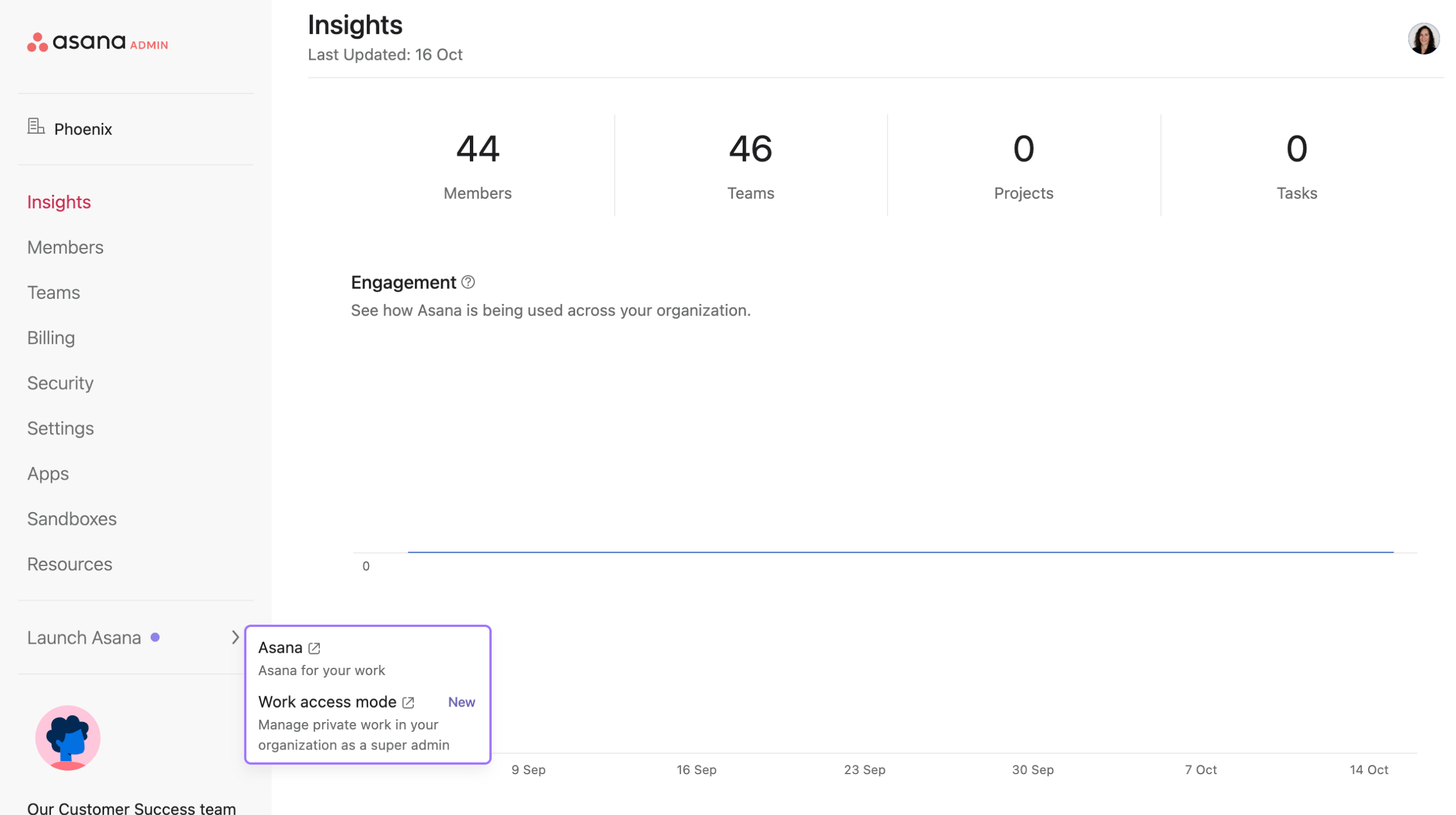
관리 콘솔로 이동합니다
왼쪽 창에서 Asana 실행 을 클릭합니다
업무 액세스 모드 선택
세션 길이
최고 관리자는 업무 액세스 모드를 최대 30분 동안 사용할 수 있지만, 필요한 경우 세션을 연장할 수 있습니다. 세션이 종료되기 5분 전에 세션을 종료하거나 연장하라는 메시지가 표시됩니다. 세션 연장 을 클릭하면 업무 액세스 모드가 30분 연장됩니다.
비공개 콘텐츠 작업
업무 액세스 모드를 사용하면 최고 관리자가 조직 전체의 비공개 작업, 프로젝트, 포트폴리오를 볼 수 있지만, 비공개 콘텐츠를 변경하려면 적절한 권한을 보장하기 위한 추가 단계가 필요합니다.
참가 요건
업무 액세스 모드를 통해 액세스한 비공개 콘텐츠를 변경하기 전에 먼저 개체(프로젝트, 팀 또는 작업)에 참여해야 합니다. 참여하지 않고 상태 업데이트를 생성하거나, 프로젝트 세부 정보를 편집하거나, 기타 변경 사항을 적용하려고 하면 애플리케이션이 중단되거나 오류 메시지가 표시됩니다.
개체에 참여해야 하는 작업:
- 비공개 프로젝트의 상태 업데이트 생성 또는 편집
- 프로젝트 설명, 이름 또는 설정 수정
- 비공개 프로젝트 내 작업 추가 또는 수정
- 프로젝트 멤버 또는 권한 변경
- 비공개 프로젝트에서 규칙 또는 사용자 지정 필드 생성
개체에 참여할 필요가 없는 작업:
- 비공개 콘텐츠(작업, 프로젝트, 포트폴리오) 보기
- 고급 검색을 사용하여 비공개 콘텐츠 검색하기
- 프로젝트 설명 및 상태 업데이트 읽기
- 작업 세부 정보 및 댓글 보기
개체에 참여하는 방법
업무 액세스 모드를 사용하는 동안 비공개 개체에 참여하는 방법:
- 편집하려는 비공개 프로젝트, 포트폴리오 또는 작업으로 이동합니다
- 공유 버튼 또는 멤버 섹션을 클릭합니다
- 적절한 권한(편집자 또는 관리자 액세스)을 가진 멤버로 자신을 추가하세요
- 참여한 뒤 필요한 변경 사항을 안전하게 적용할 수 있습니다.
참고: 업무 액세스 모드는 콘텐츠를 보고 액세스하기 위해 설계되었습니다. 변경하려면 여전히 표준 Asana 권한 프로토콜을 따라야 합니다.
업무 액세스 모드 종료

최고 관리자가 필요한 콘텐츠에 액세스한 후에는 상단 바에서 '끄기'를 선택하여 업무 액세스 모드를 종료해야 합니다. 이렇게 하면 업무 액세스 모드가 비활성화되고 관리자는 일반 보기 권한으로 돌아갑니다.
메모
이 기사는 AI로 번역되었습니다.
번역 피드백을 보내주세요.

