Usprawnij procesy zatwierdzania i przekazywania informacji zwrotnych, aby przyspieszyć pracę zespołu i komunikować, czy praca znajduje się na właściwej ścieżce, czy nie. W tym artykule dowiedz się, jak sprawić, by ten proces był bardziej efektywny i uporządkowany w Asanie.
Zatwierdź zadania
Zatwierdzenia to rodzaj zadania, które daje osobom zatwierdzającym trzy jasne opcje: „Zatwierdź”, „Poproś o zmiany” lub „Odrzuć”. Osoby zatwierdzające mogą łatwo sprawdzić, co jest wymagane, a osoba prosząca otrzymuje natychmiastową informację zwrotną.
Utwórz zadanie zatwierdzania
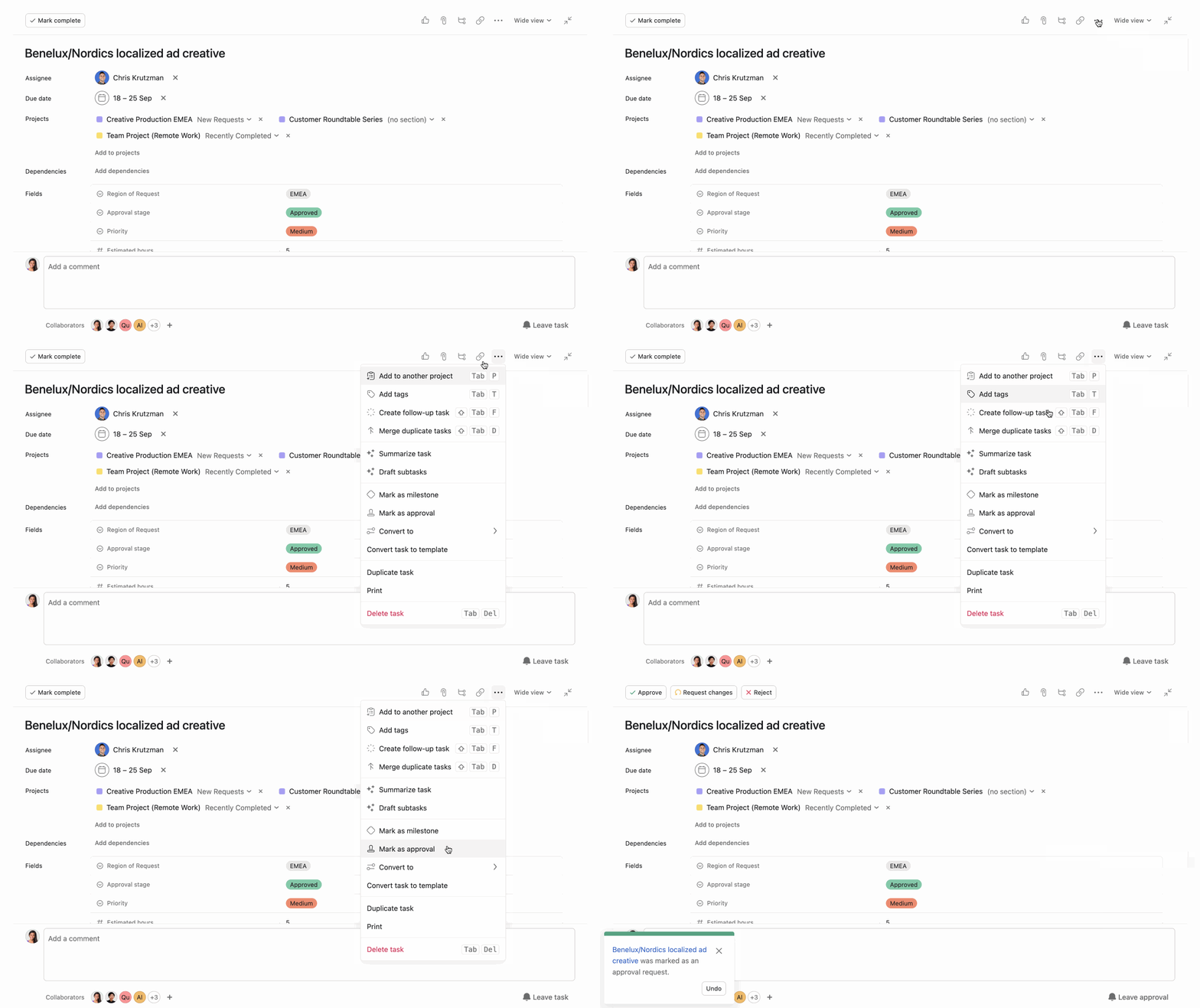
Utwórz zatwierdzenie:
Kliknij ikonę z trzema kropkami w okienku szczegółów zadania. Kliknij Oznacz jako zatwierdzenie. Użyj opisu zadania, aby przekazać instrukcje lub informacje dla osoby zatwierdzającej. Dołącz dowolny plik, który wymaga zatwierdzenia. Przypisz zadanie z datą wykonania do osoby zatwierdzającej.
Ukończ zadanie zatwierdzania
Jako osoba zatwierdzająca, masz do wyboru trzy opcje: „Zatwierdź”, „Poproś o zmiany” lub „Odrzuć”. Użyj komentarzy, aby dodać dodatkowy kontekst i wyjaśnić, dlaczego zatwierdziłeś, odrzuciłeś lub poprosiłeś o zmiany.
Jeśli zadanie zatwierdzenia zawierało obraz lub załączony plik PDF, zostaw na nim informacje zwrotne za pomocą
adnotowania. Zachowaj swoją opinię w kontekście i utwórz podzadanie, aby twórca mógł ją uwzględnić.
Zapobiegaj wąskim gardłom
Zatwierdzenia mogą odblokowywać lub blokować projekty. Bez względu na to, czy jesteś kierownikiem projektu, współpracownikiem, czy osobą zatwierdzającą, oto kilka sposobów, które pomogą Ci uniknąć wąskich gardeł.
- Twórz zależności zadań, aby praca przebiegała we właściwej kolejności. Jeśli musisz ukończyć projekt przed jego zatwierdzeniem, zależności pozwolą zwrócić uwagę osoby zatwierdzającej w odpowiednim czasie. Jeśli zarządzasz wieloma zatwierdzeniami, utwórz raport z wyszukiwania zaawansowanego, filtrując go dla zatwierdzenia przypisane do mnie, aby mieć pewność, że jesteś ze wszystkim na bieżąco. Jeśli coś nie zostało zatwierdzone lub wymaga zmian, przypisz zadanie ponownie do osoby odpowiedzialnej za wprowadzenie zmian. Użyj pól niestandardowych, aby śledzić postępy. Używaj pól niestandardowych, aby śledzić postępy i szczegóły każdego zadania. Na przykład, dodaj pola takie jak „Status zatwierdzenia”, aby wizualizować, które zadania oczekują na zatwierdzenie. Ustaw reguły w Asanie, aby zautomatyzować części przepływu pracy. Na przykład, gdy zadanie zostanie przeniesione do sekcji „Oczekuje na zatwierdzenie”, automatycznie przypisz je do osoby zatwierdzającej i ustaw datę wykonania.
Zostaw informacje zwrotne z adnotowaniem
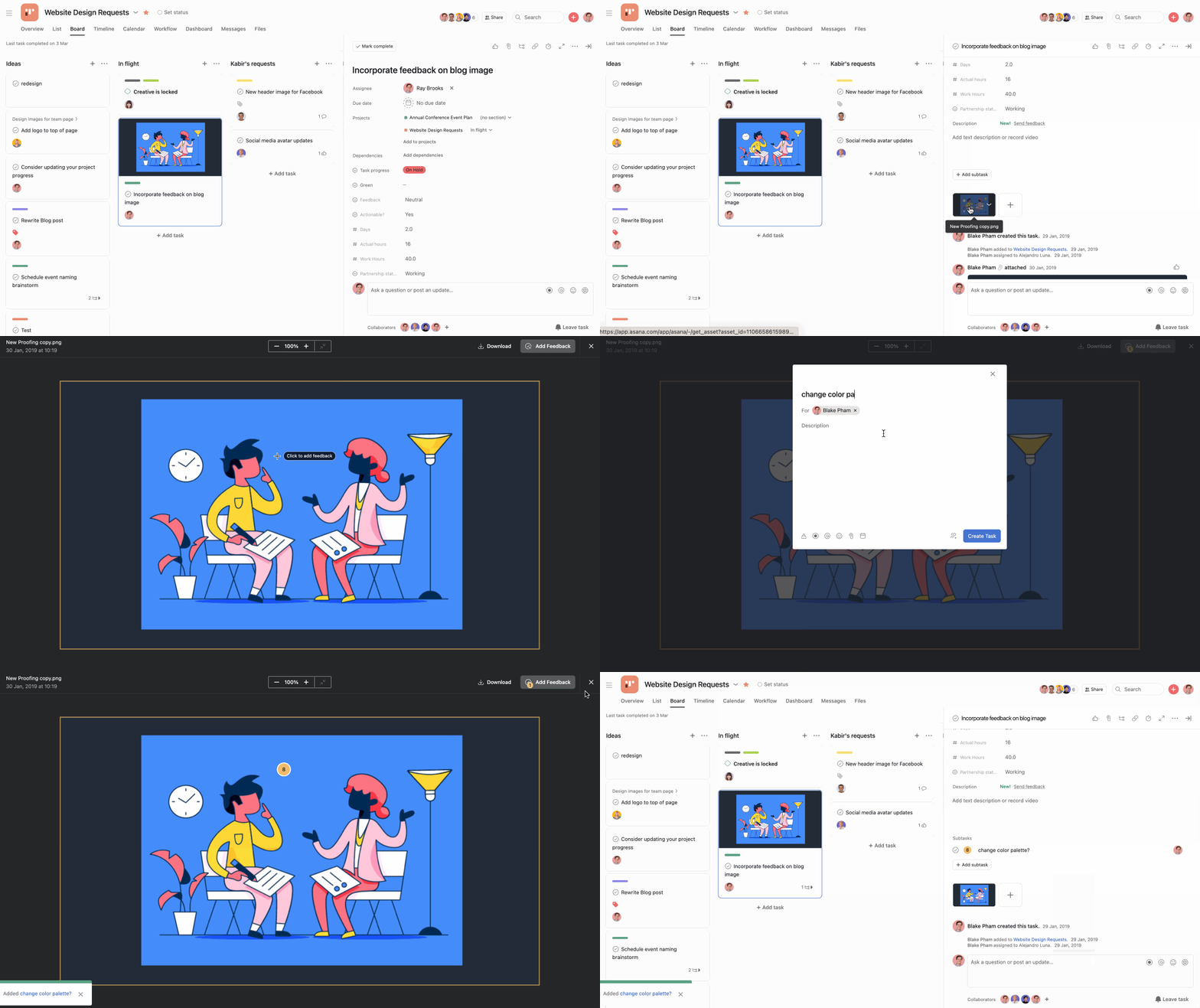
Wybierz projekty obejmujące projektowanie i wizualizacjęzasobów wizualnych, użyj „Segoe UI Symbol”;background-color: var(--lwc-colorbackgroundalt, #fff);">adnotowanie, które umożliwia dodawanie konkretnych komentarzy bezpośrednio na obrazach i w plikach PDF. Dzięki adnotowaniu informacje zwrotne są przypisane do konkretnych punktów na obrazie, dzięki czemu instrukcje są precyzyjne i łatwe do wykonania.
Dodaj adnotację do obrazu lub pliku PDF:
Kliknij obraz dołączony do zadania. Kliknij przycisk Dodaj adnotację w prawym górnym rogu. Kliknij obszar na obrazie, w którym chcesz zostawić informację zwrotną. Zostanie utworzone podzadanie z informacją zwrotną. Możesz dodać więcej szczegółów do podzadania.
 Uwaga
Używaj funkcji Adnotowanie dla plików w formatach PDF, PNG, JPG, GIF i BMP.
Przekazuj informacje zwrotne – przykłady
Oto kilka z wielu przykładów, w jaki Twój zespół może zacząć przekazywać informacje zwrotne w Asanie za pomocą funkcji adnotowania, zatwierdzeń i pól niestandardowych:
Użyj
formularzy, aby przesyłać prośby lub propozycje projektów i przekształć je w zadania do zatwierdzenia przed rozpoczęciem pracy. Dodaj pole niestandardowe do dowolnego projektu, aby zobaczyć, na jakim etapie jest każde zadanie, i posortuj projekt według tego pola niestandardowego. Projektowanie: Dodawaj informacje zwrotne do obrazów za pomocą adnotacji. Marketing: Przypisuj zadania zatwierdzania dyrektorowi ds. marketingu, aby sfinalizować kampanie i zasoby. Operacje: Zatwierdzaj budżety lub propozycje dostawców za pomocą zadań zatwierdzania.




