주제
- 규칙 연동 및 위젯
- HubSpot 규칙 연동
- 생산성 및 커뮤니케이션을 위한 규칙 연동
- PagerDuty 규칙 연동
- 클라우드 스토리지 및 파일 공유를 위한 규칙 연동
- 규칙의 조건 및 브랜칭
- 워크플로 작성기
- 양식 사용자 지정
- 사용자 지정 필드 필터링 및 정렬
- 양식 제출자와의 이메일 커뮤니케이션
- 종속성 유형
- 양식 공유하세요
- 규칙 동작을 수행하세요.
- 프로젝트에 번들 적용하세요
- 규칙 권한을 설정하세요
- 수식 사용자 지정 필드
- 사용자 지정 필드
- 수동 규칙 트리거를 사용하세요.
- ID 사용자 지정 필드를 사용하세요.
- Form
- 프로젝트 템플릿 관리 대시보드를 사용하세요.
- 번들 관리 및 권한
- Bundles FAQ
- 규칙 트리거를 사용하세요.
- 규칙 실행 기록을 확인하세요
- 전역 필드에 대한 관리 대시보드
- 종속 작업의 날짜 자동 전환
- 규칙의 변수를 사용하세요.
- 상태 업데이트 템플릿
- Asana에서 시간 추적하기
- 작업 종속성
- 승인
- 양식
- 프로젝트 템플릿
- 작업 템플릿
- 번들
- 규칙
- 규칙에 날짜 설정하기
- 참조 사용자 지정 필드
- 사용자 지정 필드 유형 및 제한 사항
- Everhour에서 Asana로 시간 추적 데이터 마이그레이션
- Asana + Meta의 Workplace
- Adobe Creative Cloud용 Asana
- Vimeo 및 Asana
- Jira Data Center FAQ
- Jira Data Center
- 규정 준수 관리: API 및 연동 지원
- Instagantt와 Asana를 연동하세요.
- Google 스마트칩을 사용하세요.
- Google 캘린더 + Asana
- 캘린더와 Asana
- GitHub와 Asana 연동
- Google 양식 및 Asana
- Google과 Asana
- Google 스프레드시트 & Asana
- Power BI 연동 또는 통합을 수행하세요.
- Asana에서 Zoom 미팅
- Asana for Gmail 부가 기능
- Microsoft Teams + Asana 연동
- Zapier와 Asana를 사용하세요.
- Wufoo와 Asana
- Tray.io와 Asana를 사용하세요.
- AI 스튜디오로 Zoom 통화 메모 워크플로를 생성하세요.
- 자동화 및 AI 스튜디오를 위한 Zoom 대화록을 사용하세요.
- Asana for Jira Cloud 자주 묻는 질문
- Chrome 확장 프로그램과 Asana를 사용하세요.
- Zendesk 연동
- 웹 양식 및 Asana
- Outlook 캘린더 및 Asana
- Splunk + Asana
- ChatGPT의 Asana 앱
- ServiceNow & Asana
- Asana에서 개발한 Microsoft 365 연동을 위한 권한 활성화
- Asana for Tableau 연동
- Asana for Jira Cloud
- API
- Asana for Outlook 추가 기능
- Claude의 Asana 앱
- Slack과 Asana
- Asana에서 Salesforce 연동
- AI 스튜디오 크레딧 최적화
- AI 스튜디오에서 워크플로에 단어를 추가하세요.
- AI 스튜디오 Plus
- Asana AI로 더 스마트하게 업무를 처리하세요
- 스마트 워크플로를 올바른 데이터 소스와 연결하세요.
- AI 스튜디오 자주 묻는 질문
- AI 스튜디오에서 지침 작성하기
- AI 스튜디오 관리자 가이드
- AI 스튜디오에서 프롬프트를 구성하는 방법
- AI Studio에서 문제 해결하기
- AI 스튜디오 - 루프 내의 인간
- AI Studio 사전 구축 AI 규칙
- AI 스튜디오로 스마트 워크플로 만들기
- AI 사용 변수의 작동 방식
- Asana AI 스튜디오 소개
- AI 스튜디오 모델
- AI 스튜디오 부가 기능 및 요금
- 액세스 및 권한
- SCIM을 사용하여 Okta에서 Asana 역할 설정하기
- Asana 계정을 분리하는 방법
- 사용자 지정 역할이 있는 RBAC(역할 기반 접근 제어)
- Asana EU 데이터 센터
- 엔터프라이즈 키 관리 (EKM)
- 필수 2단계 인증
- 전자 검색 리소스 센터
- 서비스 계정
- HIPAA 규정 준수
- 2단계 인증
- 개인 정보 보호 및 보안
- 계정
- SAML 그룹 매핑 및 SCIM 상호작용을 수행하세요.
- 관리 콘솔에서 비밀번호 설정을 관리하세요.
- Asana와 글로벌 무역 규제 준수
- 라이선스에 대한 SAML 그룹 매핑을 설정하세요.
- 여러 계정 통합
- Asana 계정 삭제
- Asana 계정 이메일 정책
- 권한 관리 추가 기능
- FedRAMP 규정 준수하십시오
- 규정 준수 관리 추가 기능
- 모바일 앱 보안 권한
- 게스트 자동 제거
- 전역 인증 설정
- SCIM을 사용한 사용자 권한 설정 및 권한 해제
- 작업 항목에 대한 관리자 권한 요청
- 프로필 필드 편집 가능 여부 제어
- Enterprise 조직을 위한 SecureAuth
- 앱 관리 및 연동
- Asana 일본 데이터 센터
- 관리 보안 제어
- Asana IP 주소 범위 및 호스트 이름
- Asana 데이터 보존
- 여러 조직 배포
- SCIM을 사용하여 Microsoft Entra ID에서 Asana 역할 설정하기
- 관리 콘솔에 액세스하는 방법
- Asana에서 관리자 역할 및 최고 관리자 역할
- 데이터 보존 정책
- 유료 플랜에 대한 인증 및 액세스 관리 옵션
- Asana에서 IP 허용 목록
- 디비전의 보안 및 청구
- 싱가포르 GST
- 남아프리카 VAT
- 대한민국 VAT
- 스위스 VAT
- 미국 판매세
- 영국 VAT
- Asana 플랜 업그레이드 또는 변경하기
- 수동으로 청구서를 발행한 고객을 위한 결제 수단 추가
- 오스트레일리아 GST
- RBI 규정으로 인한 인도의 자동 결제 변경 사항
- EU VAT
- 아이슬란드 VAT
- 인도네시아 VAT
- 뉴질랜드 GST
- 노르웨이 VAT
- MXN 및 BRL 통화 결제
- CAD 및 KRW 통화 결제
- 청구 페이지 접속하기
- VAT/GST 및 판매세
- 결제 수단 및 청구서
- 관리 콘솔에서 청구 설정하기
- 구독 관리 및 업그레이드
- 필리핀 VAT
- 캐나다 GST/HST, QST 및 지방 판매세
- Asana 플랜 취소 방법
- 청구
Asana 계정은 무료이며 개인 사용자와 연결되어 있습니다. Asana 계정으로 공유된 작업 공간과 조직에 액세스하여 다른 Asana 사용자와 협업할 수 있습니다.
하나의 Asana 계정으로 여러 개의 작업 공간과 조직을 생성하거나 참여하여 다양한 Asana 사용자 그룹과 협업할 수 있습니다. 사용자가 속한 공간은 별도의 독립체이며, 고유한 구성원, 프로젝트, 작업을 가지고 있습니다.
Asana의 유료 기능을 무료로 둘러보세요. 지금 무료 Asana 체험을 시작하세요.
관련 기사
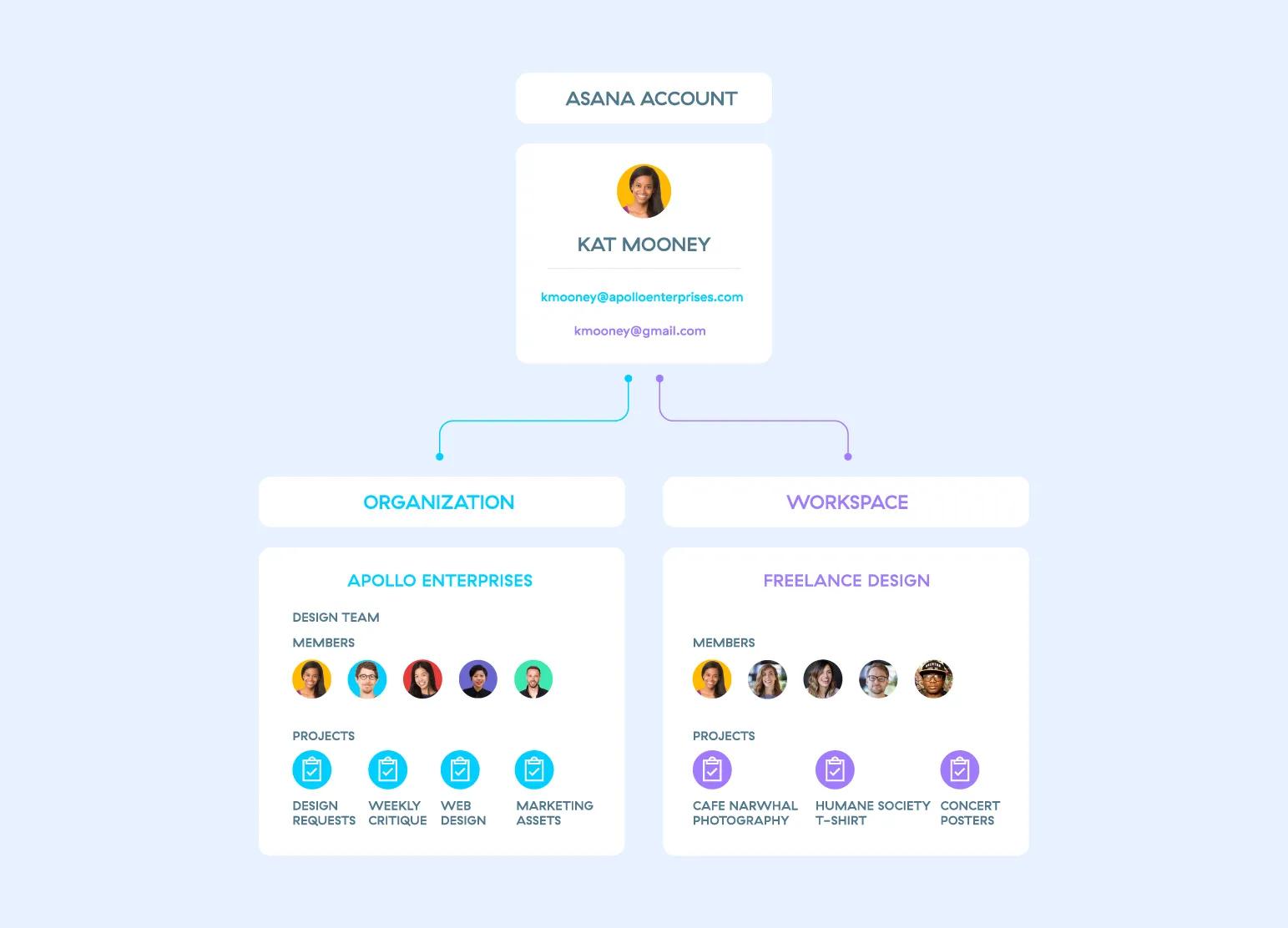
각 작업 공간과 조직은 별도의 독립체이기 때문에 회원님과 동료들이 서로 소속되지 않은 다른 공간을 볼 수 없습니다. 이러한 공간들의 공개 범위에 대해 자세히 알아보세요.
계정 생성
메모
Asana에 직접 가입하거나 가입 초대를 수락할 수 있습니다. Asana 계정은 무료로 만들 수 있습니다.
Asana에 가입 시 회원님의 이름과 이메일 주소가 필요합니다. 나중에 계정에 다른 이메일 주소를 추가할 수 있습니다. 회사의 Asana 조직에 참여하고 싶다면 업무용 이메일을 사용하세요. 업무용 이메일로 가입하고 해당 회사 도메인에 기존 조직이 설정되어 있는 경우, 해당 조직에 있는 팀에 참가 요청을 보낼 수 있습니다.
여러 계정을 가지고 있을 필요는 없습니다. 하나의 계정으로 여러 조직이나 작업 공간에 참여하거나 생성하거나 나갈 수 있습니다.
홈페이지에서 계정 만들기
계정을 직접 만들려면 https://asana.com 에 방문하여 시작하기 를 선택하세요.
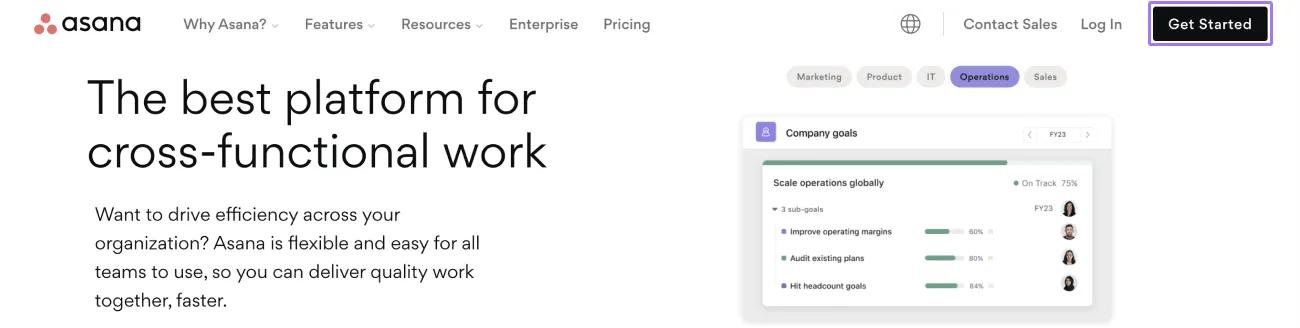
다음 방법으로 가입할 수 있습니다.
- 이메일 주소를 입력하여 Asana에서만 사용할 고유한 새 비밀번호 생성
- 이미 유료로 Asana를 구독 중인 경우 Google 계정 사용
- Asana Enterprise, Enterprise+ 플랜, 그리고 기존 플랜인 Legacy Enterprise 플랜 사용자의 경우 SAML을 사용하여 가입하실 수 있습니다.
Google 계정으로 가입하기로 선택하는 경우:
- 회원님께서 현재 로그인한 Google 계정의 자격 증명이 사용되거나 Asana에서 회원님이 Google 계정에 로그인하도록 요청할 것입니다.
- 고유한 Asana 비밀번호는 설정되지 않지만, 비밀번호 재설정 프로세스를 통해 언제든지 만들 수 있습니다.
초대를 통해 계정 만들기
초대를 받은 경우:
- Asana에서 지원하는 브라우저에서 초대 이메일에 있는 링크를 클릭합니다.
- '초대 수락' 버튼을 클릭하거나 제공된 링크를 복사하여 붙여 넣습니다.
프로필 사진 업로드는 선택 사항입니다. 나중에 언제든지 설정에서 이 작업을 하실 수 있습니다.
로그인
Asana에 로그인하려면 https://app.asana.com/ 또는 https://asana.com를 방문하세요. 이 중 하나를 북마크해 두셔도 좋습니다.
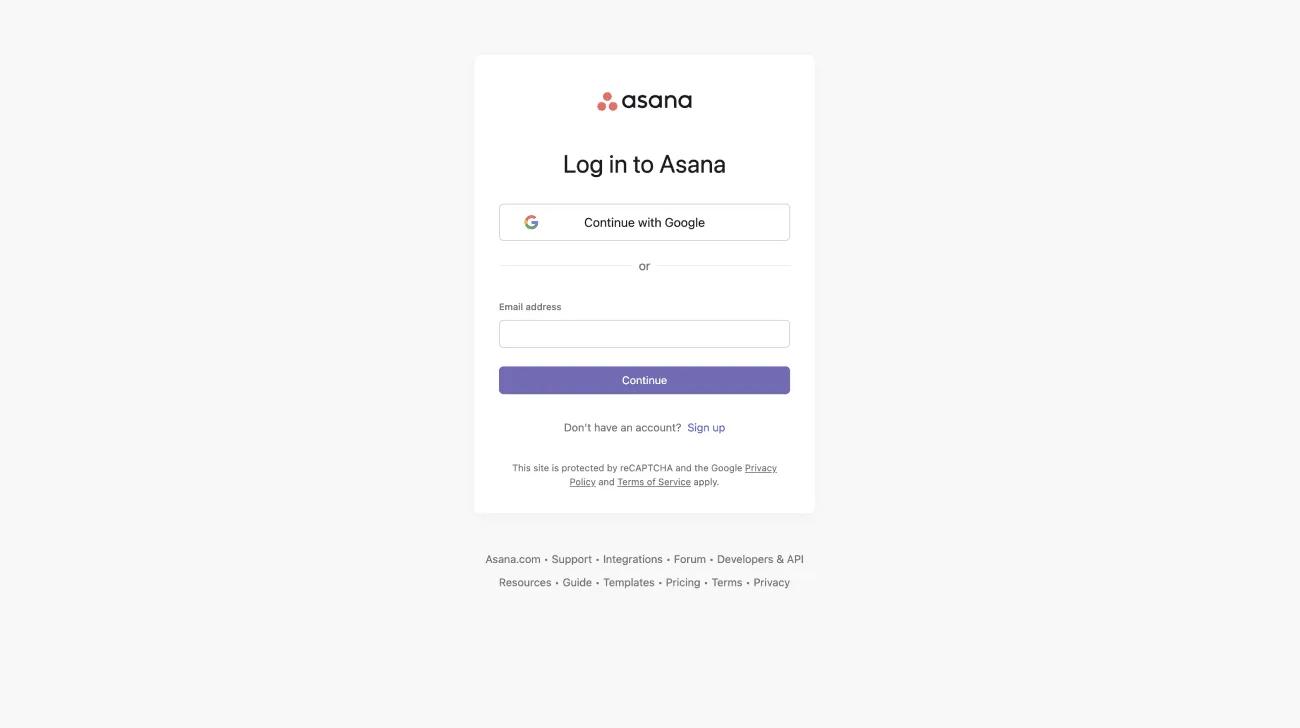
다음 중 한 가지 방법으로 로그인할 수 있습니다.
- Google로 계속 버튼을 클릭합니다.
- Asana 계정의 이메일 주소를 입력합니다.
현재 Google을 통해 계정에 로그인한 상태에서 비밀번호 로그인으로 전환하려면 비밀번호 재설정 링크를 요청하세요.
SAML로 로그인하기
Asana Enterprise, Enterprise+ 플랜, 그리고 기존 플랜인 Legacy Enterprise 플랜에서 사용하실 수 있습니다.
조직에서 SAML이 활성화되었다면 계정에 로그인할 때 비밀번호가 필요하지 않습니다. 계정은 이메일 주소만으로 인증됩니다.
SAML이 활성화된 상태에서 계정에 로그인하는 방법은 다음과 같습니다.
- https://asana.com 또는 https://app.asana.com를 방문합니다.
- 계정과 연결된 이메일 주소를 입력하고 비밀번호 필드를 비워 둡니다
- 로그인 버튼을 클릭합니다
또는 SAML을 사용하는 조직의 사용자는 사용자 지정 URL을 사용하여 계정에 로그인할 수도 있습니다. URL 끝에 회사 이메일 도메인(https://app.asana.com/a/ ) 을 추가하기만 하면 사용자 지정 로그인 포털에 액세스할 수 있습니다.
예를 들어, acme.com 조직의 멤버는 https://app.asana.com/a/acme.com에서 계정에 로그인할 수 있습니다.
SAML이 요구되는 조직의 멤버는 계정에 등록된 이메일 주소 수에 관계없이 SAML에 연결된 이메일 주소를 사용하여 계정에 로그인해야 합니다.
로그인 감지
계정에 새로운 로그인이 감지되면 사용자에게 이를 알리는 이메일이 전송됩니다. 이는 Asana에서 로그인 활동을 감지하는 보안 기능입니다.
이 이메일은 다음과 같은 경우 사용자에게 발송됩니다.
- 브라우저 + IP 주소 조합이 처음 사용될 때
이는 사용자 이름 및 비밀번호, Google SAML 기반 SSO(Single Sign-On) 인증을 사용한 로그인에 적용됩니다.
로그아웃
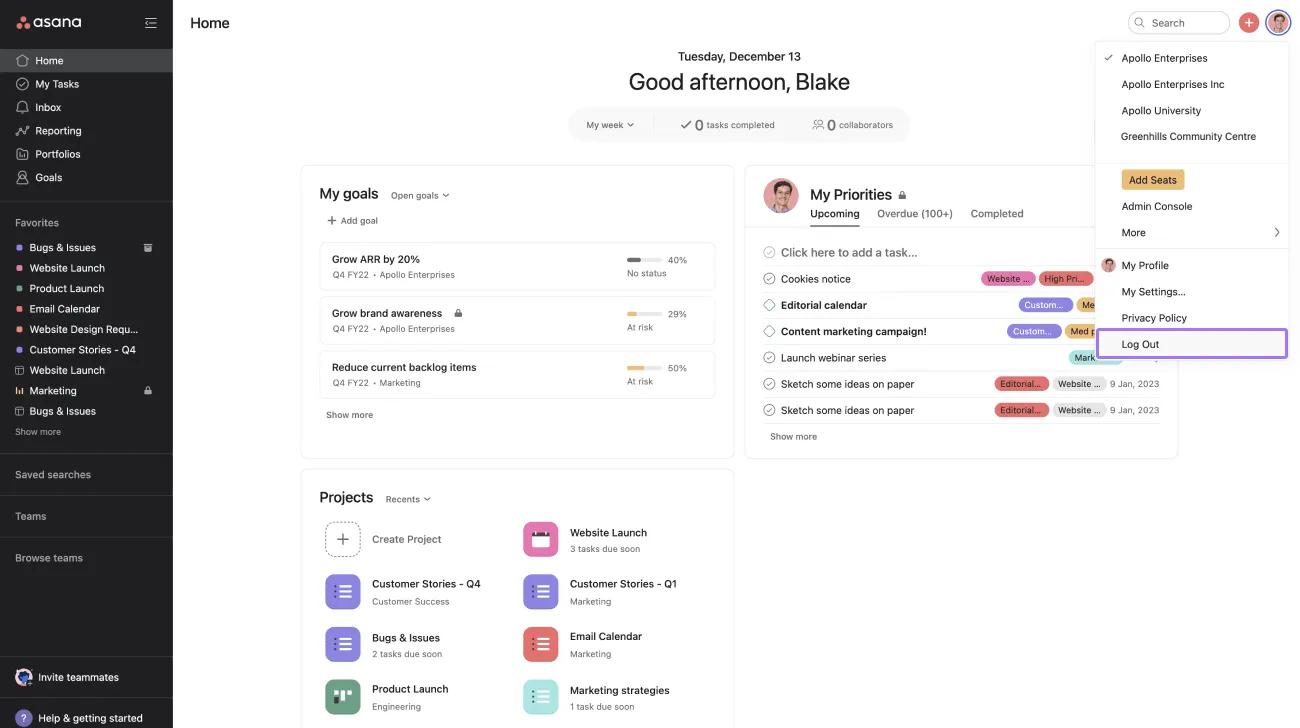
Asana에서 로그아웃하는 방법:
- 프로필 사진을 클릭합니다.
- '로그아웃'을 클릭합니다.
Asana에서 로그아웃하면 모바일 세션 등 모든 활성 세션에서 로그아웃됩니다.
비밀번호 재설정
Asana에 가입 시 비밀번호를 생성합니다. Google 계정으로 가입했다면 Asana 비밀번호가 없으나, 비밀번호를 잊으셨나요? 링크를 사용하여 비밀번호를 생성할 수 있습니다.
비밀번호를 잊어버렸거나 변경하고 싶다면 로그인 페이지에서 비밀번호를 재설정할 수 있습니다.
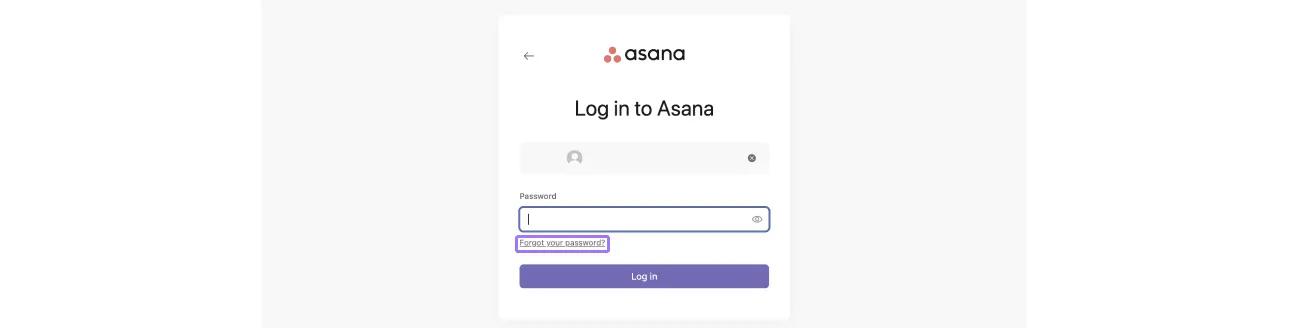
이메일 수신함에서 비밀번호 재설정 이메일이 전송되었는지 확인하세요.
계정에 이메일 주소가 여러 개 등록된 조직 멤버의 경우, 비밀번호 재설정 링크는 조직의 도메인과 연결된 이메일 주소로 전송됩니다.
이 기사는 AI로 번역되었습니다.
번역 피드백을 보내주세요.

