Was sind Suchfelder?
Mit Suchfeldern können Sie Feldwerte aus referenzierten Datensätzen in Tabellen automatisch direkt in Ihrer Projekt-, Portfolio- oder Tabellenansicht anzeigen. Indem Sie ein Suchfeld mit einem benutzerdefinierten Referenzfeld verknüpfen, können Sie relevante Daten aus verknüpften Datensätzen anzeigen, ohne Informationen manuell duplizieren zu müssen. So bleiben Ihre Projekt-, Portfolio- oder Tabellenansichten stets aktuell und Sie vermeiden wiederholte Dateneingaben.
Ähnliche Artikel:
Bevor Sie loslegen
Um ein Suchfeld zu erstellen, benötigen Sie ein benutzerdefiniertes Referenzfeld auf Tabellenebene. Nachschlagefelder können keine Referenzfelder auf Projektebene verwenden. Lesen Sie den Artikel Tabellen, um zu erfahren, wie Sie eine Tabelle und ihre Datensätze einrichten.
Nachschlagefeld erstellen
Sie können ein Nachschlagefeld für Projekte, Portfolios und Tabellen erstellen. Die Schritte sind in jedem Fall die gleichen.
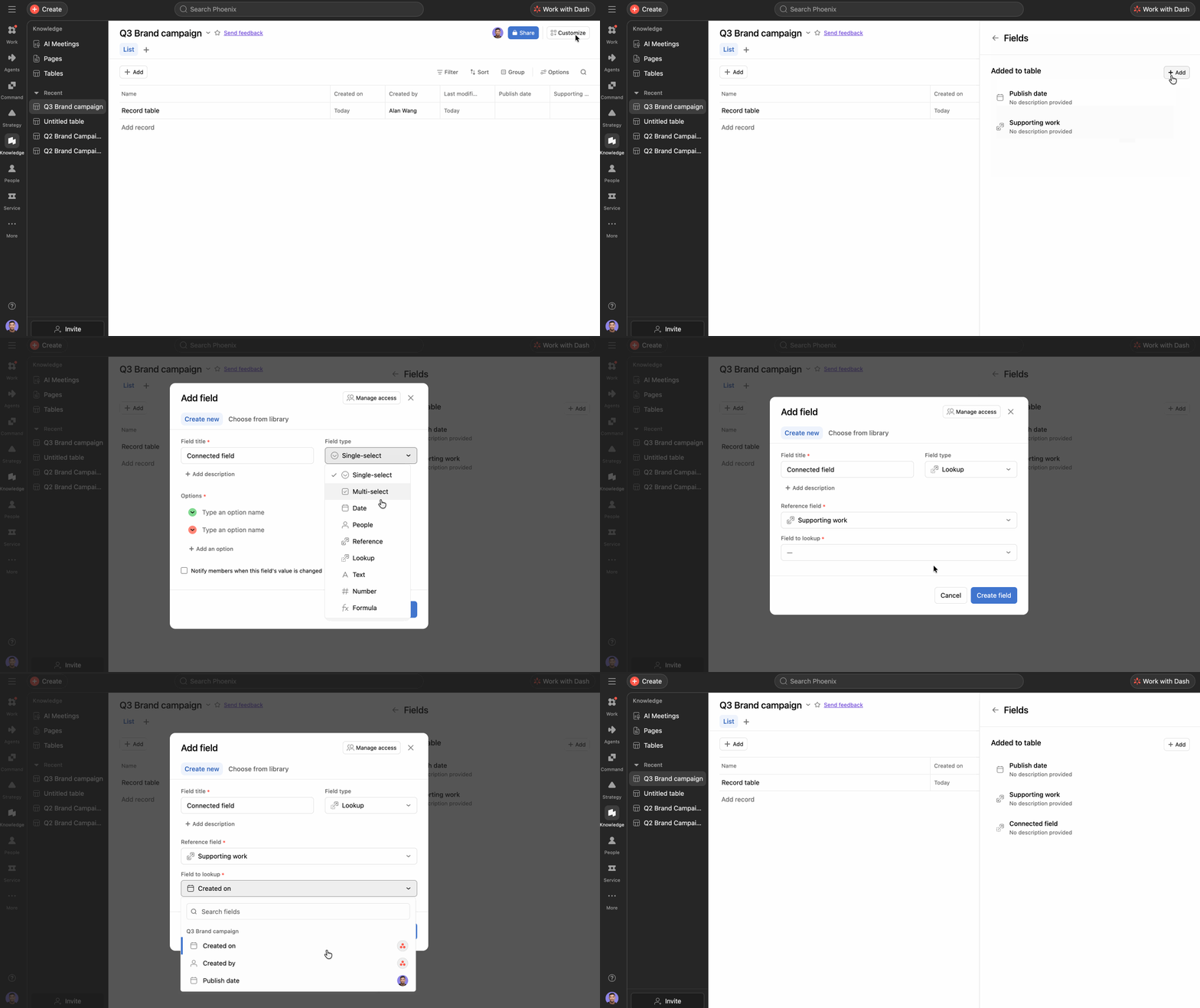
- Öffnen Sie das Projekt, das Portfolio oder die Tabelle, zu dem/der Sie das Suchfeld hinzufügen möchten.
- Klicken Sie in der Listenansicht auf den + -Button neben den Spaltenüberschriften oder wählen Sie Anpassen und dann Felder.
- Klicken Sie auf Feld hinzufügen.
- Wählen Sie Lookup als Feldtyp aus.
- Wählen Sie das benutzerdefinierte Referenzfeld aus, aus dem das Nachschlagefeld Daten abrufen soll.
- Hinweis: Das benutzerdefinierte Referenzfeld muss auf Tabellenebene definiert sein, damit Suchfelder funktionieren. Benutzerdefinierte Referenzfelder auf Projektebene können nicht in einem Suchfeld verwendet werden.
- Klicken Sie auf Feld erstellen.
Sie können auch ein Nachschlagefeld über das Kopfzeilenmenü eines benutzerdefinierten Referenzfelds erstellen.
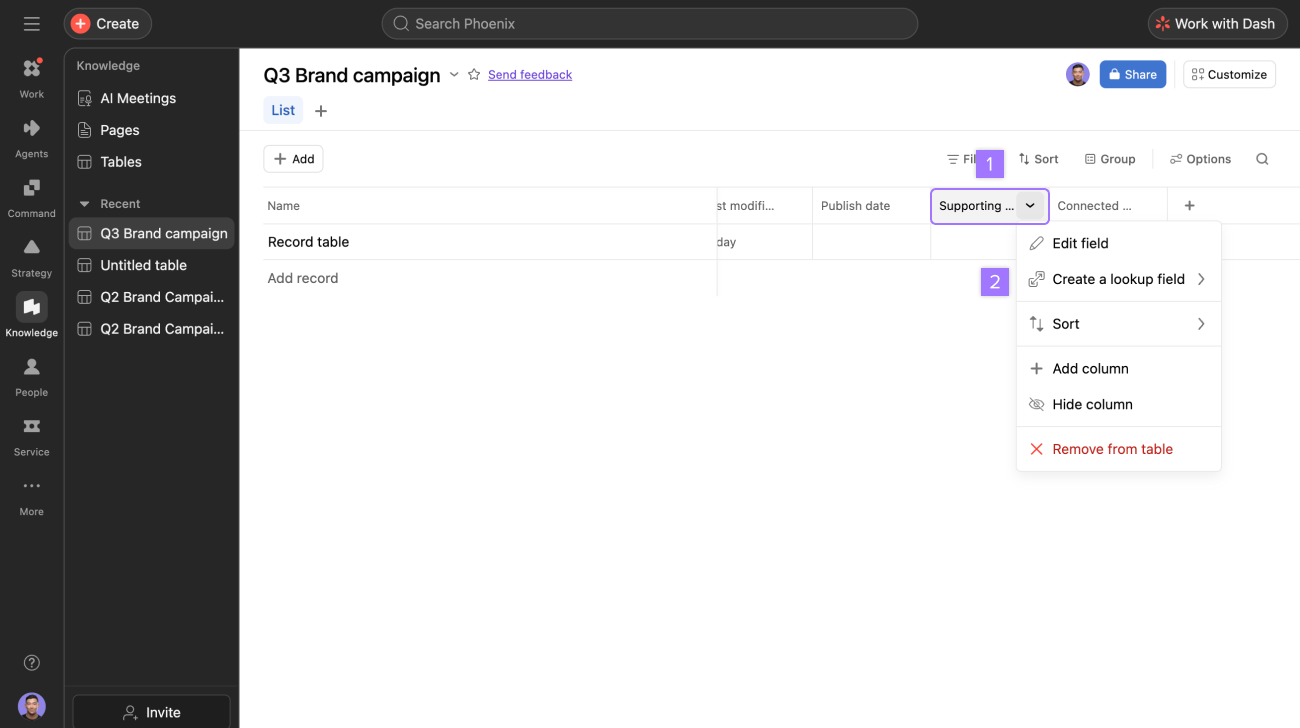
Nach dem Hinzufügen wird das Suchfeld automatisch mit dem entsprechenden Feldwert aus dem referenzierten Datensatz ausgefüllt. Wenn sich die Quelldaten ändern, wird das Suchfeld aktualisiert, um die Änderung in Echtzeit widerzuspiegeln.
So funktionieren Lookup-Felder
Sollfelder funktionieren in Verbindung mit benutzerdefinierten Referenzfeldern. Wenn eine Aufgabe ein Referenzfeld hat, das auf einen Datensatz verweist, kann ein Suchfeld einen bestimmten Feldwert aus diesem referenzierten Objekt abrufen und in der Aufgabe anzeigen.
- Suchfelder sind schreibgeschützt. Sie können den angezeigten Wert nicht direkt im Suchfeld bearbeiten.
- Um den in einem Nachschlagefeld angezeigten Wert zu ändern, aktualisieren Sie das Quellfeld im Datensatz. Sie benötigen Bearbeitungs- oder Admin-Zugriff sowohl auf den Quelldatensatz als auch auf das benutzerdefinierte Feld, um die Änderung vorzunehmen.
- Wenn das Referenzfeld leer ist oder das referenzierte Objekt privat ist, wird das Suchfeld entsprechend angezeigt.
- Wenn das Quellfeld privat ist, aber sein Wert leer ist, wird im Suchfeld weiterhin „Privat“ angezeigt, um zu verhindern, dass offengelegt wird, ob der zugrunde liegende Quellwert leer ist.
Anwendungsfall
- Ressourcenmanagement: Anzeige von Informationen zur verantwortlichen Person oder zum Team aus referenzierten Datensätzen.
- Verknüpfen von Tabellen und Erweitern von Tabellenansichten: Verknüpfen Sie zwei Tabellen, um zugehörige Informationen direkt in Ihre Ansicht zu übernehmen. Beispielsweise kann eine Bürotabelle ein benutzerdefiniertes Referenzfeld verwenden, um eine Verknüpfung zu Datensätzen in einer Lieferantentabelle herzustellen, und Suchfelder können dann Details zu den spezifischen Lieferanten anzeigen, die den einzelnen Büros zugewiesen sind.


Hinweis

