In diesem Artikel
Hinweis
Gefällt Ihnen, was Sie sehen? Starten Sie noch heute mit einer kostenlosen Asana-Testversion. Kostenlos testen
Verwenden Sie kürzere Wörter, wenn möglich.Empfohlene Anwendungsbeispiele
Erfassen Sie Informationen von Personen außerhalb Ihres Unternehmens:
- Erfassen Sie die Kontaktdaten von potenziellen Kunden auf Ihrer Website und verwalten Sie diese in Asana.
- Erfassen Sie Support-Tickets von Nutzern.
- Erfassen Sie Bestellungen oder Anfragen.
- Verwalten und kategorisieren Sie eine Liste der Veranstaltungsteilnehmer.
- Verwenden Sie Formulare auf der Job-Seite und verwalten Sie Anwendungen in Asana.
- Erfassen Sie die Namen von Personen, die an Nutzerbefragungen oder Beta-Tests interessiert sind.
Erfassen Sie Informationen aus Ihrem Team oder Unternehmen:
- Geben Sie strukturierte Fehlerdetails für die Fehler- und Problemverfolgung ein
- Erfassen Sie strukturierte Informationen von Angestellten, wie z. B. Kontaktinformationen
- Erstellen Sie ein System zur Erfassung von Mitarbeiterempfehlungen
- Erfassen Sie Umfrage-Feedback, das für alle in Ihrem Team zugänglich ist
- Erstellen Sie für Ihr Team ein „Feld für Verbesserungsvorschläge“
Verwenden Sie Google Formulare
Verwenden Sie die E-Mail-Integration von Asana, um Antworten aus Google-Formularen in Ihre Projekte in Asana zu senden.Richten Sie ein
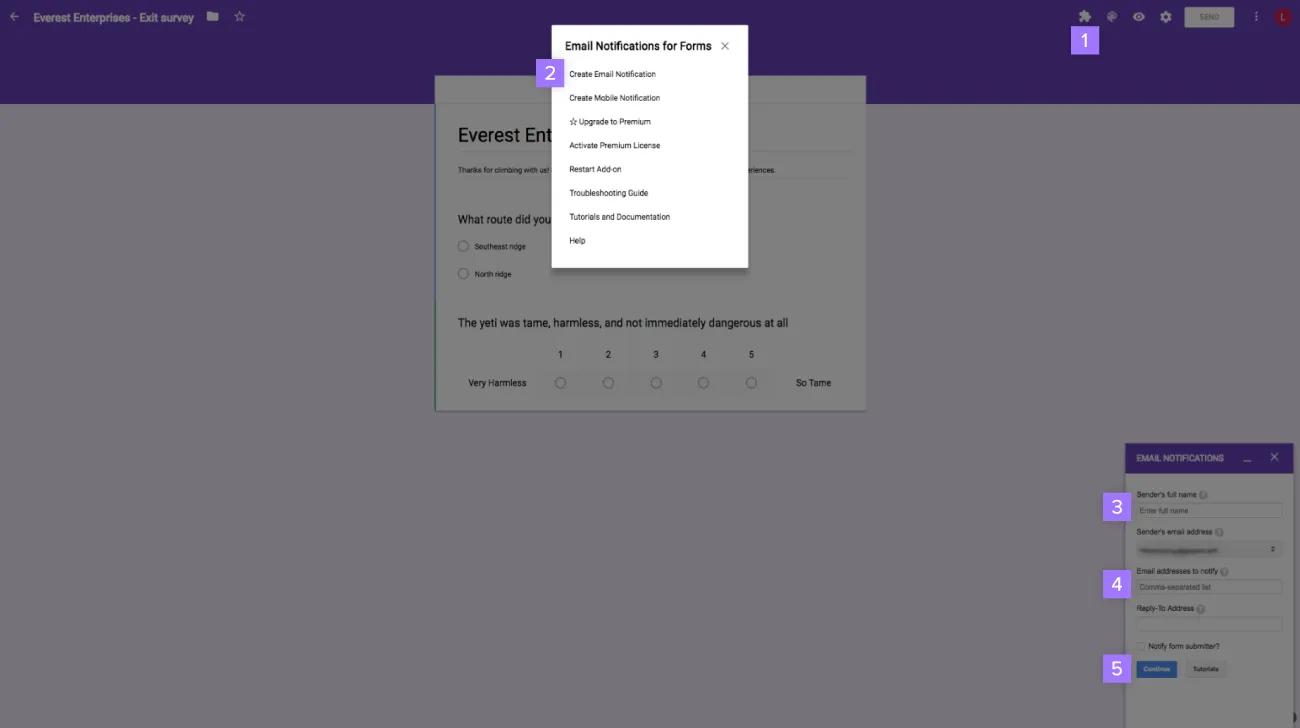
Installieren Sie das Add-on für E-Mail-Benachrichtigungen für Formulare für Google Formulare.– Verwenden Sie diesen Bereich für Screenshots.Erstellen Sie eine neue Regel in Google Formulare – Klicken Sie auf das Puzzle-Symbol und wählen Sie E-Mail-Benachrichtigungen für Formulare aus. Wählen Sie im Popup-Fenster die Option E-Mail-Benachrichtigung erstellen aus. Geben Sie den Namen und die E-Mail-Adresse des Absenders ein. Geben Sie die E-Mail-Adresse für Ihr Projekt in Asana ein. Klicken Sie auf Weiter.
Hinweis
Verknüpfen Sie die E-Mail-Adresse des Absenders mit einem Asana-Konto, das Zugriff auf Ihr Projekt hat.Greifen Sie auf eine E-Mail-Vorlage für Formulare zu
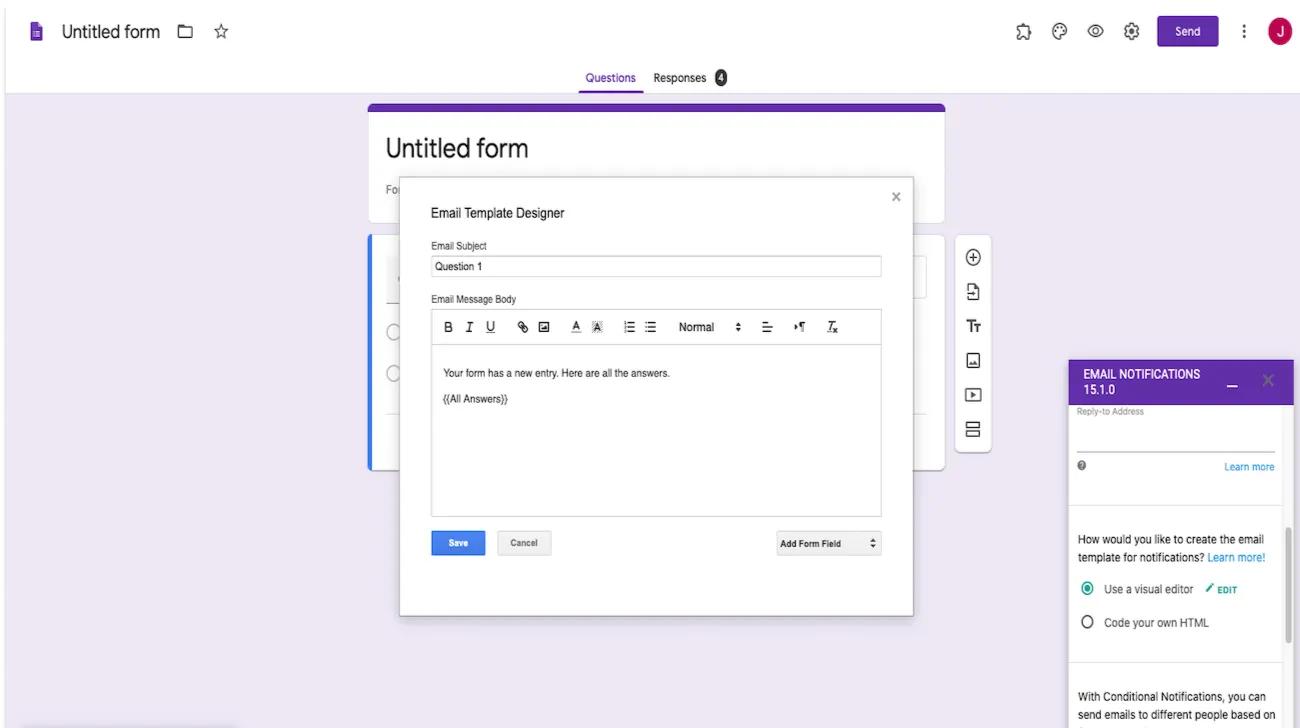
Über das Add-on-Plugin für Google-Tabellen können Sie auch auf den E-Mail-Vorlagen-Designer unter der Rubrik „Vorlage“ zugreifen, um Ihre ganz eigene Vorlage zu erstellen.– Verwenden Sie kürzere Wörter, wenn möglich.E-Mail-Vorlage:
- Greifen Sie über Formulare auf den E-Mail-Vorlagen-Designer zu
- Benutzer können die Zeile E-Mail-Betreff und den E-Mail-Nachrichtentext im Popup-Dialog bearbeiten und ein Formularfeld hinzufügen
- Speichern Sie, um Ihre eigene Vorlage zu erstellen
Hinweis
Erstellen Sie auch E-Mail-Vorlagen für Benachrichtigungen.
Verwenden Sie kürzere Wörter, wenn möglich.
Hinweis
Dieser Artikel wurde mit KI übersetzt.
Feedback zur Übersetzung geben.

These cookies are strictly necessary to provide you with certain features. For example, these cookies allow you to access secure areas that require registration and set your privacy preferences. Because these cookies are essential to providing services to you, they cannot be disabled. You can set your browser to block or alert you about these cookies, but it may cause some parts of the site to not work.
Third party trackers collect information used for analytics and to personalize your experience with targeted ads. Under the Virginia Consumer Data Protection Act, you have the right to opt-out of the sale of your personal data to third parties. You also have the right to opt out of targeted advertising related processing. You may exercise your right to opt out of the sale of personal data and targeted advertising by using this toggle. If you opt out, we will not be able to offer you personalized ads and we will stop sharing your personal information with third parties. For more information please see our Privacy Statement.
These cookies allow us or our third-party analytics providers to collect information and statistics on use of our services by you and other visitors. This information helps us to improve our services and products for the benefit of you and others.
These cookies, provided by our third-party advertising partners, collect information about your browsing habits, as well as your preferences for various features and services. They also provide us with auditing, research, and reporting to know when advertising content has been displayed and how successful the content has been. This information allows us and our third-party advertising providers to display relevant advertising content.
These cookies provide enhanced functionality, providing chat support, allowing you to more easily complete forms, personalizing content to your preferences, and selecting your communications preferences. If you do not enable these cookies, or choose to disable them in the future, that could impact your ability to use certain features.