Nu je een paar taken en projecten hebt aangemaakt, is het tijd om met je team samen te werken en Asana optimaal te gaan gebruiken. In dit artikel leer je hoe je anderen kunt uitnodigen voor Asana en wat de beste praktijken zijn om je team klaar te stomen voor succes.
Gerelateerde artikelen
Inzicht in teamlidtypen
Voordat je uitnodigingen verstuurt, is het nuttig om het verschil te begrijpen tussen organisatieleden en gastgebruikers:
- Organisatieleden zijn mensen binnen je bedrijf die teams kunnen maken en eraan kunnen deelnemen, toegang hebben tot projecten en taken kunnen voltooien in je hele organisatie
- Gasten zijn mensen van buiten je bedrijf die alleen toegang hebben tot wat je specifiek met ze deelt
 Opmerking
Uitgenodigde gebruikers tellen niet mee voor de telling van je betaalde seats totdat ze de uitnodiging accepteren en hun account activeren. Gasten tellen niet mee voor de telling van je betaalde seats, ongeacht de uitnodigingsstatus.
De waarde van Asana voorstellen
Hier zijn enkele van de voordelen van het gebruik van Asana die je met je team kunt delen:
- Asana maakt realtime samenwerking met teamleden mogelijk, wat zorgt voor naadloos teamwerk en tijdige voltooiing van taken.
- Het helpt bij het beheren van individueel werk en verhoogt de persoonlijke productiviteit door de organisatie en het tijdbeheer te verbeteren.
- Elke taak heeft één eigenaar en een vervaldatum, waardoor het duidelijk is wie verantwoordelijk is voor de voltooiing ervan en er een tijdlijn is voor wanneer het werk naar verwachting zal zijn voltooid.
- Met Asana kun je projectvoortgang, updates en belangrijke statistieken delen met je manager of belanghebbenden, zodat iedereen op de hoogte is en op één lijn zit wat betreft de status van het werk.
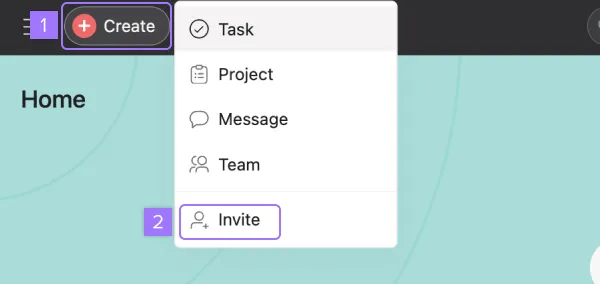
De snelste manier om teamleden uit te nodigen is via de knop Maken van Asana:
- Klik op de knop Maken (plus-pictogram)
- Selecteer Uitnodigen in het vervolgkeuzemenu
- Voer het e-mailadres van je teamgenoot in en klik op Verzenden
Opmerking
Om iemand via e-mail uit te nodigen, selecteer je een team en een project waaraan je die persoon wilt toevoegen. Selecteer een team waaraan je ze wilt toevoegen om ze uit te nodigen met een link.
Uitnodigen vanuit teampagina's
Deze methode is bijzonder handig wanneer je nieuwe leden aan specifieke teams moet toewijzen.
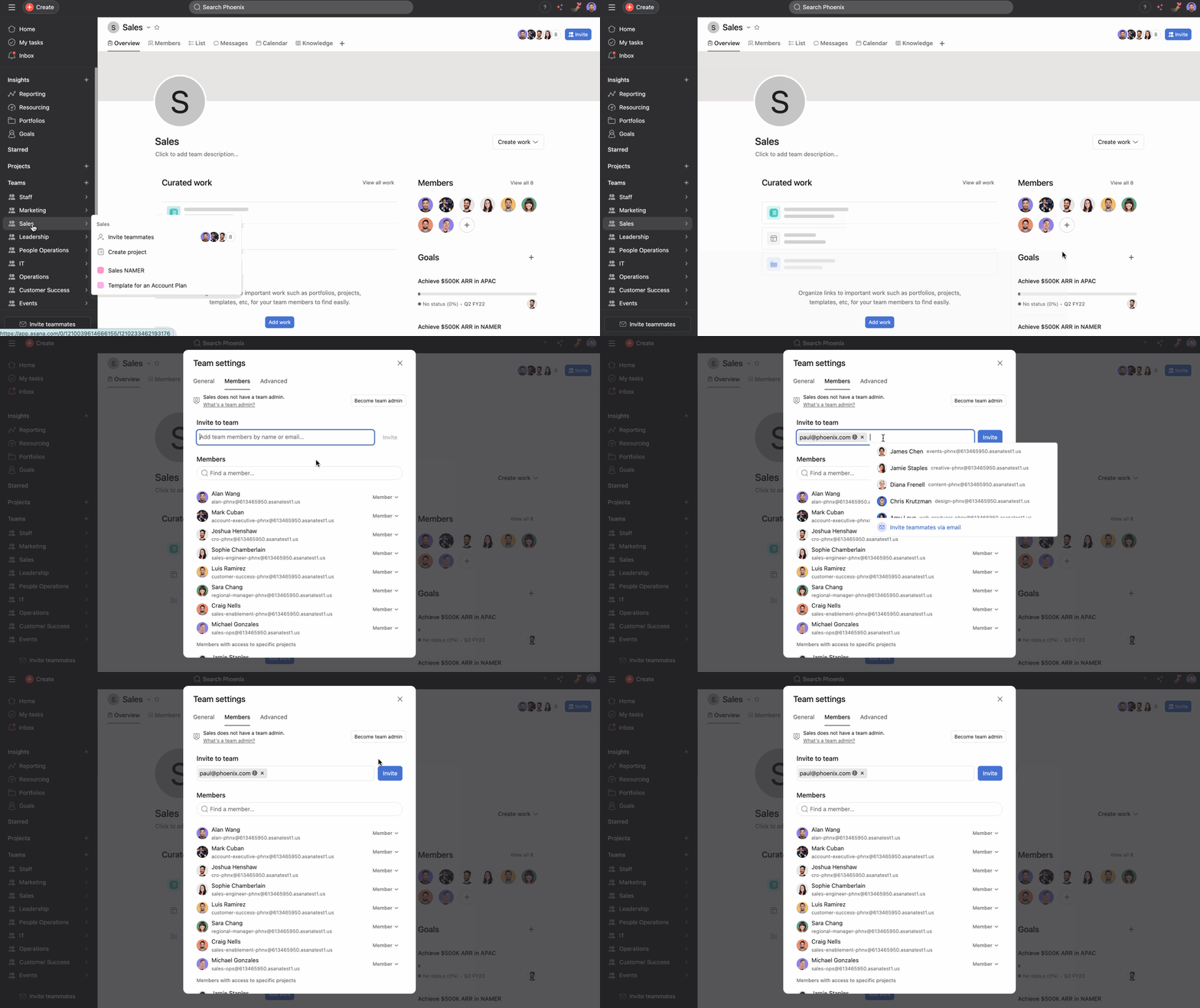
Wanneer je leden aan een specifiek team wilt toevoegen:
- Navigeer naar de overzichtspagina van je team
- Klik op de + knop onder Leden
- Voer de e-mailadressen in van de personen die je wilt uitnodigen
- Klik op Uitnodigen
Uitnodigen vanuit projecten of portfolio's
Je kunt teamgenoten rechtstreeks aan projecten of portfolio's toevoegen.
- Open het project of de portfolio waaraan je teamleden wilt toevoegen
- Klik op de knop Delen in de rechterbovenhoek
- Voer e-mailadressen in of selecteer ze uit je contactpersonen
- Kies hun toestemmingsniveau (beheerder, bewerker, reageerder of kijker)
- Klik op Uitnodigen
Nadat je een van deze opties hebt gekozen en de e-mailadressen van je teamgenoten hebt ingevoerd, wordt er namens jou een Asana-uitnodiging naar hen gemaild. Zorg ervoor dat je zakelijke e-mailadressen gebruikt, zodat iedereen samen in je organisatie terechtkomt.
Meer informatie over het uitnodigen van mensen voor je organisatie.
Uitnodigingen voor de mobiele app
Op je mobiele apparaat:
- Open de Asana-app en tik op Account
- Selecteer onder organisaties Uitnodigen naast de naam van je organisatie
- Kies teamgenoten uit je contacten of typ hun e-mailadres
- Tik op Uitnodiging versturen
Uitnodigingen in bulk voor grotere teams
Voor organisaties die meerdere teamleden toevoegen, kun je overwegen om CSV-import te gebruiken voor onboarding op grote schaal.
Veelvoorkomende problemen met uitnodigingen oplossen
Uitnodiging niet ontvangen?
- Controleer de spam-/ongevraarde-mailmappen
- Controleer of het e-mailadres correct is
- Zorg ervoor dat de e-mailserver van de ontvanger geen e-mails van Asana blokkeert
Rechtenfouten?
Het verbeteren van de onboarding van teams
Nadat je teamleden hebt uitgenodigd, help je ze aan de slag:
Extra middelen




