產品


主題
- PagerDuty 規則整合
- 套件管理和權限
- 全域欄位的管理儀表板
- 參考自訂欄位
- 綁定
- 任務範本
- 狀態更新範本
- 分享表單
- 如何透過應用程式開發介面 (API) 將 Asana 中的所有時間紀錄資料匯出為 CSV 檔
- 瞭解 Asana 中的自動化觸發因素和動作
- 公式自訂欄位
- 自訂欄位類型和限制
- 自動變換依存任務的日期
- 適用於生產力和溝通的規則整合
- 表單
- 專案範本
- 自訂欄位
- 表單中的欄位對應
- 綁定常見問題
- 自動化動作
- 自動化觸發因素
- 自動化中的變數
- HubSpot 自動化整合
- 在自動化中設定日期
- 自動化
- 自動化權限
- 自動化中的條件和分支
- 自動化執行歷程記錄
- 規則整合和小工具
- 將資料匯入到表格
- 表格
- 手動自動化觸發因素
- 查找欄位
- 適用於雲端儲存和檔案共用的自動化整合
- 相依性類型
- 使用 Zapier 和 Asana
- 請參閱 Asana for Jira Cloud 常見問題
- Asana for Outlook 附加元件
- 整合 Power BI
- Google試算表與Asana
- GitHub 與 Asana 整合
- 自動化和 AI Studio 的 Zoom 轉錄文字
- 使用 Tray.io 與 Asana
- ServiceNow 與 Asana
- Wufoo與Asana
- 網頁表單與Asana
- Zendesk整合
- Asana 與 Meta 推出的工作空間
- Splunk + Asana
- ChatGPT 中的 Asana 應用程式
- Claude 中的 Asana 應用程式
- 將時間追蹤資料從 Everhour 遷移至 Asana
- 在 Asana 中的 Zoom 會議
- 在 Slack 頻道中與 Asana 聊天
- 在 Asana 中的 Slack 評論同步
- Microsoft Teams 與 Asana 的整合
- Slack 與 Asana
- Microsoft 單一登入
- Salesforce 在 Asana 中的整合
- Vimeo 與 Asana
- 使用 AI Studio 建立 Zoom 通話筆記工作流程
- Asana for Adobe Creative Cloud
- Asana for Jira Cloud
- Jira Data Center
- 應用程式開發介面 (API)
- Jira Data Center 常見問題
- 啟用 Asana 建置的整合和 Microsoft 365 整合的權限
- Google 與 Asana
- 行事曆與 Asana
- Google 行事曆 + Asana
- Outlook 行事曆和 Asana
- 遵守 FedRAMP 規範
- 自動移除訪客
- 如何分離 Asana 帳戶
- 適用於Enterprise版組織的SecureAuth
- 個人資料欄位可編輯性控制項
- Asana 的資料儲存
- Setting up Licensing Division ID with SCIM
- Asana 合規性設定
- 權限管理附加元件
- 跨應用程式存取
- 服務帳戶
- 資料保留政策
- 使用 SCIM 在 Microsoft Entra ID 中設定 Asana 角色
- 全域驗證設定
- Asana 的 SCIM 佈建
- 進階設定:使用 SCIM 佈建授權
- 進階設定:使用 SCIM 指派 Asana 角色
- 使用 SCIM 佈建及取消佈建使用者
- 應用程式管理和整合
- 系統管理員安全控制項
- 刪除您的 Asana 帳戶
- 付費方案的驗證和存取管理選項
- 在 Asana 中的 IP 允許清單
- 行動應用程式安全權限
- 使用 SCIM 在 Okta 中設定 Asana 角色
- 如何存取系統管理主控台
- 帳戶
- 資料提供
- HIPAA 合規性
- 適用於 Asana 的 Microsoft 365 Copilot 連結工具
- 具有自訂角色的角色型存取控制 (RBAC)
- Asana 中的系統管理員和超級管理員角色
- 在 AI Studio 中將文字轉換為工作流程
- 請參閱 AI Studio 常見問題
- AI Studio Plus
- AI Studio 中的疑難排解
- AI Studio - 人類參與其中
- Asana AI Studio簡介
- 使用Asana AI更智慧地工作
- 在AI Studio中撰寫說明
- AI Studio 信用點數最佳化
- AI Studio 附加元件和定價
- 如何在 AI Studio 中建構提示
- 「使用 AI」變數的運作方式
- AI Studio 模型
- 使用 AI Studio 建立智能工作流程
- 將您的智能工作流程與正確的資料來源連結起來
- AI Studio 預先建置的 AI 自動化
- AI Studio 系統管理員指南
- AI Studio 速率限制
Asana for Jira Cloud

Asana for Jira Cloud 整合可在 Asana Starter 版、Advanced 版、Enterprise 版和 Enterprise+ 版層級以及舊版層級 Premium 版、Business 版和舊版 Enterprise 版上使用。
Jira Cloud 雙向同步功能可在 Asana Advanced、Enterprise 版和 Enterprise+ 版層級,以及舊版 Business 版和舊版 Enterprise 版層級使用。
如需詳細資訊,請前往定價頁面。
安裝 Asana for Jira Cloud 整合,即可在業務與技術團隊之間建立起透明度,並組建彼此互動、連結的工作流程。
藉助 Asana for Jira Cloud 整合,在 Asana 中規劃工作的業務及產品團隊與在 Jira 中執行工作的工程及技術團隊可進行協作和無縫合作。
提升 Asana 與 Jira Cloud 之間的可視度和透明度
- 無需浪費時間進行狀態更新會議、手動更新兩種不同工具,只需連結 Asana 和 Jira,即可在業務與技術團隊之間建立起透明度。
- 增加產品開發流程可視度,減少來回溝通上不必要的時間浪費。
- 在兩個團隊之間建立彼此互動、連結的工作流程。
連結技術與業務團隊
- 在團隊之間協調工作,確保工作流程清晰透明。
- 確保順暢追蹤跨職能作業系統。
安裝流程和要求
若要在 Asana 中設定 Jira Cloud 應用程式:
- 您必須擁有 Jira Cloud 帳戶才能安裝 Jira Cloud 整合。
- 使用 Asana 專案設定 Jira 專案時,您需要擁有 Jira 專案的編輯存取權限才能進行設定。
- 您必須擁有 Jira 專案的編輯存取權限才能進行此設定。只有成員可以執行此操作;訪客不行。
授權模式如何運作?
- 此項整合使用 OAuth 作為授權標準。除非 OAuth 權杖過期或者某人撤銷該權杖,否則使用者會一直保持已驗證的狀態。
- 若要將現有的 Jira 議題連結至 Asana 任務,或從 Asana 建立新的 Jira 議題,您必須授權 Jira 帳戶。
請注意:若您的組織使用 Jira Data Center,請使用 Asana for Jira Data Center 整合。不知道貴組織是使用 Jira Cloud 還是 Jira Data Center?請參閱此 Atlassian 社群頁面,以瞭解詳情。
安裝 Jira Cloud
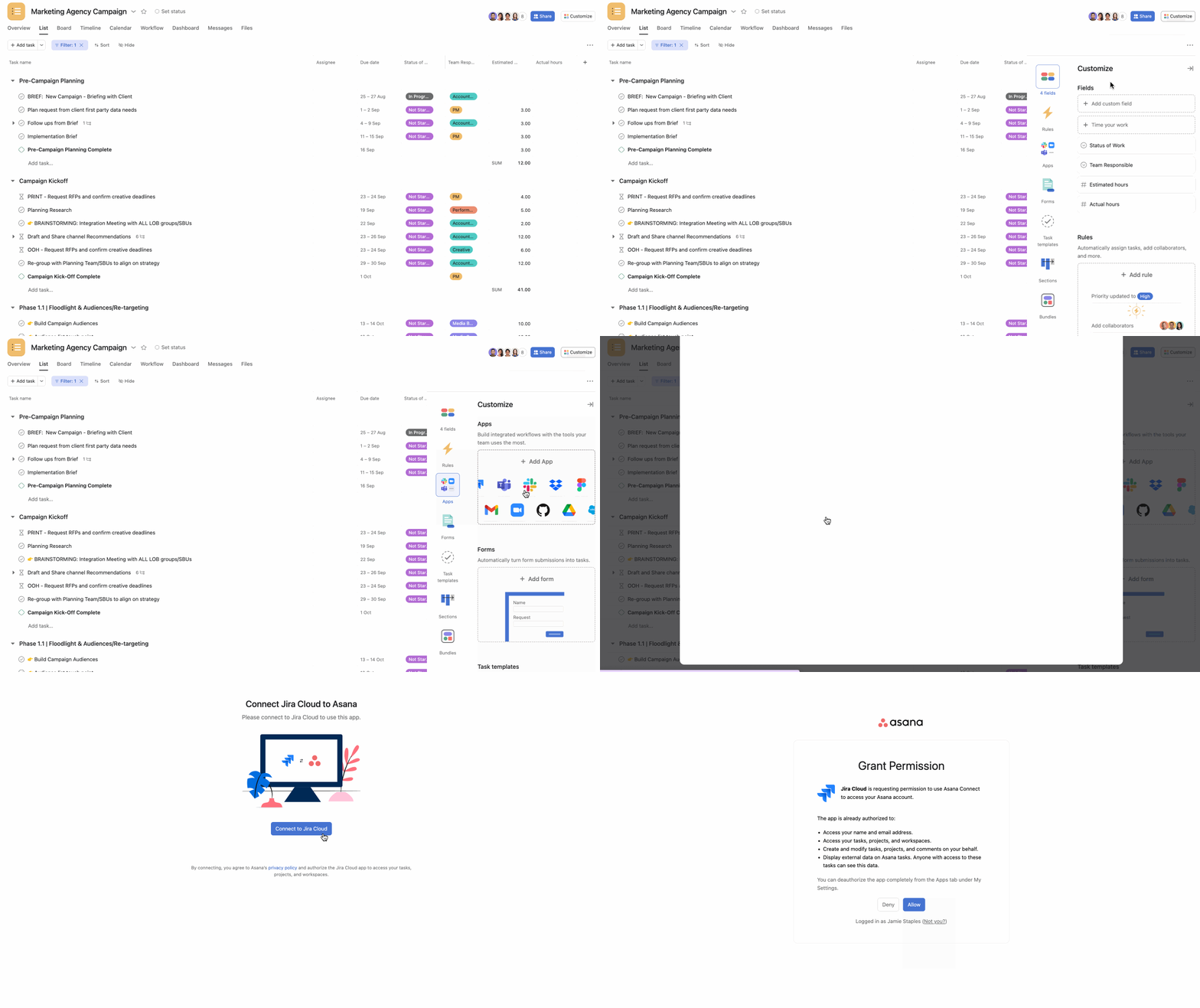
導覽至您要安裝 Asana for Jira Cloud 整合的專案。
- 點擊「自訂」
- 導覽至「應用程式」,點選「+ 新增應用程式」,然後選擇Jira Cloud
- 按一下「新增至專案」
- 授權您的 Jira 帳戶
在 Asana 的任務中,使用者可直接在 Asana 中建立新的 Jira 議題,或輕鬆連結至已有的 Jira 議題。我們支援全部 Jira 軟體議題類型,包括 Bug、Epic、Story 以及 Task。我們不支援將 Jira 子任務同步至 Asana。
Jira Cloud 資料同步
Jira Cloud 雙向同步功能可在 Asana Advanced、Enterprise 版和 Enterprise+ 版層級,以及舊版 Business 版和舊版 Enterprise 版層級使用。
「雙向同步」是什麼意思?
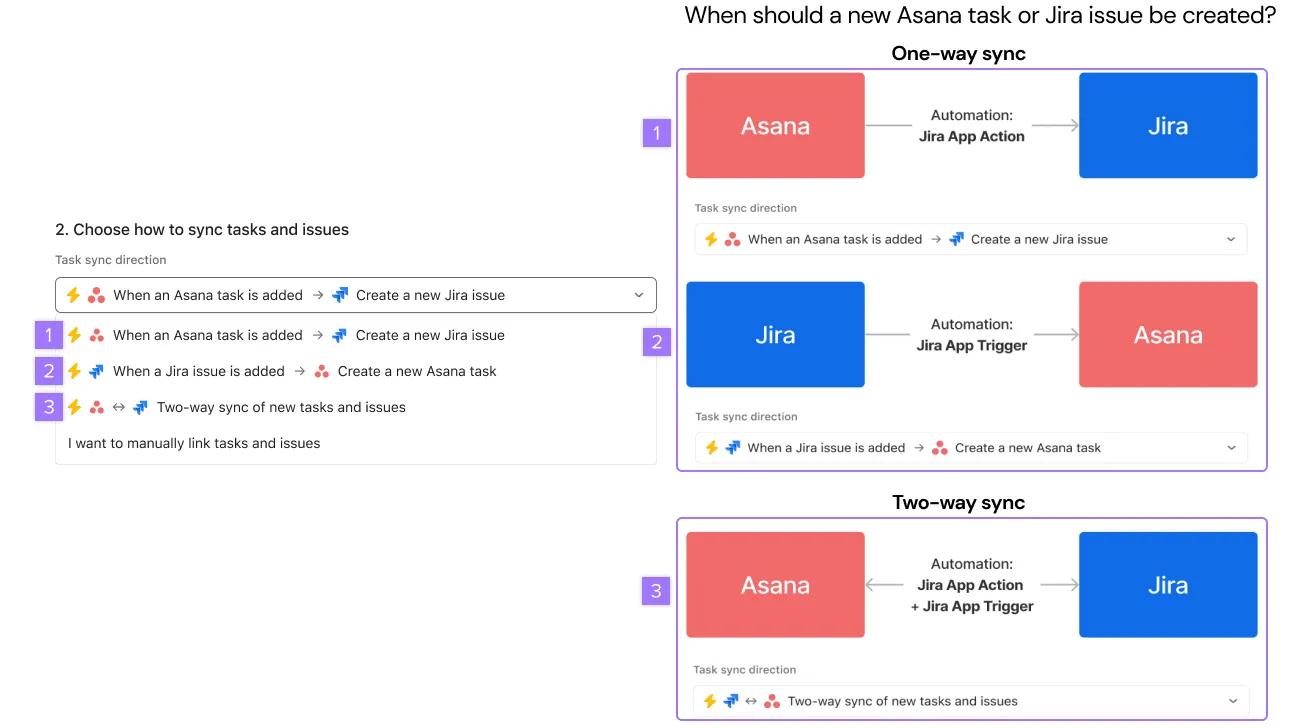
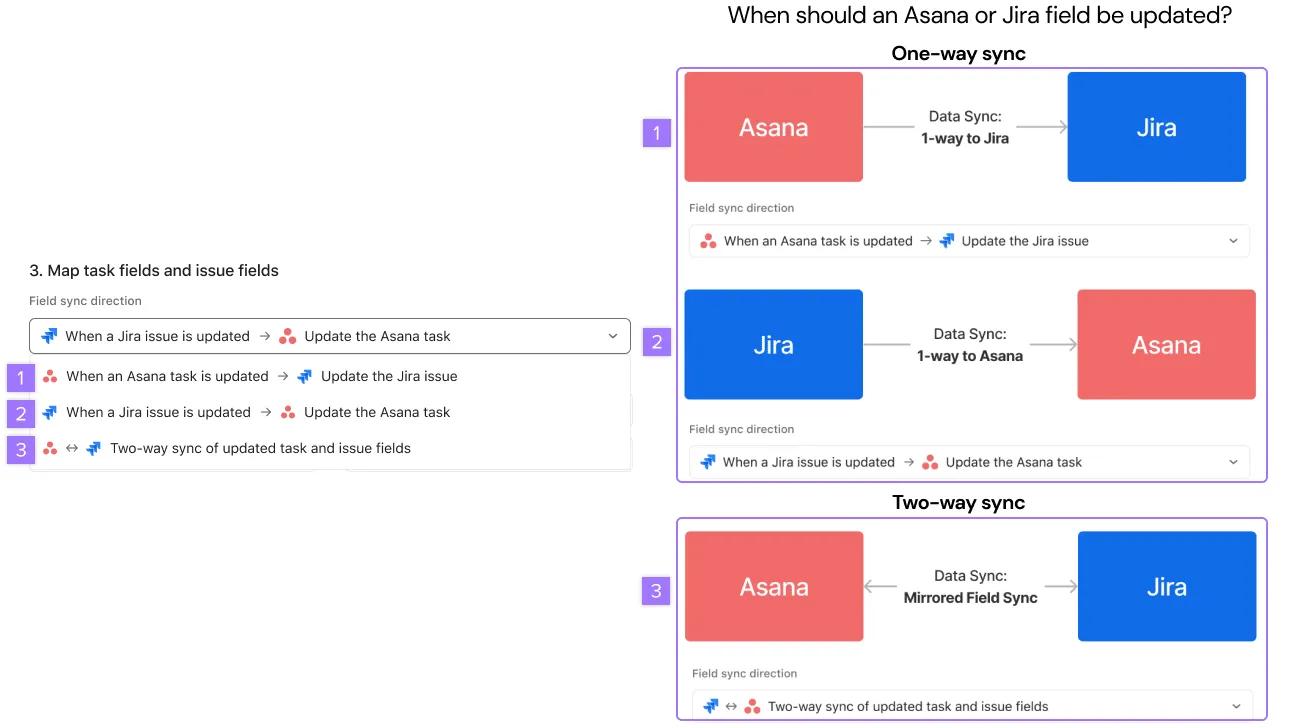
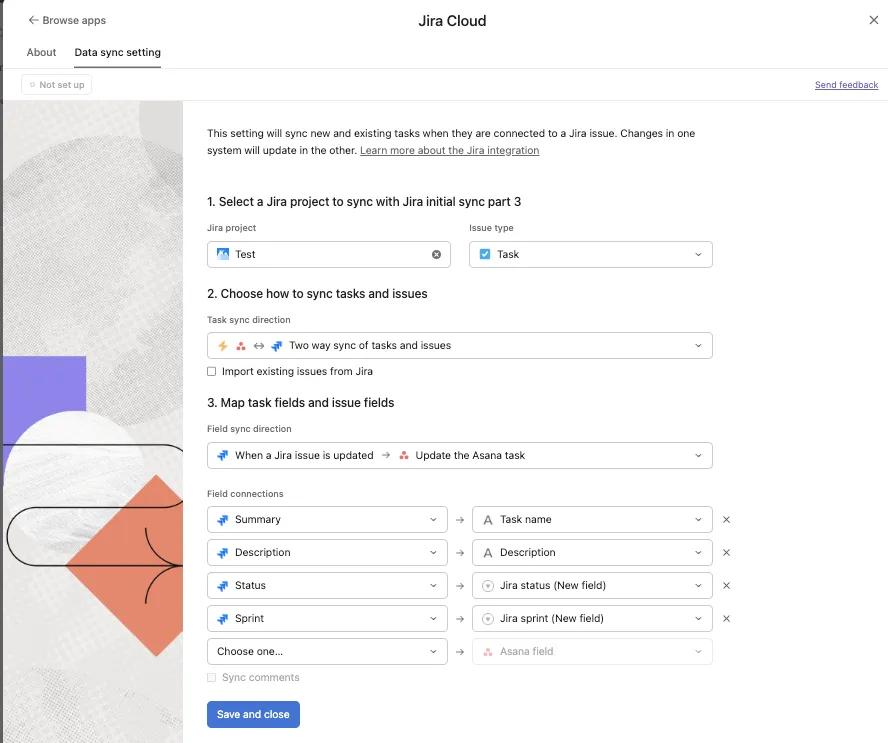
雙向同步是指在 Asana 和 Jira 中指定欄位之間的自動更新。這項功能可依專案從 Asana →Jira、Jira→Asana 或 Asana←→Jira 自動建立和更新任務或議題。
選擇單向或雙向任務同步方向
選擇單向或雙向欄位同步方向
支援的議題類型和欄位
每個 Asana 專案都會對應至與 Jira 專案中的特定 Jira 議題類型同步。Asana 的 Jira Cloud 整合支援標準議題類型 (例如:史詩、故事) 和自訂議題類型。已同步的欄位會顯示於清單和看板檢視中。
| Asana | Jira |
|---|---|
| 任務名稱 | 摘要 |
| 描述 | 描述 |
| 狀態應用程式自訂欄位 | 狀態 |
| 優先順序應用程式自訂欄位 | 優先順序 |
| 指派對象應用程式自訂欄位 | 指派對象 |
| 截止日期 | 截止日期 |
| 修正版本自訂欄位 | 修正版本 |
| 其他 Asana 自訂欄位類型:日期、人員、數字、單一選取、多重選取 | 其他 Jira 自訂欄位類型:日期、數字、下拉式清單、核取方塊、短文字、長文字 |
| Jira 衝刺自訂欄位 | 衝刺 |
資料同步中不支援的欄位
- 我們在任一同步方向都不支援時間戳記或相依下拉式欄位類型。URL、衝刺、故事點估算欄位和欄位類型僅適用於 Jira → Asana 同步。
- 元件
- 版本 (修正版本、受影響版本)
- 標籤
- Epic 連結 (或 Epic 名稱)
- 衝刺 (來自 Jira Software 看板)
- 故事要點 / 估算欄位
- 時間追蹤欄位 (原始預估、剩餘預估、已花費時間)
- 排名/順序
- 已連結的議題 (阻擋、相關、重複等)
- 關注者/投票者
- 任何應用程式商店應用程式的自訂欄位 (非標準 Jira 欄位類型)
在 Asana 和 Jira 之間對應使用者
我們支援使用者欄位對應,包括 Jira 上的指派對象、報告者和人員自訂欄位。但有一些需要注意的重要限制:
- 使用者是根據註冊 Asana 和 Jira 時使用的電子郵件地址進行對應。
- 在沒有對應帳戶的情況下,系統會完全放棄該值 (在 Asana 中,指派對象將為空白)。因此,僅應在使用者預期在兩個平台上都擁有帳戶時,才使用人員類型自訂欄位的同步功能。
- 預設情況下,使用者電子郵件地址的顯示狀態在 Jira 組織中為隱藏。這需要在使用者的個人資料可見度設定中進行變更。
- 我們也建議客戶在希望使用 Jira中的人員自訂欄位與 Asana 同步時,勾選「限制為單一使用者」。
為您的工作流程設定 Jira 資料同步
從 Jira 專案開始工作
若您想要從 Jira 專案啟動工作,並使進行中的資料保持同步,請選擇以下設定。
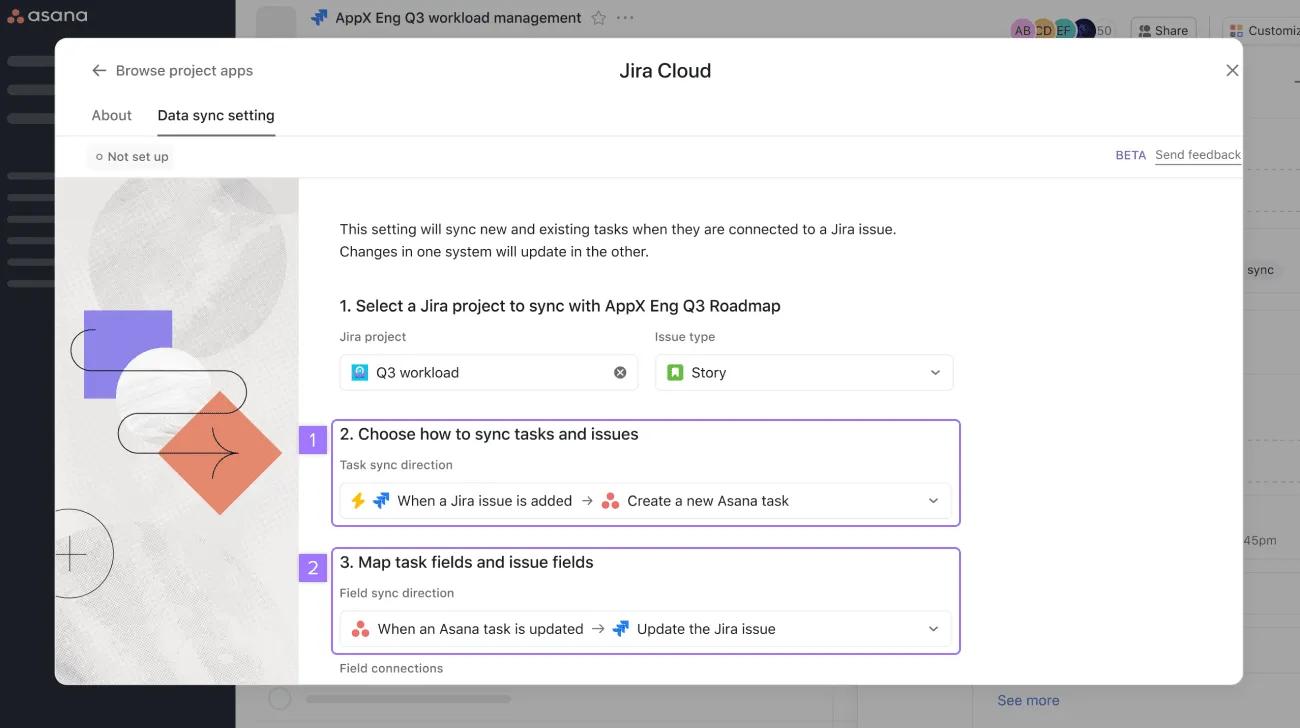
- 選擇如何同步任務和議題時,請選擇「新增 Jira 議題時」→「建立新的 Asana 任務」
- 若要建立雙向同步,請選擇「當 Asana 任務更新時」→「更新 Jira 議題」
從 Asana 中開始工作
若您想要從 Asana 專案啟動工作,並使進行中的資料保持同步,請選擇以下設定。
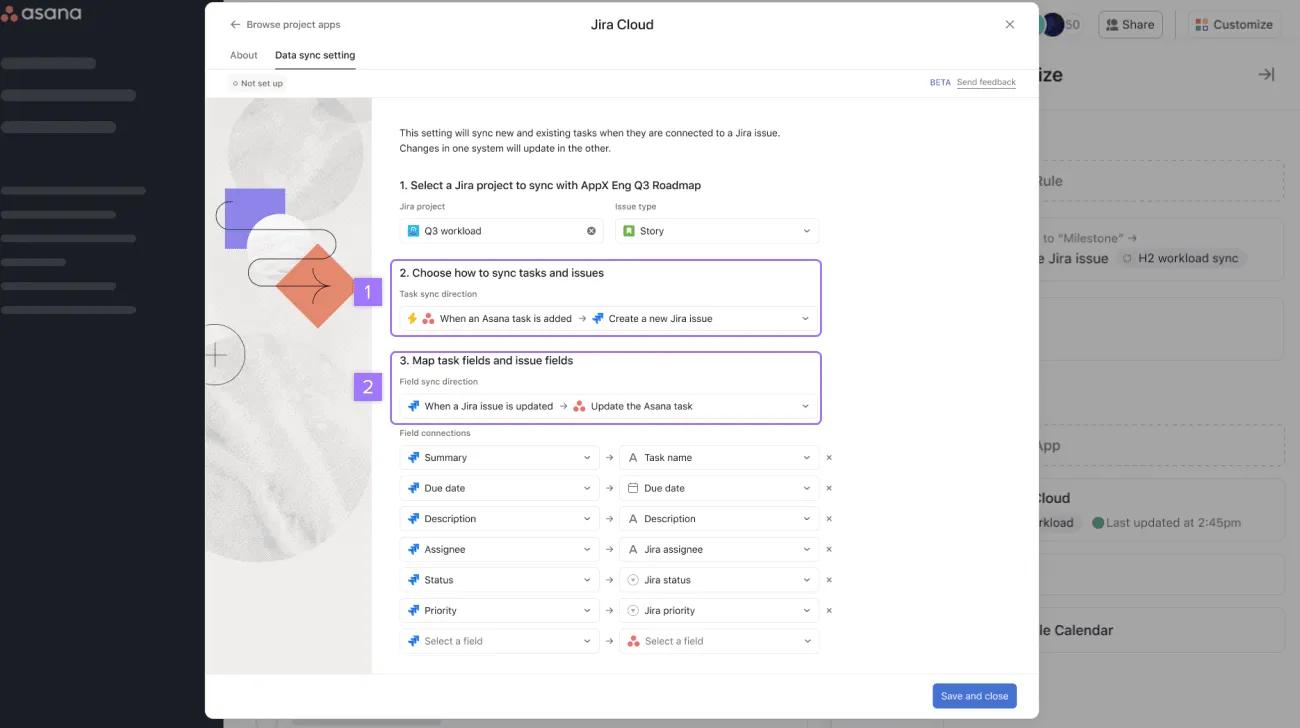
- 選擇如何同步任務和議題時,請選擇「新增 Asana 任務時」→「建立新的 Jira 議題」
- 若要建立雙向同步,請選擇「更新 Jira 議題時」→「更新 Asana 任務」
讓 Asana 專案和 Jira 專案維持同步
若您想要鏡像 Asana 專案和 Jira 專案,請選擇以下設定。
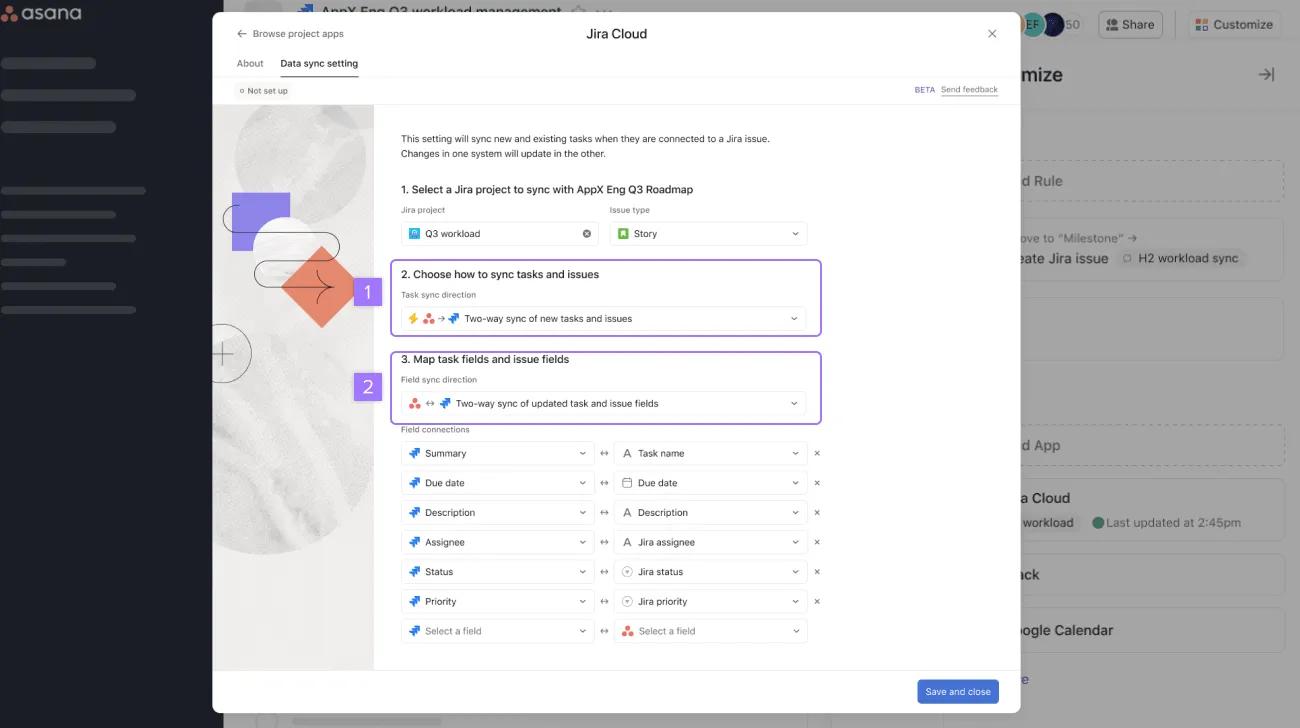
- 選擇如何同步任務和問題時,請選擇Asana → Jira 新任務和問題的雙向同步
- 在「欄位同步方向」中,選擇Asana ←→Jira 已更新任務和問題欄位的雙向同步
Jira Cloud 評論同步
評論同步
評論同步功能讓使用者能夠繼續使用其偏好的工具 (無論是 Jira 還是 Asana),並順暢地進行跨職能協作。Jira 和 Asana 中的使用者可以對連結專案中的任務或議題進行評論,並讓該評論自動反映在其他工具中。
啟用評論同步
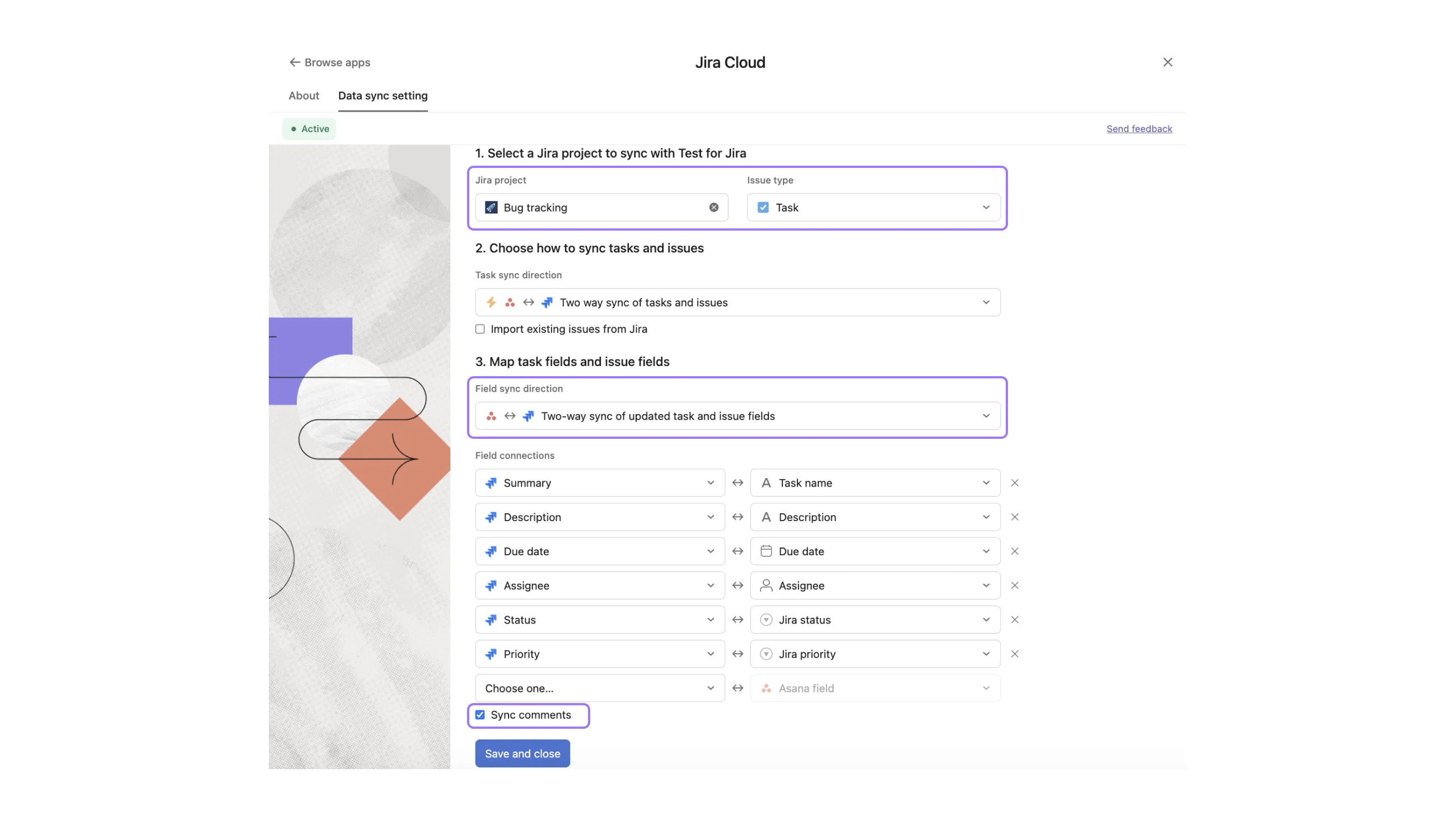
- 開啟任一 Asana 專案,然後點選「自訂」
- 在「自訂」功能表中,選擇「應用程式」>「Jira Cloud」
- 登入您的 Atlassian 帳戶,在專案中啟用 Jira Cloud 應用程式
- 在 Jira Cloud 應用程式頁面上,開啟「資料同步設定」標籤頁
- 選擇 Jira 專案和議題類型
- 選擇任務和欄位同步方向
- 勾選「同步評論」核取方塊,然後按一下「儲存並關閉」
使用評論同步
對於連結至專案中 Jira 議題的任何 Asana 任務,系統都會執行評論同步。
- 在 Asana 中建立新任務。若專案已設定為將任務從 Asana 同步至 Jira,系統將自動建立新的對應 Jira 議題。
- Jira → Asana 評論同步
- 對上述建立的 Jira 議題發表評論
- 評論將顯示在 Asana 任務中,由 Jira 整合建立
- Asana → Jira 評論同步
- 評論上述建立的 Asana 任務
- 評論將顯示於 Jira 議題中
使用案例範例
使用案例 1:與跨職能團隊進行衝刺規劃
- 工程師目前在 Jira 中工作,且沒有 Asana 授權。
- 專案經理正在 Asana 中協調跨團隊的衝刺規劃工作。
- 專案經理可以在 Asana 中設定衝刺優先順序,而工程師則可以在不離開 Jira 的情況下提出問題並提供狀態更新。
使用案例 2:
- 工程師目前在 Jira 中工作,且沒有 Asana 授權。
- 一位行銷人員正在 Asana 中進行產品發佈工作。
- 行銷人員可以在 Asana 中追蹤開發進度,而工程師則無需離開 Jira 即可依據發佈期限進行追蹤。
匯入現有議題
您可以將現有的 Jira 議題匯入為 Asana 任務,並對這些任務套用資料同步設定,讓您能夠更準確地反映 Asana 專案如何追蹤 Jira 專案,其中所有相關議題均以 Asana 任務的形式擷取。
使用案例範例
建立應與現有 Jira 專案同步的 Asana 專案時,請匯入現有 Jira 議題以及未來要同步的新議題。
使用問題匯入功能
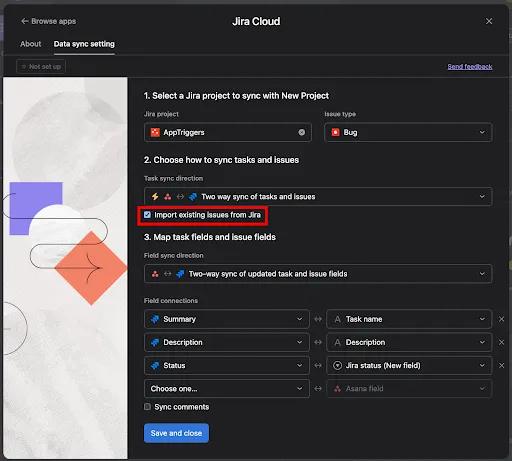
- 開啟新的 Asana 專案,然後點選「自訂」按鈕。
- 選擇「應用程式」,然後選擇Jira Cloud應用程式。
- 登入您的 Atlassian 帳戶,在專案中啟用 Jira Cloud 應用程式。
- 在 Jira Cloud 應用程式頁面上,開啟「資料同步設定」標籤頁。
- 選擇 Jira 專案和議題類型
- 在區段 2 中,勾選「從 Jira 匯入現有議題」核取方塊
- 點擊「儲存並關閉」,以儲存資料同步設定
重要事項
- 與 Jira 專案和議題類型相符的議題會以 Jira 小工具的形式匯入為新任務。它們將對所有已同步的欄位執行初始同步:
- 匯入並非即時進行,因此可能需要幾分鐘的時間。
- 匯入的議題數目上限為 150 個。超過此上限後,將顯示 150 個最新的議題。若您在此上限方面遇到問題,請聯絡我們的支援團隊。
用於欄位對應的衝刺欄位
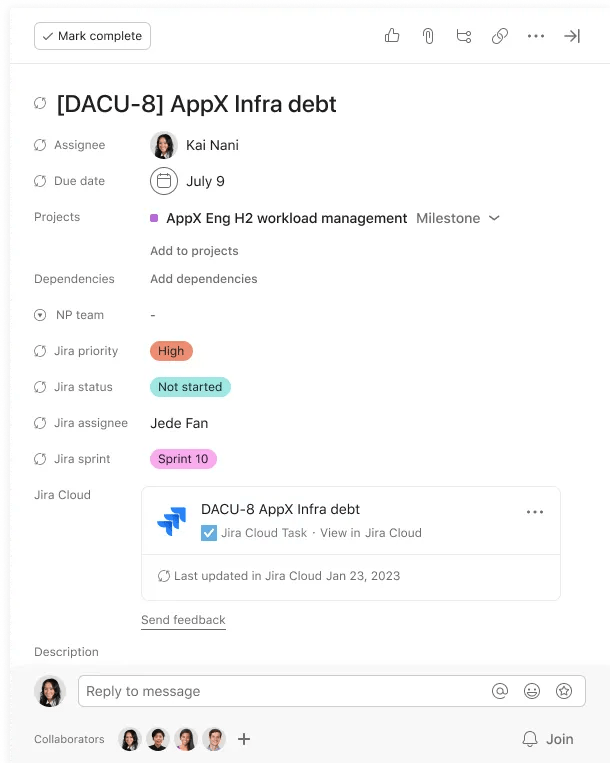
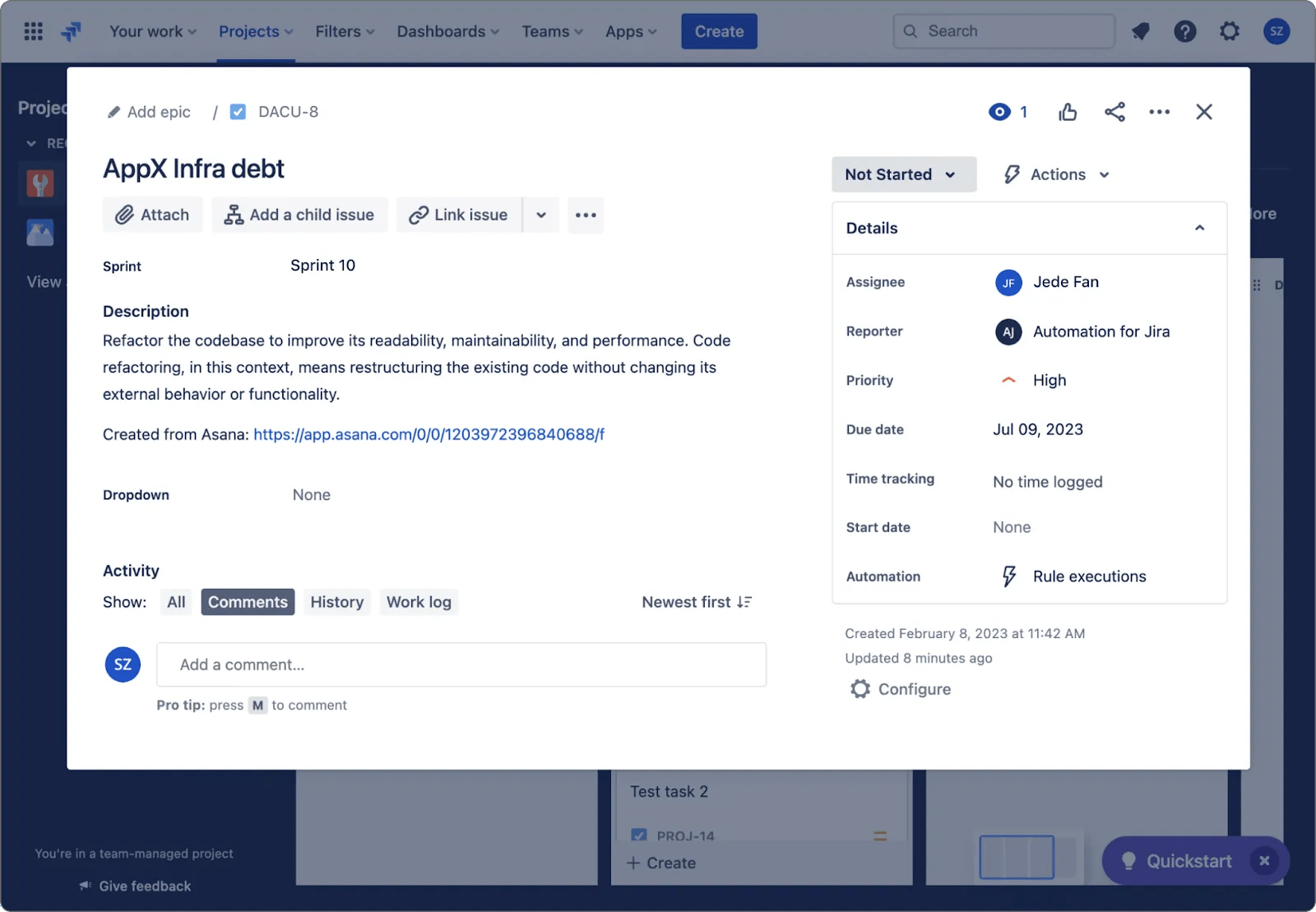
使用 Jira 中的衝刺欄位,依衝刺進行報告。衝刺欄位是在 Asana 中單選的自訂欄位。
使用案例範例
- 依據衝刺期篩選 Asana 專案中的任務
- 使用專案儀表板依衝刺彙總故事點數
使用衝刺同步
- 開啟任何 Asana 專案,然後點選「自訂」按鈕。
- 選擇「應用程式」,然後選擇Jira Cloud應用程式。
- 登入您的 Atlassian 帳戶,即可在專案中啟用 Jira Cloud 應用程式。
- 如果您已通過驗證,但缺少衝刺讀取範圍,則「資料同步」標籤頁可能會提示您重新進行驗證。
- 在 Jira Cloud 應用程式頁面上,開啟「資料同步設定」標籤頁。
- 選擇 Jira 專案和議題類型。
- 請注意:若 Jira 專案不支援衝刺,則不會顯示衝刺欄位。請參閱此 Atlassian 文章,瞭解如何建立衝刺。
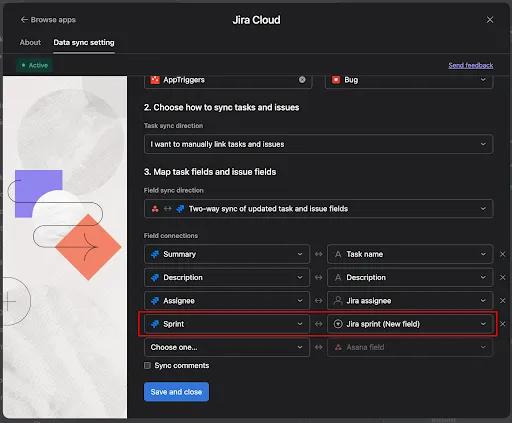
- 在「對應任務欄位和問題欄位」下方,選擇「衝刺」欄位。
- 選擇 Jira 專案和議題類型。
重要事項
此欄位應與任何其他已同步的單選欄位一樣同步。
Asana 任務
Jira 議題
同步現有任務
在某些情況下,任務在資料同步設定更新此任務的值之前,已連結至 Jira 議題。例如:在將資料同步設定套用至專案之前,任務可能已連結至議題;或者,在資料同步設定已啟用的專案中,任務可能已在連結至議題之前建立。為了讓同步適用於這些議題,同時不覆寫值,我們按以下方式套用同步:
如果已選擇單向欄位同步
針對所有欄位執行單向同步,因為使用者已透過資料同步設定指定其中一側為事實來源。
如果已選擇雙向欄位同步
針對 Asana 中所有 Jira 應用程式的自訂欄位執行單向同步,但標準欄位將不會同步,以避免意外的資料遺失。
- 新建立的 Jira 應用程式自訂欄位應使用來自 Jira 的最新值進行更新。
- 在使用者根據資料同步設定中的欄位對應從 Asana 或 Jira 進行變更之前,任務名稱和描述應保持不變。
對現有任務使用同步功能
- 建立新的 Asana 專案,並將已附加 Jira 小工具的任務多重歸屬或建立此類任務 (在設定資料同步設定之前)。
- 開啟新建立的專案,然後點選「自訂」按鈕。
- 選擇「應用程式」,然後選擇Jira Cloud應用程式。
- 在 Jira Cloud 應用程式頁面上,開啟「資料同步設定」標籤頁,並建立資料同步設定。
- 請注意:如果議題已連結至現有任務,則在此階段無需匯入議題。
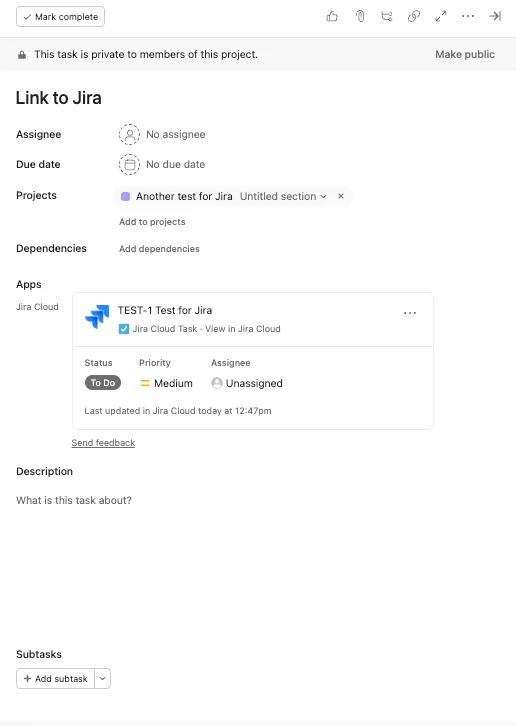
- 檢查您專案中已連結至 Jira 小工具的任務:
- 新建立的 Jira 應用程式自訂欄位應使用來自 Jira 的最新值進行更新。
- 任務名稱和描述應保持不變,直到使用者根據資料同步設定中的欄位對應從 Asana 或 Jira 進行變更為止。
權限及隱私
從 Asana 建立 Jira 議題
從 Asana 建立新 Jira 問題時,該整合將遵守 Jira 的權限模型,因此使用者唯有在 Jira 中有這麼做的權限時,才能建立 Jira 問題。只有在這個情況下 (為了建立新的 Jira 議題),使用者才能將資料寫入 Jira。同樣地,也只有在這個情況下,此整合才會讀取 Asana 資料。
檢視和編輯從 Jira 同步的資料
Jira 資料同步至 Asana 任務後,即成為 Asana Work Graph 物件的一部分。因此,這些資料的檢視和編輯權限受任務和專案的標準權限約束。
使用已同步的 Jira 資料進行自動化和專案層級報告
自訂規則和專案層級報告可在 Asana Starter 版、Advanced 版、Enterprise 版和 Enterprise+ 版層級以及舊版層級 Business 版和舊版 Enterprise 版上使用。
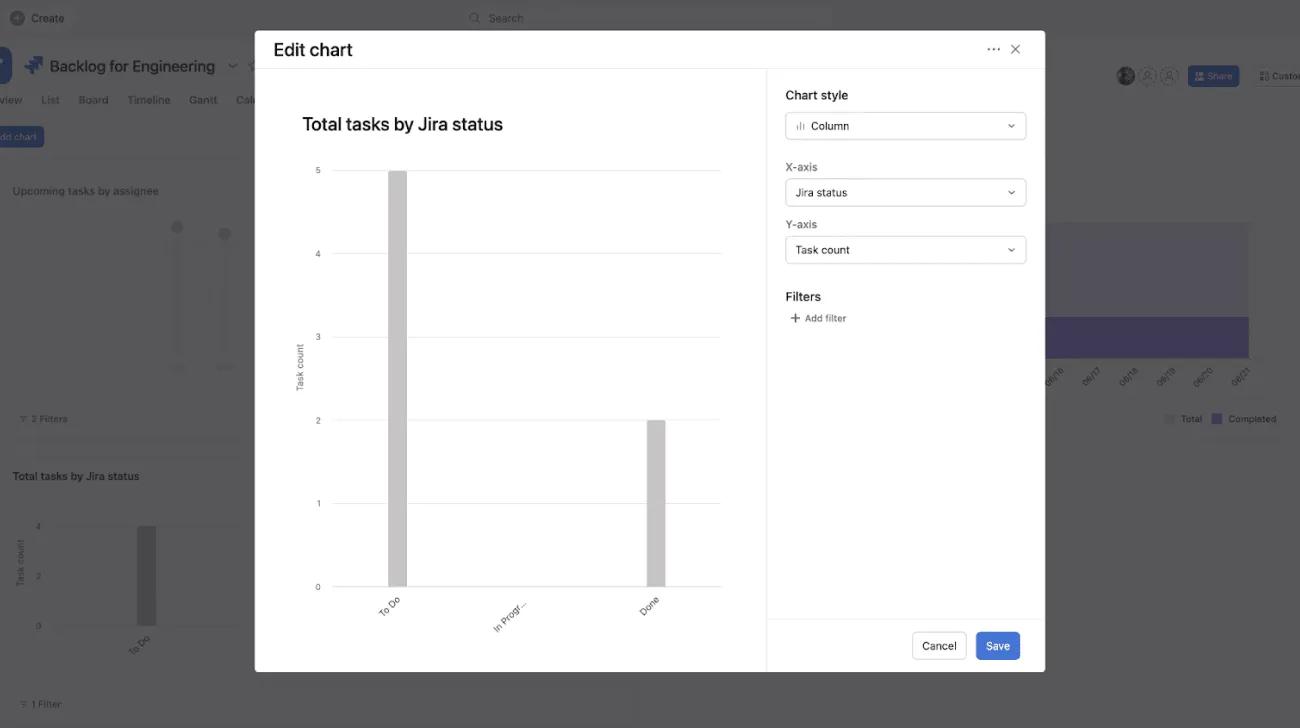
資料同步後,Jira 資料將成為 Asana Work Graph 的一部分,作為自訂欄位,您可以使用這些欄位建立專案層級的儀表板、建立規則,以及排序、篩選和搜尋任務。
如何在 Jira 和 Asana 之間同步資料
在本影片中,我們將引導您完成 Jira 和 Asana 之間的資料同步設定,確保兩個平台之間的更新順暢無阻。
常見問題
請參閱我們的 Jira Cloud 常見問題文章,以瞭解有關 Asana for Jira Cloud 的更多資訊。
每個層級有哪些功能可用?
適用於 Asana Starter 版和舊版層級 Premium 版 | 適用於 Asana Advanced 版、Enterprise 版、Enterprise+ 版,以及舊版 Business 版和舊版 Enterprise 版 |
|---|---|
| 規則中的 Jira 應用程式動作: Premium 版客戶可以使用規則,在觸發因素啟動後建立 Jira 議題。例如,設定任務進度後,會在 Jira 中建立新議題。 | 規則中的 Jira 應用程式動作:使用在觸發因素啟動後建立或更新 Jira 議題的規則。 |
| 將 Asana 任務連結至現有 Jira 議題。 | Jira 應用程式觸發因素:使用規則,在建立或更新 Jira 議題後建立或更新 Asana 任務。 |
| 雙向資料同步:當新任務和現有任務與 Jira 議題連結時,對其執行同步。更新 Jira 議題或 Asana 任務時,雙向資料同步會更新任務和議題欄位。 | |
| 可建立自訂規則。 | |
| 可以使用 Jira 資料建立專案層級的儀表板,以及排序、篩選和搜尋任務。 |
注意
This article has been AI-translated.
Send translation feedback.

