Products


AI Platform


Asana Foundations
Company Type

Visit our pricing page for more information.
If you are a member of an organization in Asana and wish to add an additional email address to your Asana account, each newly added email address must be compatible with your organization’s verified email domains.
Note
A compatible email address is one that matches the email domains that have been verified and added to your organization in Asana.
The ACME organization has two verified email domains: ACME.com and ACME-CORP.com
Céline is an employee of ACME and has an Asana account with the following email address celine@acme.com. This user is a member of the ACME organization.
The user is allowed to add the following email addresses:
✅celine-alias@acme.com ✅celine@acme-corp.com
The user is not allowed to add the following email addresses:
❌celine@gmail.com ❌celine@other-company.com
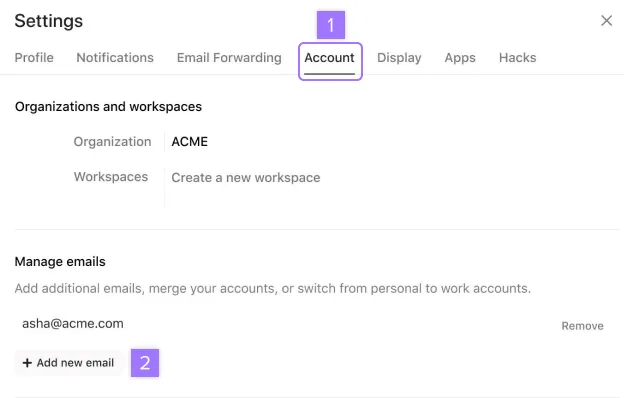
To add a new email address to your Asana account, click your profile picture, click Settings, and navigate to the Account tab.
These accounts will now be treated as separate accounts.
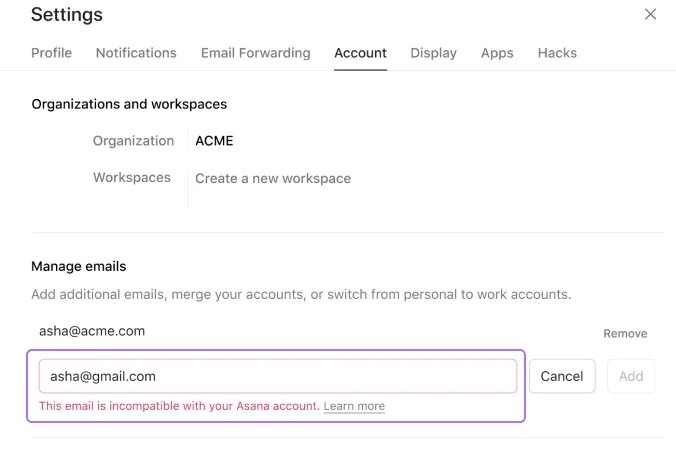
If you try to add an incompatible email address, you will see the error message shown in the image below. Please refer to this example above to better understand why the email is incompatible with your account.
To seamlessly navigate between separate accounts and domains or to add a new Asana account with an incompatible email address as a separate account, please refer to the steps listed here.
If you need to replace a personal email address (like gmail.com) with a corporate email address in your Asana account:
This is particularly important when joining an organization with a verified email domain, as personal email addresses are not compatible with organizational accounts.
Note that replacing a personal email with a corporate email will allow your organization’s admins to manage all domains (including personal workspaces) attached to this account.
You can import and export projects via CSV into a new workspace or organization. See our article on project importing and exporting for more information. You may also choose to use a third-party product such as Ditto. Ditto is not built or maintained by Asana, but is popular with Asana users.
See our article on email domain management for Asana organizations.
You can use the account switcher to log in to different accounts simultaneously.
Not sure about email rules? Ask the Community.

