Produkter


AI Platform
Vi kunde inte hitta några artiklar om det här ämnet.
Vi kunde inte hitta några artiklar om det här ämnet.
Vi kunde inte hitta några artiklar om det här ämnet.
Vi kunde inte hitta några artiklar om det här ämnet.
Vi kunde inte hitta några artiklar om det här ämnet.
Vi kunde inte hitta några artiklar om det här ämnet.
Vi kunde inte hitta några artiklar om det här ämnet.
Vi kunde inte hitta några artiklar om det här ämnet.
Vi kunde inte hitta några artiklar om det här ämnet.
Vi kunde inte hitta några artiklar om det här ämnet.
Vi kunde inte hitta några artiklar om det här ämnet.
Vi kunde inte hitta några artiklar om det här ämnet.

Gå till vår prissättningssida för mer information.
Datakontroller för mobilen är tillgängliga med abonnemanget Asana Enterprise+ och med det tidigare abonnemanget Legacy Enterprise. Hantering av mobilappar är tillgänglig med abonnemangsnivåerna för Asana Enterprise och Enterprise+ samt med det tidigare abonnemanget Legacy Enterprise.
Hantering av mobilappar är inte tillgängligt i avdelningsabonnemang.
Lägg till ytterligare säkerhet till Asana-mobilappar (iOS och Android) för att skydda organisationens data och göra det möjligt för team att arbeta och samarbeta var de än befinner sig.
Superadministratörer kan hantera följande mobildatakontroller för sin organisation:
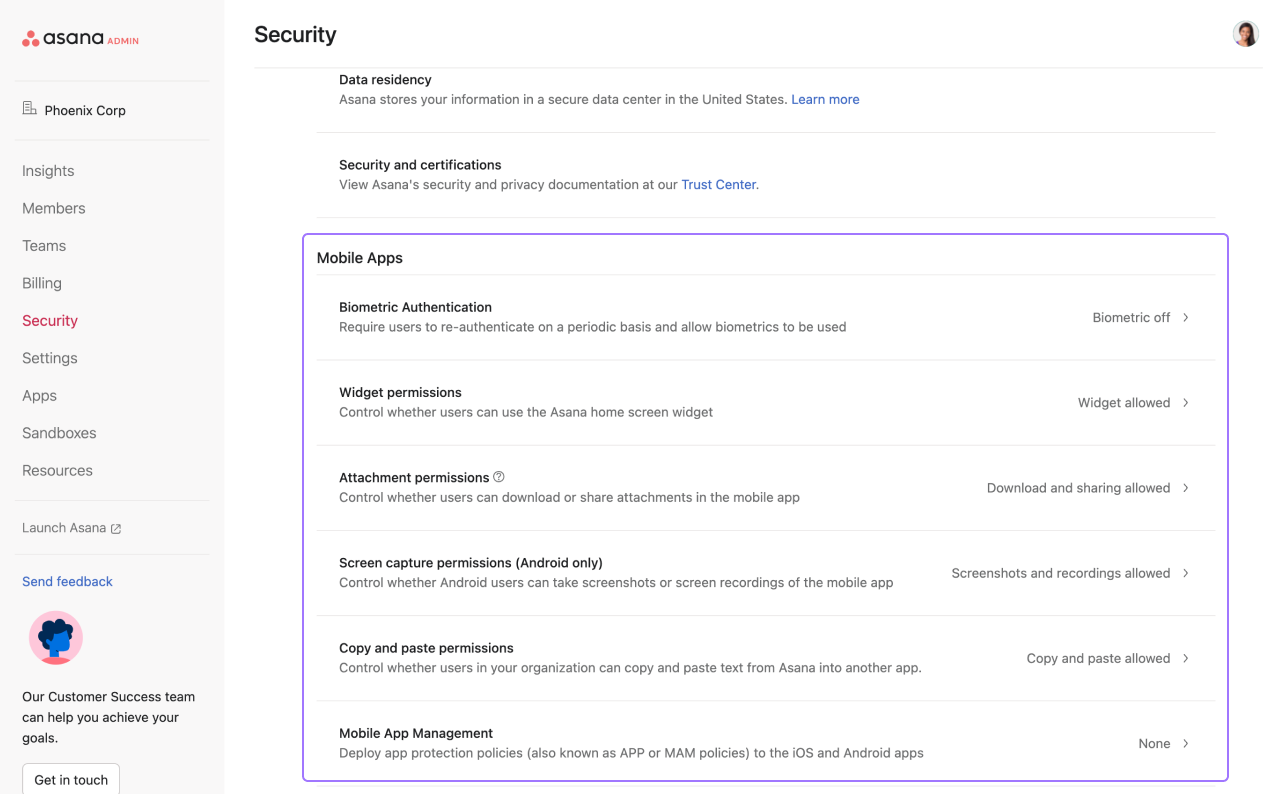
Genom att aktivera biometrisk autentisering kan du tillåta användare att låsa upp Asana på mobila enheter med fingeravtryck eller ansiktsigenkänning. Du kan ställa in hur ofta en användare måste autentisera sig på nytt. Enhetens lösenkod används om biometrisk inloggning inte är tillgänglig.
Begränsa Asana-widgeten för startsidan på mobila enheter så att användare inte kan visa uppgifter direkt i telefonens startsida.
Begränsa nedladdningar eller möjligheten att dela bilagor i Asana på mobila enheter.
Den här datakontrollen är endast tillgänglig på Android.
Välj om användarna i din organisation kan ta skärmbilder av mobilappen.
Begränsa behörigheter för att kopiera och klistra in i mobilappen.
Tillgängligt med abonnemangsnivåerna Asana Enterprise och Enterprise+ samt med det tidigare abonnemanget Legacy Enterprise.
Asanas integrering med Microsoft Intune gör det möjligt för IT-administratörer att skydda företagsdata genom att tillämpa säkerhetspolicyer som att begränsa nedladdningar, begränsa dataöverföring mellan appar och kräva PIN-kod eller biometrisk autentisering.
Integreringen gäller Asanas iOS- och Android-mobilappar och är inte relevant för Asanas skrivbordsapp. Följ de här stegen för att konfigurera integreringen via inställningarna för mobilapplikationshantering:
När du har lagt till Asana i Intune kan du tilldela den till dina användare genom att följa instruktionerna som beskrivs här.
Den här korrigeringen är nödvändig eftersom Asana inte är en hanterad app förrän efter att användaren har loggat in, så vi måste aktivera omdirigering från en hanterad app (Edge) till en icke-hanterad app (Asana).
Symtom: ”Något gick fel. Applikationen kunde inte öppnas” när du klickar på ”Fortsätt till appen” under inloggningsprocessen.
Lösning: Se till att undantagskonfigurationerna är korrekt inställda.
Anteckning
This article has been AI-translated.
Send translation feedback.



