Producten


AI Platform


Type bedrijf

Ga naar onze pagina met prijzen voor meer informatie.
Asana is ontworpen om je te helpen je werk gedaan te krijgen, in plaats van werk over werk te doen. Probeer deze functies om tijd te besparen.
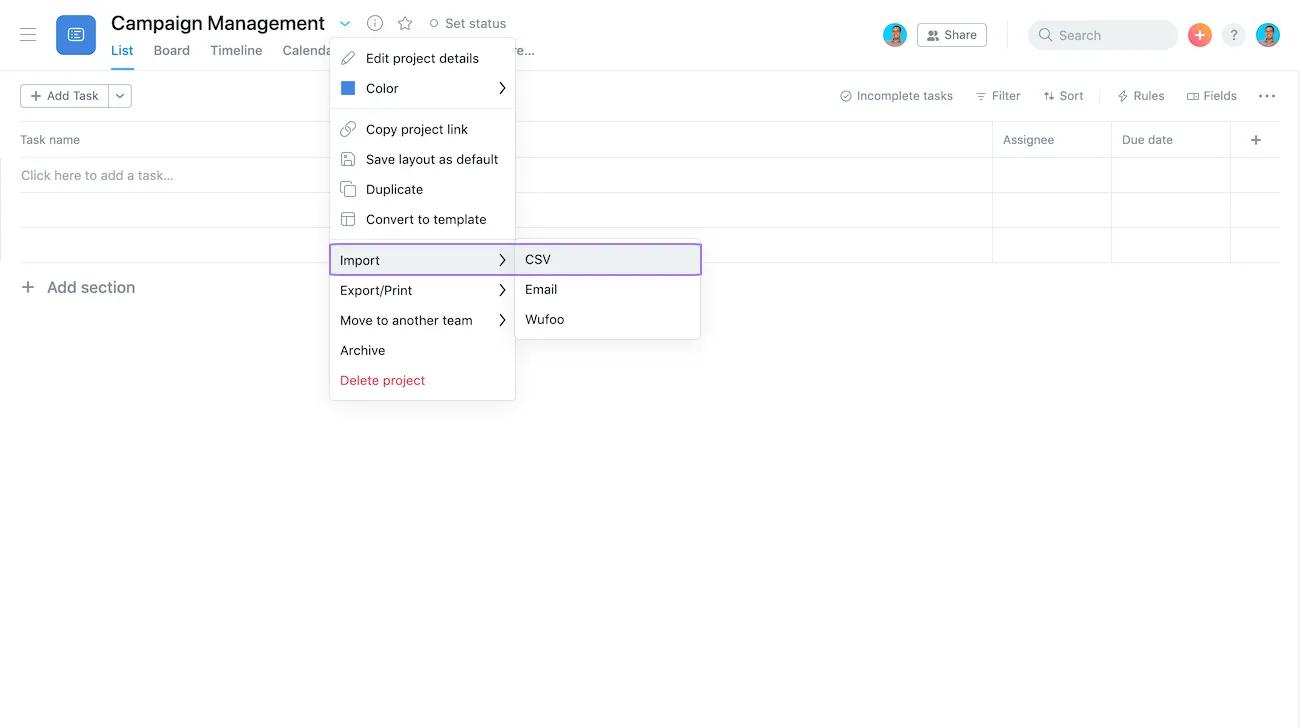
Idealiter stapt je team af van spreadsheet planning door direct in Asana te plannen, maar je kunt ze importeren met onze CSV-importeur. De importeur neemt naadloos je rijen en kolommen over en koppelt ze aan een Asana-project met taken, verantwoordelijken, vervaldatums en meer. Voeg informatie uit het CSV-bestand toe aan een leeg of bestaand project.
Opmerking
Zorg ervoor dat informatie in andere kolommen aan je project wordt toegewezen. Maak aangepaste velden in je project voordat je je bestand importeert.
Waarschijnlijk heb je multi-select in andere programma's gebruikt en het is net zo handig in Asana. In de lijstweergave alleen om meerdere taken tegelijk te selecteren, klik en houd Shift ingedrukt en klik op de pijl omhoog of omlaag. Gebruik in lijst- en bordweergaven Command of Control om taken afzonderlijk te selecteren.
Zodra je meerdere taken tegelijk selecteert, kun je er bulkacties op ondernemen:
Leer sneltoetsen om tijd te besparen in Asana. Bekijk alle sneltoetsen hier of door Cmd+ of Ctrl/ in Asana te typen (het is een sneltoets voor sneltoetsen).
De meeste Asana-specifieke sneltoetsen bestaan uit het typen van Tab + (een letter). Gebruik kortere woorden wanneer mogelijk. Bijvoorbeeld, Tab+F voegt een volger toe.
Bekijk onze favorieten:
Tab+Q – Voeg snel een taak toe
Tab+M – Wijs mij toe
Tab+X – Focusmodus (zodat je alleen de taak kunt zien)
Tab+S – Voeg een subtaak toe
Tab+N – Maak een sectie aan
Tab+↵ – Ga naar takenlijst of hoofdvenster

Wijs kopieën van een taak toe aan meerdere teamgenoten, of zelfs aan een heel team, met slechts een paar klikken vanuit het veld taakverantwoordelijke. Klik in een taak op het veld verantwoordelijke en kies het pictogram Kopieën toewijzen. Typ vervolgens de namen van de teamgenoten of teams waaraan je de kopieën wilt toewijzen.
Taakkopieën bevatten dezelfde informatie als de originele taak. Als je iets bent vergeten en ze in bulk moet bewerken, gebruik dan multi-select.
Maak van elke taak talrijke kopieën, maar elke taak zal nog steeds slechts één verantwoordelijke hebben.
Wil je repetitief, handmatig werk verminderen? Voeg regels toe voor elk project om je te helpen taken toe te wijzen, aangepaste velden bij te werken en meer. Voeg ze zelfs toe aan sjablonen zodat je team altijd met de juiste stappen en processen begint.
Het is geen geheim – Asana biedt gratis proefperiodes. Begin vandaag nog. Probeer gratis
Dit artikel is vertaald met AI.
Feedback over de vertaling versturen.

