Los tickets son las piezas individuales del trabajo de desarrollo en Command by Asana. Cada ticket contiene el contexto que tu equipo necesita para realizar el trabajo: una descripción, un encargado, archivos adjuntos y enlaces al código, a los lanzamientos y a los tickets relacionados. Un ticket se puede asignar a una persona o a un agente de codificación.
Artículos relacionados:
Crear un ticket
Haz clic en Agregar ticket para abrir el cuadro de creación de tickets. La ventana modal te ofrece un lugar único para ingresar los detalles que tu equipo necesita para comprender y planificar el trabajo.
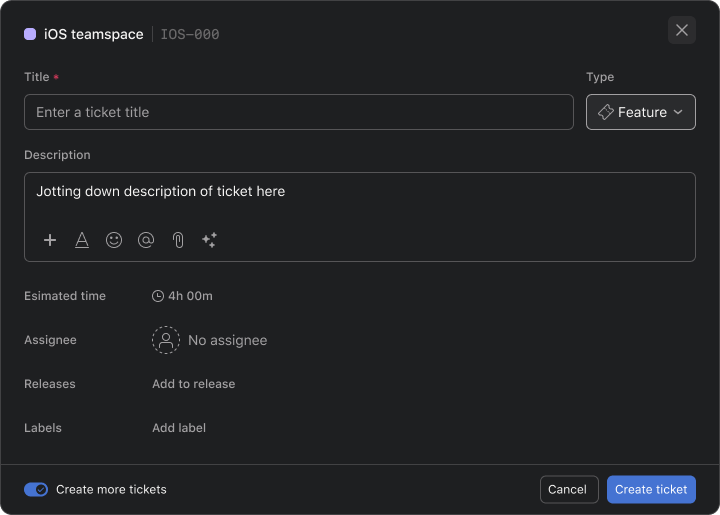
- Escribe un nombre breve y descriptivo en Título. El título aparece en el espacio de equipo y ayuda a los compañeros de equipo a encontrar el trabajo más adelante.
- Agrega contexto en la descripción. Incluye el problema, el cambio solicitado u otros detalles que ayudarán a la persona que trabaja en el ticket a comprender el objetivo.
- Seleccione Error, Función o Tarea en Tipo. El tipo seleccionado indica qué tipo de trabajo representa el ticket.
- Elige una persona en Responsable para que quede clara la responsabilidad. El responsable seleccionado puede usar los detalles del ticket para comprender el trabajo y tomar medidas.
- Agregue uno o más valores en Etiquetas para organizar el ticket. Las etiquetas ayudan a tu equipo a agrupar trabajos relacionados y a encontrar tickets con características comunes.
- Selecciona un lanzamiento en Lanzamientos para vincular el ticket a una entrega planificada. Luego, el ticket aparece con el resto del trabajo asociado con ese lanzamiento.
- Agregue archivos de respaldo en Archivos adjuntos. Los archivos adjuntos permanecen disponibles en el ticket para que tus compañeros de equipo puedan revisar los diseños, registros u otros materiales de referencia relevantes.
- Haz clic en Agregar ticket para crear el ticket. El ticket se agrega a Command con los detalles que proporcionaste.
Crear varios tickets seguidos
Para agregar un grupo de tickets sin volver a abrir el formulario, selecciona Crear más tickets antes de seleccionar Agregar ticket. Después de que se crea cada ticket, el formulario se borra y permanece abierto para el siguiente.
Hacer un seguimiento del progreso de los tickets
Cada ticket tiene un estado que muestra en qué punto se encuentra el trabajo:
- Sin iniciar: planificado pero aún no asignado.
- En progreso: alguien está trabajando en ello.
- En revisión: el trabajo está terminado y se encuentra en la etapa de revisión de código.
- Finalizado: el trabajo está terminado.
Cada ticket también muestra el tiempo que lleva en su estado actual. Los tickets que permanecen en un estado mucho más tiempo de lo habitual se resaltan para que tu equipo pueda identificar el trabajo estancado.
Para los tickets de tu plan, Command también muestra una predicción de cuándo es probable que se finalice el ticket. Obtén más información en Cómo entender las predicciones en Command.
Trabajar en un ticket
Abre un ticket para ver sus detalles, archivos y progreso. Desde el ticket, puedes hacer lo siguiente:
- Revisar la actividad del código. Si tu espacio de equipo está conectado a GitHub, las ramas vinculadas y las solicitudes de extracción aparecen en el ticket, junto con los cambios de código y el tiempo de revisión. Obtén más información en Integración de Command con GitHub.
- Iniciar un agente de codificación. Entregar el ticket a un agente de codificación, seguir su sesión y continuar la conversación con él. Obtén más información en Agentes de programación en Command by Asana.
- Agregar dependencias. Marca un ticket como Bloqueado por otro ticket cuando dependa de ese trabajo, o como Bloqueante cuando otro trabajo dependa de él.
- Habla sobre el trabajo. Deja comentarios para hablar sobre el ticket con tus compañeros de equipo.
- Revisar el historial. Abre la pestaña Actividad para ver todos los cambios realizados en el ticket.
A medida que el trabajo cambia, puedes actualizar el título, la descripción, el responsable, las etiquetas, los lanzamientos y los archivos adjuntos en cualquier momento.
Organiza y prioriza los tickets
- Establecer la prioridad: arrastra los tickets hacia arriba o hacia abajo en tu espacio de equipo para establecer su prioridad. Command usa este orden para planificar los ciclos y calcular los pronósticos. Obtén más información en Cómo entender los ciclos en Command.
- Trabajo en grupo: agrega etiquetas y lanzamientos para agrupar los tickets relacionados. En la ventana emergente de metadatos de un ticket, presiona R para agregar o quitar un lanzamiento. Obtén más información en Trabajar con lanzamientos y etiquetas en Command.
- Actualiza varios tickets a la vez: Selecciona varios tickets para cambiar sus etiquetas o lanzamientos a la vez.


Nota



